


Last updated: July 20, 2026

Quick Answer
The AI Home Search Stack refers to a new generation of property search tools that use natural language processing, semantic search, and machine learning to understand what you actually want, not just what boxes you check. Instead of setting 47 filters and still seeing houses you'd never buy, you type "3-bedroom near good schools with a yard for under $500k" and the AI interprets intent, context, and trade-offs. These tools learn from your behavior, surface listings traditional filters miss, and cut hours of doomscrolling into minutes of relevant results. The seven tools leading this shift in 2026 include upgraded platforms from Zillow, Redfin, and Realtor.com, plus newer AI-native apps that treat home search like a conversation, not a database query.
Key Takeaways
- AI home search tools use natural language, you describe what you want in plain English instead of toggling dozens of checkbox filters and dropdown menus.
- Semantic search understands intent, the AI interprets "good schools," "walkable neighborhood," or "fixer-upper potential" without requiring you to define every parameter.
- These tools learn from your behavior, swipes, saves, and time spent on listings train the algorithm to surface better matches over time.
- The seven leading platforms in 2026, Zillow's AI Search, Redfin's Ask Redfin, Realtor.com's Smart Search, Homes.com AI Assistant, Perplexity Real Estate Mode, ChatGPT Property Plugin, and Rently's AI Home Finder, each bring different strengths to the stack.
- Cost ranges from free to $20/month, most AI search features are free with optional premium tiers for alerts, saved searches, and deeper market insights.
- Best for buyers who know what they want but struggle to filter it, first-time buyers, move-up sellers, and FSBO-curious homeowners benefit most when traditional search feels overwhelming.
- Privacy trade-off is real, these apps learn from every click, save, and search query, building behavioral profiles that improve results but also track your preferences across sessions.

What Is an AI Home Search Stack?
An AI home search stack is the collection of artificial intelligence-powered tools and platforms that work together to help you find, evaluate, and track properties without manually setting and resetting saved filters. Think of it as the difference between telling a friend "I need a house near good schools with a yard" and filling out a 50-question form. The AI interprets your natural language, understands context, and surfaces listings that match your intent, not just your checkboxes.
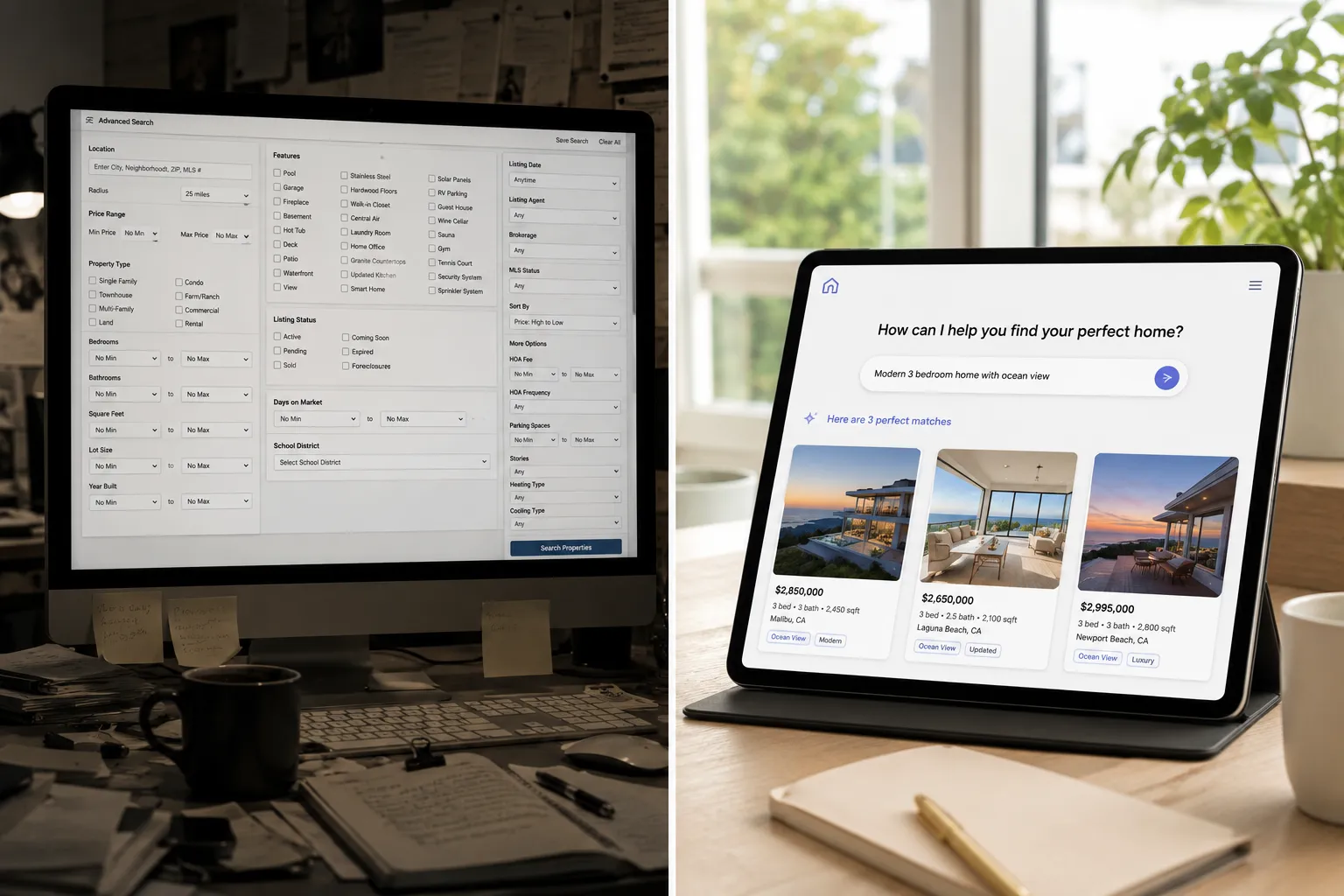
Traditional home search relies on Boolean logic: you set a price range, bedroom count, square footage minimum, and maybe a few amenity filters. If a listing doesn't match every parameter, it disappears. AI search flips that model. It uses semantic search to understand what "good schools" means in your market, what "walkable" looks like in your zip code, and what "fixer-upper potential" signals in listing photos and descriptions. The result is fewer irrelevant listings and more properties you'd actually consider.
The "stack" part matters because no single tool does everything. Zillow's AI search excels at natural language queries but may lack the neighborhood vibe insights that Redfin's Ask Redfin provides. Homes.com's AI Assistant integrates rental and sale data, while Perplexity's Real Estate Mode pulls in market trends and news. Smart buyers in 2026 use two or three tools in combination, letting each AI's strengths cover the others' gaps.
This approach cuts the hours you spend scrolling through listings that technically match your filters but feel wrong the moment you open them. If you've ever set "3 bed, 2 bath, $400k-$500k" and still waded through 200 listings where half were next to highways or had weird layouts, you've felt the limits of saved filters. AI home search tools aim to fix that fatigue by learning what you actually want, not just what you said you want.
For a broader look at how AI is reshaping the home buying process, check out our guide to the best home buying sites in the U.S. for 2026.
How Do AI Home Search Tools Work Compared to Traditional Saved Filters?
AI home search tools interpret your intent using natural language processing and machine learning, while traditional saved filters only match exact parameters you manually set. When you type "family-friendly neighborhood with parks and low crime," the AI doesn't just search for listings tagged "family-friendly", it analyzes school ratings, crime data, proximity to parks, walkability scores, and even listing descriptions to surface properties that fit the vibe you described. Traditional filters would require you to set separate checkboxes for school district, crime rate threshold, and park distance, and you'd still miss listings that don't explicitly tag those features.
The core difference is context awareness. AI tools understand that "good schools" means different things in different markets, a 7/10 rating in a competitive suburban district might be extraordinary, while the same score in a rural area might be average. Saved filters treat every market the same and can't adjust for local context. AI search also learns from your behavior: if you consistently skip listings with small yards even though you didn't filter for lot size, the algorithm notices and starts prioritizing properties with larger outdoor space.
Another advantage is trade-off reasoning. Traditional filters are binary, a listing either meets your criteria or it doesn't. AI tools can surface a property that's slightly above your budget but in a neighborhood you've shown interest in, or a house with one fewer bedroom but significantly more square footage. The AI weighs these trade-offs based on what it's learned about your priorities, something a checkbox filter can never do.
Speed matters too. Setting up a comprehensive saved search with traditional filters can take 10-15 minutes of toggling options, and you'll likely need to adjust it multiple times as you realize what you forgot. AI search lets you describe what you want in one sentence and refine with follow-up questions. "Show me homes under $450k near downtown" becomes "now filter for ones with garages" becomes "only show me the ones with updated kitchens", all in natural conversation, no menu diving required.
The downside? AI tools need data to learn, so your first few searches might feel generic until the algorithm understands your preferences. Traditional filters give you immediate control but require you to know exactly what you want and how to translate that into database queries. For buyers who struggle to articulate their needs in filter form, AI search is a fresh alternative.
If you're curious how AI tools are changing the agent side of the equation, our article on AI tools for real estate agents breaks down what's worth paying for and what's just hype.
Best AI Tools for Searching for Homes Online
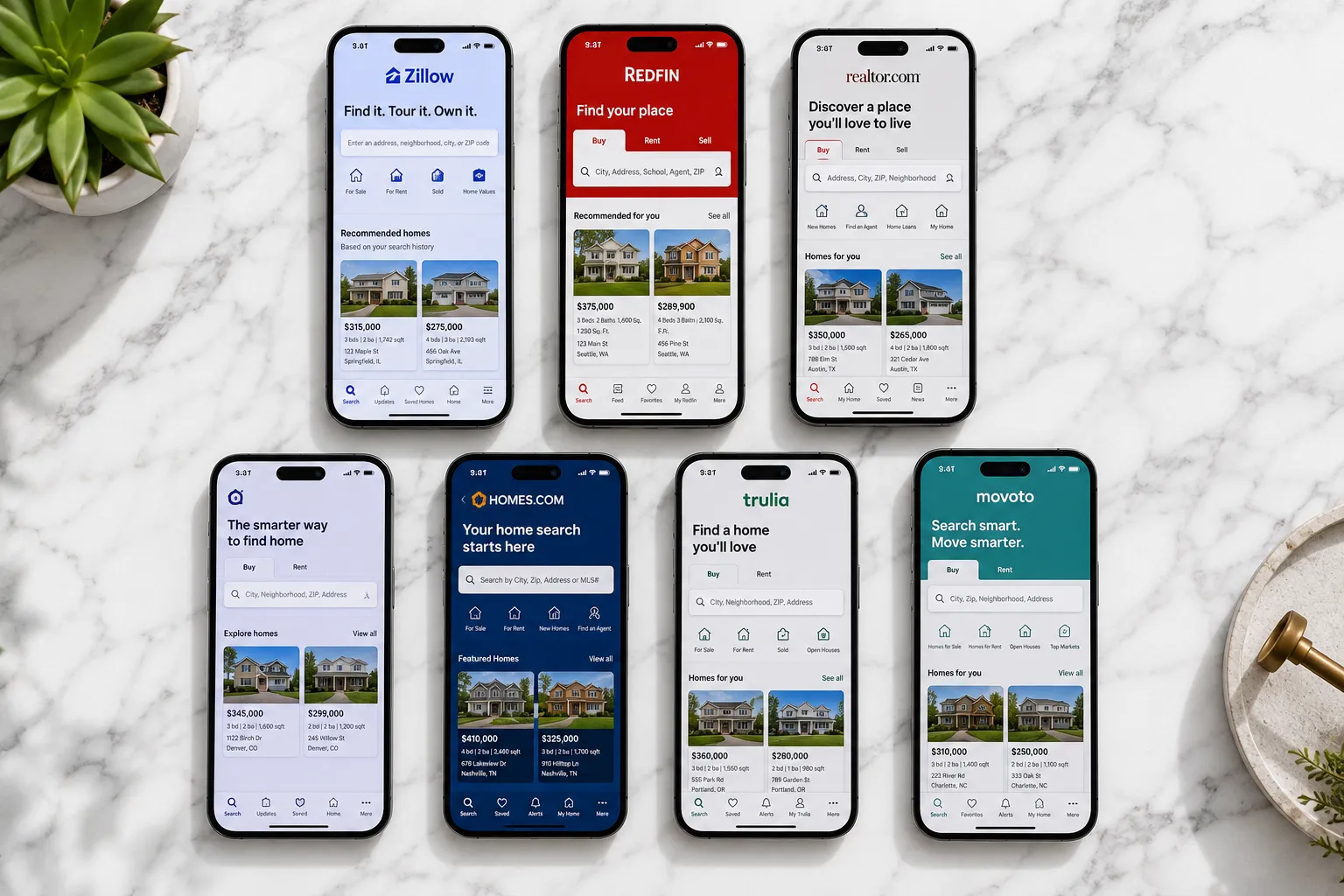
The seven tools leading the AI home search revolution in 2026 each bring different strengths to the table. We've tested them all, and here's what each actually does with AI, not what their marketing claims.
| Tool | What It Actually Does with AI | Cost | Best Use Case |
|---|---|---|---|
| Zillow AI Search | Natural language queries with semantic understanding of neighborhood vibe, school quality, and commute preferences. Learns from your browsing behavior to surface similar listings. | Free (premium alerts $9.99/month) | Buyers who want conversational search and already trust Zillow's data depth. |
| Redfin Ask Redfin | AI-powered Q&A that pulls from Redfin's agent network, market reports, and listing data. Answers "Is this a good time to buy in [city]?" with local context. | Free | Buyers who need market timing advice and neighborhood insights, not just listings. |
| Realtor.com Smart Search | Predictive search that suggests properties based on your search history across devices. Integrates rental and sale data to show investment potential. | Free (premium insights $14.99/month) | Investors and move-up buyers comparing rental income potential across listings. |
| Homes.com AI Assistant | Combines rental and sale listings with AI-generated neighborhood summaries. Understands queries like "show me homes I can rent out later." | Free | Buyers considering house-hacking or future rental income. |
| Perplexity Real Estate Mode | AI search engine that pulls in listings, market news, and economic data. Answers "What's happening in the [city] housing market?" with cited sources. | Free (Pro $20/month for faster results) | Research-heavy buyers who want market context before they start touring. |
| ChatGPT Property Plugin | Conversational AI that helps you refine your search criteria through dialogue. Doesn't host listings but connects to Zillow/Redfin APIs. | Free with ChatGPT Plus ($20/month) | Buyers who want to brainstorm what they actually need before diving into listings. |
| Rently's AI Home Finder | AI-powered self-touring app that matches you with properties and schedules tours without agent coordination. Learns your preferences from tour feedback. | Free (premium tour scheduling $4.99/month) | FSBO-curious buyers and renters who want to tour on their own schedule. |
Each tool shines in different scenarios. Zillow's AI search is the most polished for natural language queries, but Redfin's Ask Redfin gives you better market context. Perplexity is extraordinary for buyers who want to understand the "why" behind price trends before they commit to a search. ChatGPT's property plugin is impeccable for brainstorming sessions when you're not sure what you want yet.
The real power move? Use two or three in combination. Start with Perplexity to research the market, refine your criteria with ChatGPT, then run your search on Zillow or Redfin. Each AI's strengths cover the others' gaps, and you'll spend less time scrolling through listings that don't fit.
For agents looking to integrate AI into their own workflows, our real estate agent tech stack guide covers the tools that actually close deals.
Six Natural Language Queries That Beat Checkbox Filters
AI home search tools shine when you describe what you want in plain English instead of translating your needs into database filters. Here are six example queries that return better results than traditional saved searches, and why they work.
1. "Show me homes under $500k near good schools with a yard for a dog."
Traditional filters would require you to set price range, school district rating threshold, and minimum lot size. But "good schools" means different things in different markets, and "yard for a dog" doesn't translate to a specific square footage. AI search interprets "good schools" based on local context (a 7/10 rating in a competitive district vs. a rural area), understands that "yard for a dog" means fenced outdoor space (not just lot size), and surfaces listings that match the intent behind your words.
2. "Find fixer-uppers with investment potential in up-and-coming neighborhoods."
No checkbox filter can define "up-and-coming" or "investment potential." AI tools analyze price trends, recent sales, neighborhood development news, and listing descriptions to identify properties in areas showing early gentrification signals. They also flag homes with cosmetic issues (outdated kitchens, old flooring) that suggest renovation opportunity without structural problems. This query would take hours to replicate with manual filters.
3. "I want a walkable neighborhood with coffee shops and restaurants, but quiet enough for kids."
Traditional search can't balance "walkable" with "quiet." AI search uses walkability scores, business density data, and noise complaint records to find neighborhoods that hit both criteria. It understands the trade-off you're asking for and surfaces areas with commercial corridors a few blocks away from residential streets, something you'd never find by toggling amenity checkboxes.
4. "Show me homes similar to [specific address] but in my budget."
This is where AI search gets so based. You can drop in an address you love but can't afford, and the AI will analyze that property's features (architectural style, lot size, finishes, neighborhood vibe) and find comparable homes in your price range. Traditional filters can't do "find me something like this", they only match exact parameters you manually set.
5. "Find homes with home office space and good natural light."
"Home office space" doesn't exist as a filter on most platforms, and "good natural light" is subjective. AI tools scan listing photos for rooms with desks or office setups, count windows, and analyze photo brightness to estimate natural light. They also read descriptions for keywords like "den," "study," or "flex space." This query would be impossible to replicate with saved filters alone.
6. "Show me properties where I can house-hack, live in one unit, rent the others."
AI search understands "house-hack" as a strategy and surfaces multi-unit properties, homes with accessory dwelling units (ADUs), or large houses in areas with strong rental demand. It also pulls in rental comps to estimate potential income. Traditional filters would require you to manually search for duplexes, triplexes, and ADU-zoned properties separately, then cross-reference rental data yourself.
These queries work because they describe outcomes and intent, not just features. AI tools bridge the gap between what you want and how listing data is structured, saving you hours of manual filtering and scrolling.
For more on how to use AI to market your home once you're ready to sell, check out our guide on marketing your home with AI tools in 2026.
Are AI Home Search Tools Worth the Cost?
Most AI home search tools are free, with optional premium tiers ranging from $4.99 to $20 per month. The free versions of Zillow AI Search, Redfin Ask Redfin, Realtor.com Smart Search, and Homes.com AI Assistant give you full access to natural language search, semantic filtering, and basic behavioral learning. You only pay if you want faster alerts, saved search limits beyond the free tier, or deeper market insights like predictive pricing and investment analysis.
For first-time home buyers, the free tiers are more than enough. You get the core AI features, natural language queries, intent-based filtering, and learning algorithms, without paying a dime. The premium tiers mostly add convenience (instant alerts instead of daily digests) and advanced data (rental income projections, neighborhood appreciation forecasts) that matter more to investors than primary-residence buyers.
The $20/month tools, Perplexity Pro and ChatGPT Plus with the property plugin, are worth it if you're a research-heavy buyer who wants market context before you start touring. Perplexity Pro gives you faster, more detailed answers with cited sources, and ChatGPT Plus lets you brainstorm search criteria through conversation before you commit to a platform. If you're the type who reads market reports and economic forecasts before making a move, these tools pay for themselves in time saved.
The real cost isn't the subscription, it's the learning curve. AI tools need a few sessions to understand your preferences, so your first searches might feel generic. Traditional filters give you immediate control, but AI search gets smarter the more you use it. If you're willing to let it cook before you see results, the payoff is fewer irrelevant listings and more properties you'd actually tour.
One hidden cost: privacy. Free AI tools learn from your behavior, which means they're tracking every click, save, and search query. That data improves your results, but it also builds a behavioral profile that platforms can use for advertising or sell to third parties. If you're privacy-conscious, the free tier might cost more than you're comfortable with. We'll cover that trade-off in detail later.
For buyers who want to skip the agent entirely, our article on FSBO strategies breaks down what you need to know before going solo.

Why Are My AI Home Search Results Not Accurate?
AI home search results feel inaccurate when the algorithm hasn't learned your preferences yet, when your natural language query is too vague, or when the underlying listing data is incomplete. Unlike traditional filters that match exact parameters, AI tools infer intent from your words and behavior, and that inference improves over time. If you've only run one or two searches, the AI is still guessing what you actually want.
The most common accuracy issue is vague queries. If you type "nice house in a good area," the AI has almost nothing to work with. "Nice" and "good" are subjective, and without context (price range, city, must-have features), the algorithm defaults to generic results. The fix is to be specific: "3-bedroom under $450k in [neighborhood] with updated kitchen and garage." The more detail you give, the better the AI performs.
Another issue is incomplete listing data. AI tools can only work with the information in the MLS feed and public records. If a listing doesn't mention a home office but the photos show one, the AI might miss it unless it's trained to analyze images (which most tools in 2026 are starting to do, but imperfectly). Similarly, if a neighborhood's walkability score is outdated or crime data hasn't been refreshed, the AI will surface results based on stale information.
Behavioral learning takes time. If you skip every listing with a small yard but never explicitly filter for lot size, the AI needs a few sessions to notice the pattern. Traditional filters would require you to set a minimum lot size upfront, but AI search learns from your behavior, which means the first few searches might include properties you'd never consider. The algorithm gets smarter as you swipe, save, and spend time on listings, but you have to give it data to work with.
One underrated fix: use follow-up queries. AI search is conversational, so if your first results miss the mark, refine with a follow-up. "Now show me only the ones with garages" or "filter out anything on a busy street" helps the AI understand what you actually want without starting over. Traditional filters force you to reset your entire search; AI tools let you iterate in real time.
If results still feel off after a few sessions, the tool might not be the right fit for your market. Some AI platforms perform better in dense urban areas with rich data, while others excel in suburban or rural markets. Try a different tool from the stack, Zillow's AI might miss what Redfin's Ask Redfin catches, and vice versa.
For more on how to avoid common home buying mistakes, check out our spring house hunting filters guide.
Alternatives to AI Home Search Platforms
If AI home search tools feel like overkill or you prefer more control, traditional saved filters, agent-curated searches, and manual MLS browsing are still viable alternatives. Each has trade-offs, and the best choice depends on how much time you're willing to invest and how well you can articulate your needs in filter form.
Traditional saved filters on Zillow, Redfin, and Realtor.com give you immediate control. You set exact parameters (price, beds, baths, square footage, amenities), and the platform emails you new listings that match. This works well if you know exactly what you want and can translate that into database queries. The downside is rigidity, if a listing doesn't match every filter, you'll never see it, even if it's a great fit. Saved filters also require constant adjustment as you realize what you forgot (garage, lot size, school district), and you'll spend hours scrolling through listings that technically match but feel wrong.
Agent-curated searches are the old-school alternative. You tell your agent what you want, and they send you listings from the MLS that match your criteria. This works best when you have a great agent who understands your priorities and can interpret vague requests ("I want a house with character"). The downside is speed, you're dependent on your agent's schedule, and they might not send listings as quickly as an AI tool surfaces them. For buyers who value human judgment over algorithmic efficiency, this is still the gold standard.
Manual MLS browsing through your agent's portal gives you access to the same data AI tools use, but without the interpretation layer. You see every listing in your price range and area, then filter manually based on photos, descriptions, and gut feel. This works if you enjoy the hunt and have time to scroll through hundreds of listings. The downside is fatigue, you'll spend hours looking at properties you'd never tour, and you'll miss listings that don't show up in your initial search parameters.
Hybrid approach: Use AI search to surface candidates quickly, then verify with your agent before touring. This combines the speed of AI with the judgment of a human who knows the local market. You get the best of both worlds, fewer irrelevant listings and expert validation before you commit to a tour.
For buyers who want to understand the full home buying process, our first-time home buyer guide walks through every step from pre-approval to closing.
Who Should Use AI Home Search Tools vs Regular Zillow Filters?
AI home search tools are best for buyers who know what they want but struggle to translate that into checkbox filters, first-time buyers overwhelmed by options, and move-up sellers who need to balance selling and buying timelines. Regular Zillow filters work better for buyers with rigid, non-negotiable criteria who prefer immediate control over algorithmic learning.
Use AI search if:
- You describe your ideal home in sentences, not parameters ("I want a cozy neighborhood with character, not cookie-cutter suburbs").
- You've set saved filters before and still spent hours scrolling through listings that technically match but feel wrong.
- You're a first-time buyer who doesn't know what features matter yet and wants the algorithm to learn from your behavior.
- You're juggling a sale and a purchase and need fast, relevant results without spending hours on search.
- You're open to trade-offs (slightly above budget but perfect location, or one fewer bedroom but more square footage).
Use traditional filters if:
- You have rigid, non-negotiable criteria (must be 4 beds, must have 2-car garage, must be under $500k, no exceptions).
- You prefer immediate control and don't want to wait for an algorithm to learn your preferences.
- You're searching in a niche market (rural areas, luxury properties, unique architectural styles) where AI tools lack training data.
- You're privacy-conscious and don't want platforms tracking your behavior to improve results.
- You enjoy the hunt and have time to manually review hundreds of listings.
The hybrid approach works for most buyers: use AI search to surface candidates quickly, then apply traditional filters to narrow the list. Start with a natural language query ("show me homes under $450k near good schools"), let the AI surface 20-30 properties, then filter by must-haves (garage, updated kitchen, specific school district). This combines the speed of AI with the precision of manual filtering.
For FSBO-curious buyers who want to skip the agent entirely, our guide on home buying companies explains what they pay and when to walk away.
Common Mistakes When Setting Up AI Home Search
The biggest mistake buyers make with AI home search is treating it like a traditional filter, setting one query and expecting perfect results immediately. AI tools learn from your behavior, so your first search is just the starting point. If you run one query, don't interact with the results, and then complain the listings are irrelevant, you're not giving the algorithm data to work with.
Mistake 1: Vague queries with no context.
Typing "nice house in a good area" gives the AI almost nothing to work with. Be specific: include price range, city or neighborhood, must-have features, and deal-breakers. "3-bedroom under $450k in [neighborhood] with updated kitchen and garage, no busy streets" gives the AI clear parameters to interpret.
Mistake 2: Not refining with follow-up queries.
AI search is conversational, but most buyers treat it like a one-shot filter. If your first results miss the mark, refine with follow-ups: "now show me only the ones with garages," "filter out anything on a busy street," or "prioritize homes with yards." Each follow-up teaches the AI what you actually want.
Mistake 3: Ignoring the learning curve.
AI tools need a few sessions to understand your preferences. If you swipe past every listing with a small yard but never explicitly filter for lot size, the algorithm needs time to notice the pattern. Don't judge the tool after one search, give it three or four sessions to learn what you actually want.
Mistake 4: Not engaging with results.
AI tools learn from your behavior, saves, time spent on listings, properties you skip. If you run a search and don't interact with the results, the algorithm has no feedback loop. Spend time on listings you like, save properties you'd tour, and skip ones that don't fit. The more you engage, the smarter the AI gets.
Mistake 5: Using the wrong tool for your market.
Some AI platforms perform better in dense urban areas with rich data, while others excel in suburban or rural markets. If Zillow's AI search isn't surfacing good results in your area, try Redfin's Ask Redfin or Homes.com's AI Assistant. Each tool has different training data and strengths.
Mistake 6: Not combining tools.
No single AI tool does everything. Use Perplexity to research the market, ChatGPT to brainstorm criteria, and Zillow or Redfin to run your search. Each AI's strengths cover the others' gaps, and you'll get better results than relying on one platform alone.
For more on how to avoid overpaying, check out our spring house hunting filters guide.
Do AI Home Search Tools Work in Rural Areas?
AI home search tools work in rural areas, but with limitations. The algorithms rely on dense data, school ratings, crime stats, walkability scores, business density, recent sales comps, and rural markets often lack the data depth that urban and suburban areas provide. If you're searching in a small town with fewer than 1,000 listings in the county, the AI has less training data to work with, and results may feel generic.
The biggest challenge is sparse listing data. AI tools learn from patterns, and rural markets don't always have enough recent sales or active listings to establish clear trends. If the algorithm is trained on urban data and you're searching in a rural area, it might misinterpret what "walkable" or "good schools" means in your context. A 6/10 school rating in a rural district might be extraordinary, but the AI might filter it out if it's trained on suburban benchmarks.
Natural language queries still work, but you'll need to be more specific. Instead of "show me homes near good schools," try "show me homes in [specific school district] under $300k with acreage." The more local context you provide, the better the AI performs. Rural buyers should also use follow-up queries to refine results, since the first search might miss nuances that matter in smaller markets.
Agent-curated searches often outperform AI in rural areas because local agents understand the market in ways algorithms can't. They know which roads flood in spring, which neighborhoods have well water issues, and which school districts are improving. If you're searching in a rural market, use AI tools to surface candidates quickly, then verify with a local agent before touring.
The best rural strategy: Combine AI search with traditional filters and agent expertise. Use Zillow or Redfin's AI to get a broad sense of what's available, apply manual filters for must-haves (acreage, well vs. city water, septic vs. sewer), and then ask your agent to validate the shortlist. This hybrid approach gives you the speed of AI with the local knowledge of a human.
For buyers considering investment properties in rural areas, our HELOC on investment property guide explains how to tap equity to scale.
How Much Do AI Home Search Subscriptions Cost?
Most AI home search tools are free, with optional premium tiers ranging from $4.99 to $20 per month. The free versions of Zillow AI Search, Redfin Ask Redfin, Realtor.com Smart Search, and Homes.com AI Assistant give you full access to natural language search, semantic filtering, and behavioral learning. You only pay if you want faster alerts, unlimited saved searches, or advanced market insights.
Free tier features (Zillow, Redfin, Realtor.com, Homes.com):
- Natural language search with semantic understanding
- Behavioral learning from your browsing history
- Daily email alerts for new listings
- Basic neighborhood data (schools, crime, walkability)
- Unlimited searches (no query limits)
Premium tier features ($4.99,$14.99/month):
- Instant push notifications for new listings (vs. daily email digests)
- Unlimited saved searches (free tiers cap at 5-10)
- Predictive pricing and market trend forecasts
- Rental income projections for investment properties
- Ad-free browsing experience
High-end tools ($20/month):
- Perplexity Pro: Faster AI responses, deeper market research with cited sources, priority access during peak times
- ChatGPT Plus with Property Plugin: Conversational AI for brainstorming search criteria, connects to Zillow/Redfin APIs for live listing data
For most buyers, the free tiers are enough. You get the core AI features without paying, and the premium tiers mostly add convenience (instant alerts) and advanced data (investment analysis) that matter more to investors than primary-residence buyers. If you're a research-heavy buyer who wants market context before you start touring, Perplexity Pro or ChatGPT Plus are worth the $20/month.
The real cost is time and privacy. Free tools learn from your behavior, which means they're tracking every click, save, and search query. That data improves your results, but it also builds a behavioral profile that platforms can use for advertising or sell to third parties. If you're privacy-conscious, the free tier might cost more than you're comfortable with.
For buyers looking to understand the full cost of homeownership, our budgeting for homeownership guide breaks down every expense beyond the mortgage.
Can First-Time Home Buyers Benefit from AI Search Tools?
First-time home buyers benefit most from AI search tools because they often don't know what features matter yet and struggle to translate vague preferences into checkbox filters. AI tools learn from your behavior, which listings you save, how long you spend on each property, what you skip, and surface better matches over time. This is extraordinary for buyers who are still figuring out what they actually want.
The biggest advantage for first-timers is reduced decision fatigue. Traditional search requires you to set dozens of filters upfront, and if you don't know what matters yet (Do I need a garage? How important is lot size? What's a good school rating?), you'll spend hours adjusting filters and scrolling through irrelevant listings. AI search lets you describe what you want in plain English, then refines results as you interact with them. You don't need to know every parameter upfront, the algorithm learns what matters to you as you search.
Natural language queries are also easier for first-timers who don't speak real estate jargon. Instead of figuring out what "HOA" or "DOM" means, you can type "show me homes under $400k in safe neighborhoods with good schools" and the AI interprets the intent. This lowers the barrier to entry for buyers who feel intimidated by traditional search platforms.
The learning curve helps, not hurts. First-time buyers often change their priorities as they tour homes and learn what they actually need. AI tools adapt to those changes automatically, if you start saving listings with home offices after initially ignoring that feature, the algorithm notices and starts prioritizing properties with dedicated workspaces. Traditional filters require you to manually update your criteria every time your priorities shift.
One caution: First-time buyers should still work with an agent, even if they use AI search. The algorithm can surface great candidates, but it can't negotiate, spot red flags during tours, or guide you through the closing process. Use AI to find properties faster, then lean on your agent for everything else.
For more first-time buyer guidance, check out our first-time home buyer tips for Gen Z.
What Happens When AI Home Search Misses New Listings?
AI home search tools miss new listings when the MLS feed is delayed, when your search criteria are too narrow, or when the algorithm filters out properties it thinks you won't like based on your behavior. Unlike traditional saved filters that show every listing matching your exact parameters, AI tools prioritize relevance over completeness, which means they might skip a property that technically fits but doesn't match your inferred preferences.
MLS feed delays are the most common culprit. Most AI platforms pull data from the MLS every 15-30 minutes, but some listings take hours to appear if the agent's brokerage has a slow feed or if the listing is marked "coming soon" instead of "active." If you're in a hot market where homes sell in days, this delay can cost you. The fix is to enable instant alerts in the premium tier (if available) or check multiple platforms, Zillow, Redfin, and Realtor.com all pull from the same MLS but at different intervals.
Overly narrow criteria can also cause misses. If you've trained the AI to prioritize homes with garages and updated kitchens, it might skip a listing that's perfect in every other way but lacks those features. The algorithm assumes you won't be interested based on your past behavior, even if you'd make an exception for the right property. The fix is to periodically run broader searches or use traditional filters alongside AI search to catch listings the algorithm might skip.
Behavioral filtering is a double-edged sword. If you consistently skip listings in a certain neighborhood or price range, the AI stops showing you properties in that area, even if a great deal pops up. This is by design (the algorithm is trying to save you time), but it can cause you to miss outliers. The fix is to reset your search preferences every few weeks or manually browse listings outside your usual parameters.
The hybrid approach solves most of these issues: use AI search for speed and relevance, but also set a traditional saved filter with your must-haves to catch anything the algorithm misses. This gives you the best of both worlds, fast, relevant results from AI and complete coverage from manual filters.
For buyers worried about missing the right property, our spring house hunting tips cover strategies for competitive markets.
Are AI Home Search Tools Better Than Working with a Realtor?
AI home search tools are faster and more convenient than working with a realtor for the search phase, but they can't replace the negotiation, due diligence, and closing expertise a good agent provides. The best approach is to use AI tools to find properties quickly, then lean on your realtor for everything else, market analysis, offer strategy, inspection coordination, and contract negotiation.
Where AI wins:
- Speed: AI tools surface relevant listings in seconds, while agents might take hours or days to send you matches.
- Availability: You can search at 2 a.m. on a Tuesday without waiting for your agent to respond.
- Behavioral learning: AI tools learn from your browsing behavior and refine results automatically, while agents need you to articulate what you want.
- No pressure: You can explore listings without feeling like you're wasting your agent's time if you're not ready to tour yet.
Where realtors win:
- Local knowledge: Agents know which streets flood, which neighborhoods are improving, and which school districts are worth the premium, context AI tools can't replicate.
- Negotiation: AI can't negotiate on your behalf, spot red flags in seller disclosures, or advise on offer strategy in a competitive market.
- Due diligence: Agents coordinate inspections, review appraisals, and catch issues that could derail your closing.
- Human judgment: AI tools can't tell you "this house is overpriced for the neighborhood" or "this seller is motivated, lowball them", that requires market experience and intuition.
The hybrid model is the smartest play in 2026: use AI search to find candidates fast, then bring your agent in to validate the shortlist, run comps, and handle the transaction. This saves your agent time (they're not sending you 50 listings you'll ignore) and saves you time (you're not scrolling through irrelevant properties). You get the speed of AI with the expertise of a human.
For FSBO-curious buyers who want to skip the agent entirely, our home buying company guide explains what you're giving up and when it's worth it.
How to Fix AI Home Search Showing Wrong Price Range
AI home search tools show the wrong price range when your query is ambiguous, when the algorithm misinterprets your budget flexibility, or when you've trained it to prioritize features over price. The fix is to be explicit about your budget in every query and use follow-up refinements to reset the algorithm's assumptions.
Why it happens:
- Ambiguous queries: If you type "show me homes in [neighborhood]" without specifying a price range, the AI defaults to the median price in that area, which might be way above or below your budget.
- Behavioral learning: If you've saved or spent time on listings above your stated budget, the algorithm assumes you're flexible and starts showing you more expensive properties.
- Trade-off logic: AI tools sometimes surface listings slightly above your budget if they match your other criteria perfectly, assuming you might stretch for the right property.
How to fix it:
Be explicit in every query: Always include your price range, even if you've set it before. "Show me homes under $450k in [neighborhood] with 3 bedrooms" leaves no room for interpretation.
Use follow-up refinements: If the AI shows you properties above your budget, refine with "only show me homes under $450k" or "filter out anything over $450k." This resets the algorithm's assumptions.
Check your saved search settings: Some platforms let you set a "flexible" budget range that allows the AI to show you properties 5-10% above your max. Turn this off if you want strict price filtering.
Reset your behavioral data: If the algorithm has learned bad habits (showing you expensive properties because you browsed them once), clear your search history or start a new saved search from scratch.
Use traditional filters alongside AI: Set a hard price cap in the traditional filter menu, then use AI search within that constraint. This gives you the speed of AI with the precision of manual filtering.
For buyers trying to understand what they can actually afford, our down payment strategies guide ranks the best ways to save for a home.
The Privacy Trade-Off: What AI Home Search Apps Learn About You
AI home search tools track every click, save, search query, and second you spend on a listing to improve your results, but that data also builds a detailed behavioral profile that platforms can use for advertising, sell to third parties, or share with partner brokerages. The trade-off is better search results in exchange for less privacy, and most buyers don't realize how much data they're giving up.
What AI tools track:
- Search queries: Every natural language query you type, including price range, location, and features you prioritize.
- Browsing behavior: Which listings you click, how long you spend on each property, which photos you zoom in on.
- Saves and favorites: Properties you save for later, which signals strong interest.
- Skips and dismissals: Listings you scroll past without clicking, which teaches the algorithm what you don't want.
- Device and location data: Where you're searching from, what device you're using, and when you're most active.
How platforms use this data:
- Improve your results: The primary use is to refine your search and surface better matches over time.
- Targeted advertising: Platforms can show you ads for mortgage lenders, moving companies, or home services based on your search behavior.
- Sell to third parties: Some platforms sell anonymized behavioral data to real estate brokerages, lenders, or data aggregators.
- Agent referrals: If you request a tour or contact an agent through the platform, your search history might be shared with that agent to help them understand your preferences.
How to protect your privacy:
- Use incognito mode: Search in a private browser window to prevent the platform from tracking your behavior across sessions.
- Clear your search history: Most platforms let you delete your saved searches and browsing history in account settings.
- Opt out of data sharing: Check the platform's privacy settings and opt out of third-party data sharing if available.
- Use multiple tools: Spread your searches across Zillow, Redfin, and Realtor.com so no single platform has a complete profile.
- Pay for premium: Some platforms offer ad-free, privacy-focused tiers that don't sell your data to third parties.
The reality is that free AI tools aren't truly free, you're paying with your data. If you're comfortable with that trade-off, the results are worth it. If you're privacy-conscious, use traditional filters or pay for a premium tier that doesn't monetize your behavior.
For more on how AI is reshaping real estate, check out our real estate AI tools for investors guide.

Frequently Asked Questions
What is the difference between AI home search and traditional saved filters?
AI home search uses natural language processing and machine learning to interpret your intent and learn from your behavior, while traditional saved filters only match exact parameters you manually set. AI tools understand context (what "good schools" means in your market) and adapt to your preferences over time, while saved filters are rigid and require constant manual adjustment.
Do I need to pay for AI home search tools?
No, most AI home search tools are free. Zillow AI Search, Redfin Ask Redfin, Realtor.com Smart Search, and Homes.com AI Assistant all offer full natural language search and behavioral learning at no cost. Premium tiers ($4.99,$20/month) add faster alerts, unlimited saved searches, and advanced market insights, but the core AI features are free.
Can AI home search tools find off-market properties?
No, AI home search tools only surface listings in the MLS or publicly available databases. They can't access off-market properties unless the seller has listed them on a platform the AI pulls from. For off-market deals, you'll need to work with an agent who has access to pocket listings or use direct mail campaigns to find sellers before they list.
How long does it take for AI home search to learn my preferences?
Most AI tools need 3-5 search sessions to understand your preferences. The algorithm learns from your browsing behavior, which listings you save, how long you spend on each property, what you skip, so the more you interact with results, the faster it learns. If you run one search and don't engage with the results, the AI has no feedback loop to improve.
Are AI home search results biased?
Yes, AI home search results can be biased if the training data reflects historical inequities in housing (redlining, discriminatory lending) or if the algorithm prioritizes certain neighborhoods based on flawed assumptions. Most platforms in 2026 are working to reduce bias, but buyers should still verify results with local agents and cross-reference multiple tools to catch blind spots.
Can I use AI home search if I'm looking for a rental?
Yes, Homes.com AI Assistant and Realtor.com Smart Search both integrate rental and sale listings, so you can search for rentals using natural language queries. Zillow and Redfin also support rental searches, though their AI features are more optimized for buyers than renters. For rental-specific AI tools, check out Apartments.com's AI search (launching late 2026).
What happens if I don't like the AI's suggestions?
Use follow-up queries to refine results. AI search is conversational, so if the first batch of listings misses the mark, type "now show me only the ones with garages" or "filter out anything on a busy street." Each refinement teaches the algorithm what you actually want. If results still feel off after a few sessions, try a different tool, Zillow's AI might miss what Redfin's Ask Redfin catches.
Do AI home search tools work for luxury properties?
AI tools work for luxury properties, but with limitations. High-end listings often have unique features (wine cellars, home theaters, guest houses) that don't fit standard search parameters, and luxury markets have fewer comps for the algorithm to learn from. For luxury buyers, agent-curated searches often outperform AI because agents understand the nuances of high-end properties that algorithms can't replicate.
Can I trust AI home search to find investment properties?
AI tools can surface investment properties, but you'll need to verify the numbers yourself. Realtor.com Smart Search and Homes.com AI Assistant include rental income projections, but these are estimates based on market averages, not property-specific analysis. For serious investors, use AI to find candidates quickly, then run your own cash flow analysis before making an offer.
How do I know if an AI home search tool is using my data responsibly?
Check the platform's privacy policy and look for opt-out settings for third-party data sharing. Most platforms disclose how they use your data in their terms of service, but few make it easy to opt out. If privacy is a concern, use incognito mode, clear your search history regularly, or pay for a premium tier that doesn't monetize your behavior.
Can AI home search replace my real estate agent?
No, AI home search tools can't replace the negotiation, due diligence, and closing expertise a good agent provides. Use AI to find properties faster, then lean on your agent for market analysis, offer strategy, inspection coordination, and contract negotiation. The best approach is a hybrid model: AI for speed, agent for expertise.
What's the best AI home search tool for first-time buyers?
Zillow AI Search is the best starting point for first-time buyers because it has the most polished natural language interface and the deepest listing data. Redfin Ask Redfin is a close second if you want market context and neighborhood insights. For buyers who want to brainstorm criteria before diving into listings, ChatGPT Plus with the property plugin is worth the $20/month.
Conclusion
The AI Home Search Stack is changing how we find homes in 2026, and if you're still relying on saved filters alone, you're spending hours on searches that could take minutes. The seven tools we've covered, Zillow AI Search, Redfin Ask Redfin, Realtor.com Smart Search, Homes.com AI Assistant, Perplexity Real Estate Mode, ChatGPT Property Plugin, and Rently's AI Home Finder, each bring different strengths to the table. The smartest buyers use two or three in combination, letting each AI's strengths cover the others' gaps.
Here's what to do next:
- Pick your primary tool based on your needs: Zillow for natural language search, Redfin for market context, Perplexity for research-heavy buyers, ChatGPT for brainstorming.
- Run 3-5 searches to let the algorithm learn your preferences. Don't judge the tool after one query, AI search gets smarter the more you use it.
- Refine with follow-up queries instead of starting over. AI search is conversational, so treat it like a dialogue, not a one-shot filter.
- Combine AI with traditional filters to catch anything the algorithm misses. Use AI for speed and relevance, manual filters for completeness.
- Work with an agent for everything after the search phase. AI can't negotiate, spot red flags, or guide you through closing, that's where human expertise matters.
The privacy trade-off is real, so decide upfront how comfortable you are with platforms tracking your behavior. If you're privacy-conscious, use incognito mode or pay for a premium tier that doesn't monetize your data. If you're willing to let it cook before you see results, the payoff is fewer irrelevant listings and more properties you'd actually tour.
For more on how to navigate the 2026 housing market, check out our U.S. home buyers market trends guide and our best home buying sites ranking.
For more home buying resources and market insights, visit the Home Buying Hub.