




Last updated: July 20, 2026
Quick Answer
RPR AI (Realtors Property Resource with AI assistant) is a free, comprehensive property data and market analysis platform included with every NAR membership. Most agents never log in because they don't know it exists, assume it's complicated, or stick with familiar tools like Zillow. RPR offers AI-powered market trend scriptwriters, customizable CMA reports, and shareable client presentations, all at zero cost beyond your NAR dues. If you're paying for third-party property data tools while ignoring RPR, you're literally leaving money on the table.
Key Takeaways
- RPR AI is 100% free for all NAR members, no hidden fees, no premium tiers, just your existing membership dues
- The platform includes an AI Market Trends ScriptWriter that generates social media captions and client scripts from property data
- RPR pulls from over 166 million property records, tax assessor data, and public records, different data sources than your MLS
- You can create professional seller reports, CMAs, and market trend presentations in under 10 minutes
- RPR works in rural markets and small towns where Zillow and Realtor.com data is thin or outdated
- The mobile app lets you pull property data and generate reports on-site during showings or open houses
- Most agents never open RPR because they're intimidated by the interface or don't know how to access it
- Common mistakes include treating RPR as an MLS replacement (it's not) and ignoring the AI scriptwriter features
- Non-NAR members can't access RPR, it's an exclusive member benefit with no workaround
What Is RPR AI and How Does It Work for Real Estate Agents
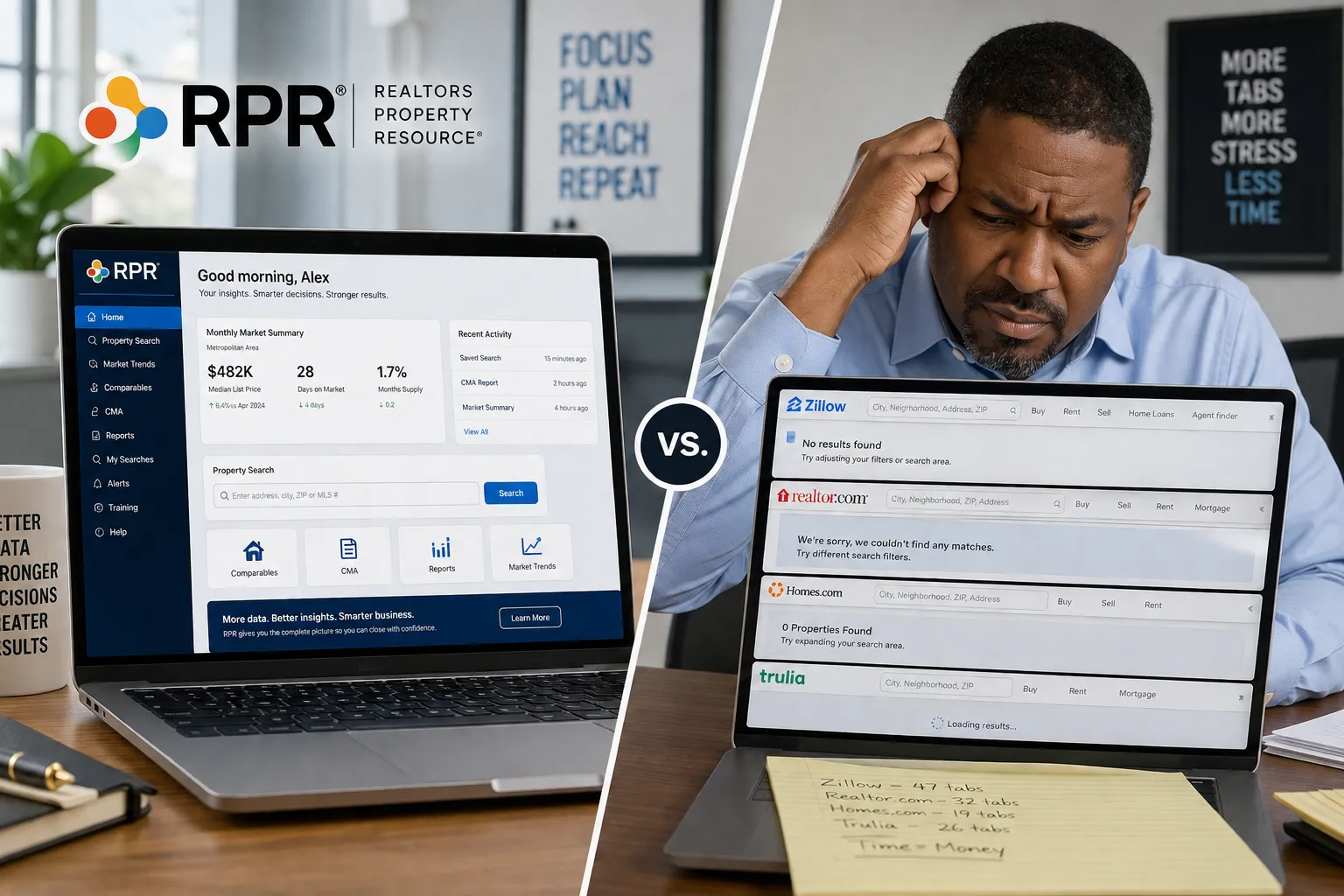
RPR AI is the Realtors Property Resource platform enhanced with artificial intelligence tools designed specifically for real estate professionals. It's a web-based and mobile application that aggregates property data, market trends, demographics, and neighborhood insights from public records, tax assessors, and proprietary databases. The AI assistant layer helps you turn raw data into client-ready presentations, social media content, and listing scripts.
Here's what makes RPR different from scrolling Zillow for the hundredth time: it's built by NAR for agents, not consumers. The interface prioritizes professional workflows, CMAs, seller net sheets, market trend reports, instead of home-shopping entertainment. The data comes from sources your MLS might not include, like school district boundaries, environmental hazards, and hyperlocal market velocity metrics.
The AI component (added in recent updates) includes a Market Trends ScriptWriter that analyzes neighborhood data and generates social media captions, video scripts, and client talking points. Think of it as ChatGPT trained on your local market, but without the generic fluff. You input a property address or ZIP code, and RPR's AI outputs ready-to-post content about price trends, inventory levels, and buyer demand.
RPR works alongside your MLS, not instead of it. Your MLS gives you active listings, sold comps, and days-on-market for listed properties. RPR gives you off-market property details, ownership history, mortgage data, and neighborhood context. Together, they're the one-two punch most agents never throw.
For agents who feel like they're gatekeeping their own success by avoiding new tools, RPR is the low-stakes entry point. It's free, it's backed by NAR, and if you mess up, nobody's watching. Let it cook before you see results, this isn't an overnight lead-gen miracle. It's a research and presentation tool that compounds over time as you build a library of market reports and social content.
RPR AI: The Free NAR Tool Most Agents Never Open
Here's the uncomfortable truth: RPR has been sitting in your NAR member benefits portal since you got licensed, and you've probably never clicked it. You're not alone. Industry estimates suggest fewer than 30% of NAR members have logged into RPR in the past year, and fewer than 10% use it regularly.
Why? Three reasons:
First, nobody told you it existed. Your brokerage onboarding covered the MLS, your CRM, and maybe Canva. RPR didn't make the cut because it's not a brokerage tool, it's a NAR tool. Brokerages don't get kickbacks for promoting it, so it falls through the cracks.
Second, the name is terrible. "Realtors Property Resource" sounds like a 2003 government database, not a modern AI-powered platform. It doesn't scream "use me," and the branding hasn't kept pace with the product upgrades.
Third, agents are creatures of habit. You already have a workflow. You pull comps from the MLS, grab listing photos from your phone, and write social posts in the Notes app. Adding a new tool feels like homework, especially when you're already drowning in CRM notifications and Zillow inquiries.
But here's what you're missing: RPR is the only free tool that combines property data, AI content generation, and client presentation templates in one platform. You're paying $150+ per year in NAR dues partly to fund this tool, and you're letting it collect dust while paying $50/month for a third-party CMA platform that does half of what RPR does.
The agents who do use RPR? They're the ones posting fresh, data-backed market updates every week. They're the ones walking into listing appointments with impeccable neighborhood reports that make sellers say, "Wow, you really know this area." They're not smarter than you, they just opened the tool.
If you're serious about building a real estate marketing system that doesn't rely on paid ads, RPR is your content engine. It's so based that NAR doesn't even promote it aggressively, they assume you'll figure it out. Spoiler: most agents don't.
How to Access RPR AI If You're a NAR Member
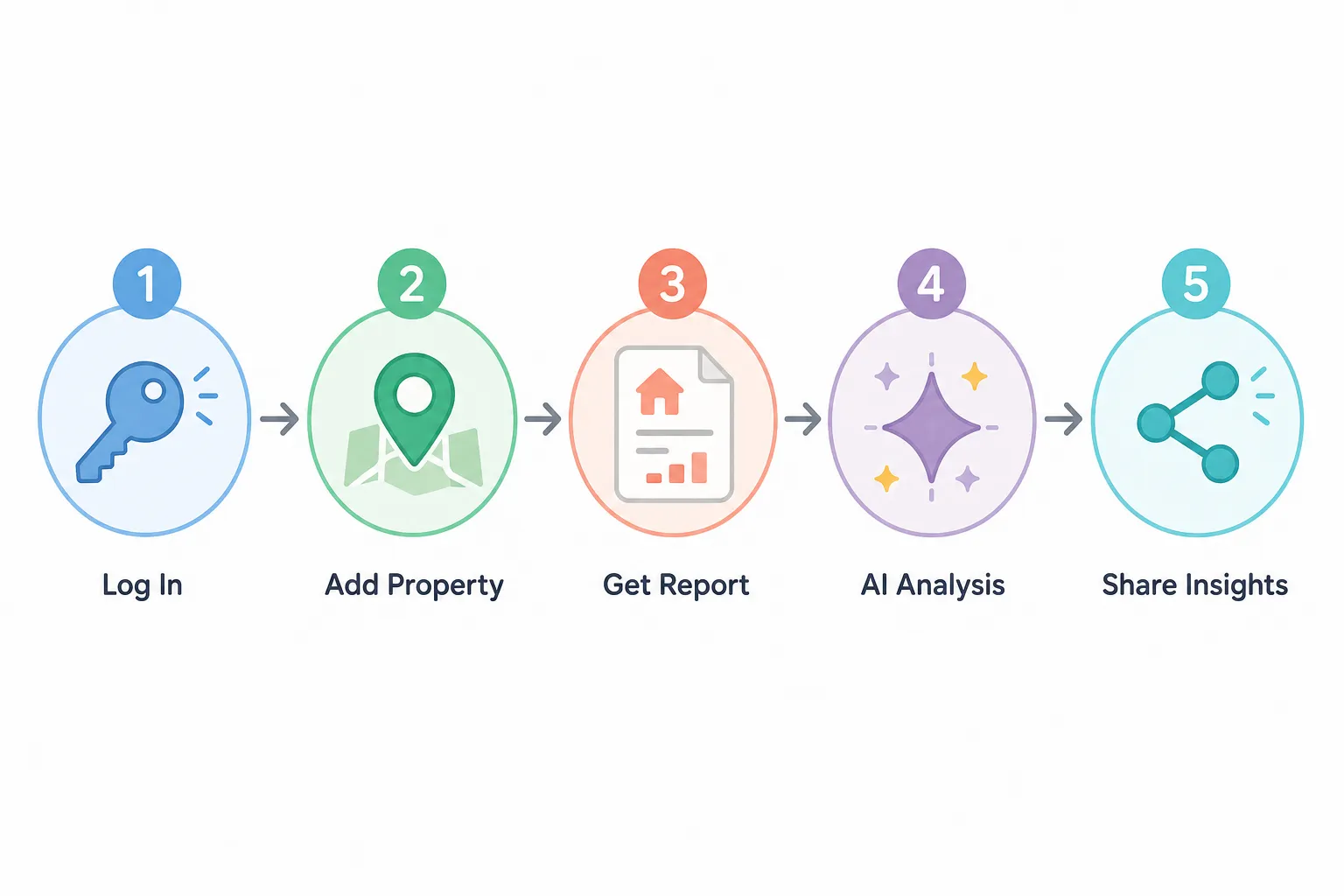
Accessing RPR is straightforward once you know where to look. Here's the step-by-step process:
Step 1: Confirm your NAR membership is active. Log into your local or state association portal and verify your dues are current. RPR access is tied to your NAR membership status, if your dues lapse, your RPR account gets suspended.
Step 2: Visit narrpr.com. This is the direct URL for the Realtors Property Resource platform. Bookmark it. You can also access RPR through the NAR member portal at nar.realtor, but the direct link is faster.
Step 3: Click "Sign In" and use your NAR credentials. Your username is typically your NRDS number (National Realtor Database System ID) or the email associated with your NAR membership. If you've never logged in before, click "Forgot Password" to set up your account.
Step 4: Complete the first-time setup. RPR will ask you to confirm your brokerage, license number, and primary market area. This takes about two minutes. The platform uses this info to pre-load local market data and customize your dashboard.
Step 5: Download the RPR mobile app. Available on iOS and Android, the app syncs with your web account and lets you pull property data on the go. Search "RPR Mobile" in your app store. Log in with the same credentials.
Step 6: Bookmark the AI Market Trends ScriptWriter. Once you're logged in, navigate to "Market Activity Reports" in the top menu, then select "AI ScriptWriter" from the dropdown. This is where the magic happens. Bookmark this page so you don't have to hunt for it every time.
Troubleshooting common login issues:
- "Invalid credentials" error: Your NAR membership might not be synced yet. Contact your local association and ask them to verify your NRDS number is active in the NAR system.
- "Access denied" message: Your dues are likely overdue. Log into your association portal and check your payment status.
- RPR won't load or times out: Clear your browser cache or try a different browser. RPR works best on Chrome and Safari. If you're on a brokerage network, your IT department might be blocking the site, ask them to whitelist narrpr.com.
Once you're in, spend 10 minutes clicking around. Pull up a property in your farm area. Run a market trends report for your ZIP code. Generate a social media caption using the AI tool. The interface is more intuitive than it looks, and the more you explore, the less intimidating it becomes.
For agents building out their real estate agent tech stack, RPR should sit right next to your CRM and MLS. It's not a replacement for either, it's the third leg of the stool.
RPR AI vs MLS Tools: Which Is Better for Agents
This isn't an either-or question. RPR and your MLS serve different purposes, and the best agents use both.
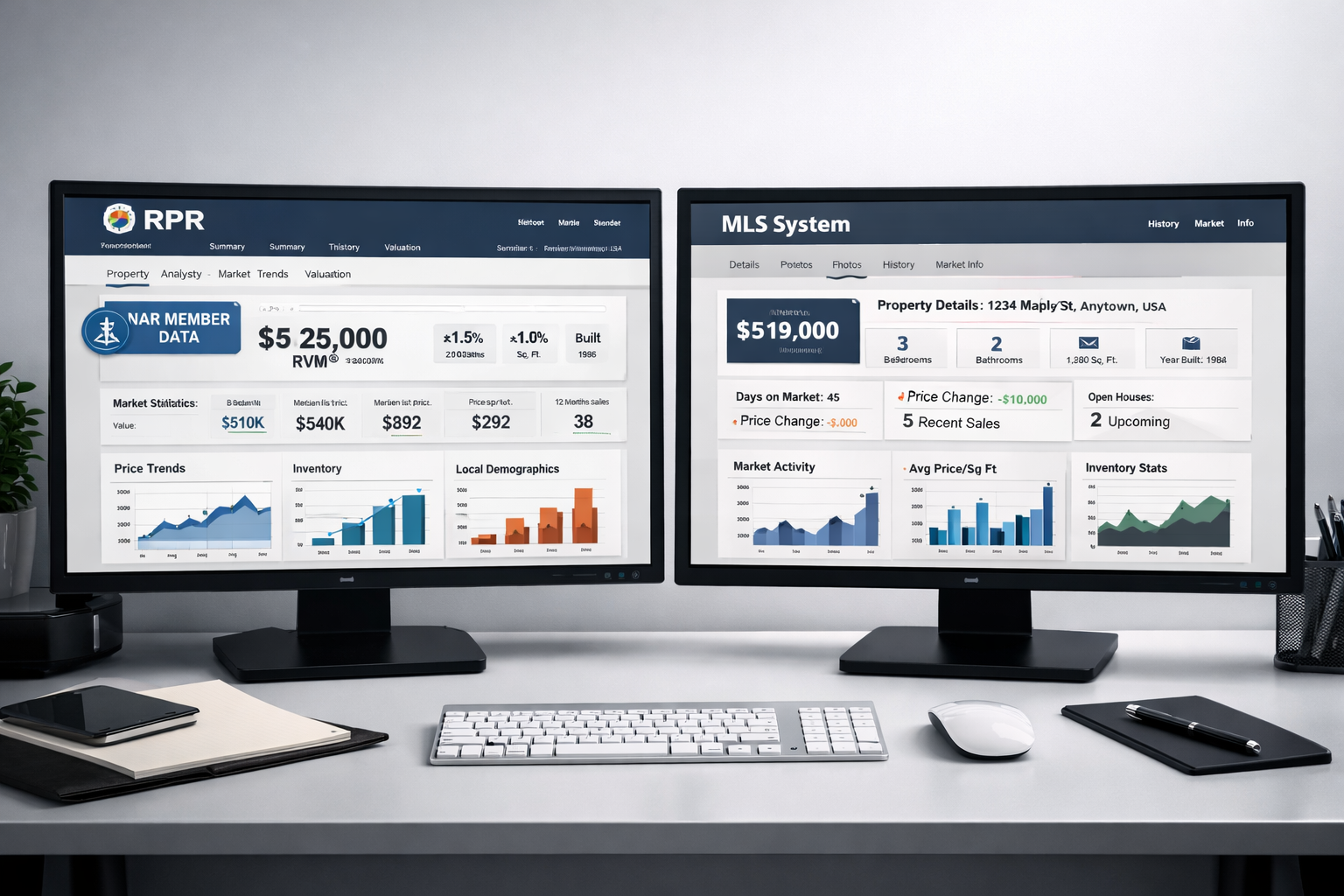
Your MLS is for active market data. It shows you what's listed right now, what sold last week, and how long properties are sitting. It's the real-time pulse of your market. You can't write an offer or pull accurate sold comps without your MLS. It's the backbone of your transaction workflow.
RPR is for context and presentation. It shows you off-market properties, ownership history, mortgage balances, neighborhood demographics, school ratings, and environmental data. It's the research layer that makes you sound like a market expert instead of a listing aggregator.
Here's a side-by-side breakdown:
| Feature | MLS | RPR AI |
|---|---|---|
| Active listings | Yes | No |
| Sold comps (listed properties) | Yes | Limited |
| Off-market property data | No | Yes |
| Ownership history | No | Yes |
| Mortgage and lien data | No | Yes |
| Neighborhood demographics | Limited | Extensive |
| AI-generated scripts | No | Yes |
| Client presentation templates | Limited | Yes |
| Mobile app | Varies by MLS | Yes |
| Cost | Included with membership | Included with NAR dues |
When to use your MLS:
- Pulling comps for a CMA or appraisal
- Checking active inventory in a neighborhood
- Writing an offer or researching a listing agent
- Tracking days-on-market and price reductions
When to use RPR:
- Researching off-market properties for prospecting
- Building a listing presentation with neighborhood context
- Creating social media content about market trends
- Educating buyers about school districts, crime rates, or environmental factors
- Generating seller net sheets with property tax and mortgage data
The killer combo: Pull sold comps from your MLS, then layer in RPR's neighborhood data and AI-generated talking points. Your CMA now includes active listings, recent sales, and a narrative about why this neighborhood is trending up. That's the presentation that wins listings.
One mistake agents make: treating RPR as an MLS replacement. It's not. RPR doesn't have real-time listing data, and it won't tell you if a property just went under contract. If you try to use RPR for transaction work, you'll miss critical details. Use it for research, presentation, and content creation, not for writing offers.
Another mistake: ignoring RPR because "my MLS already does this." Your MLS doesn't generate social media captions. It doesn't show you mortgage balances or ownership timelines. It doesn't create shareable market trend reports for your sphere. RPR fills the gaps your MLS leaves open.
For agents serious about lead generation strategies that don't rely on Zillow, RPR is the content factory that keeps your social feeds and email newsletters fresh. Your MLS gives you the data. RPR gives you the story.
Is RPR AI Really Free or Are There Hidden Costs
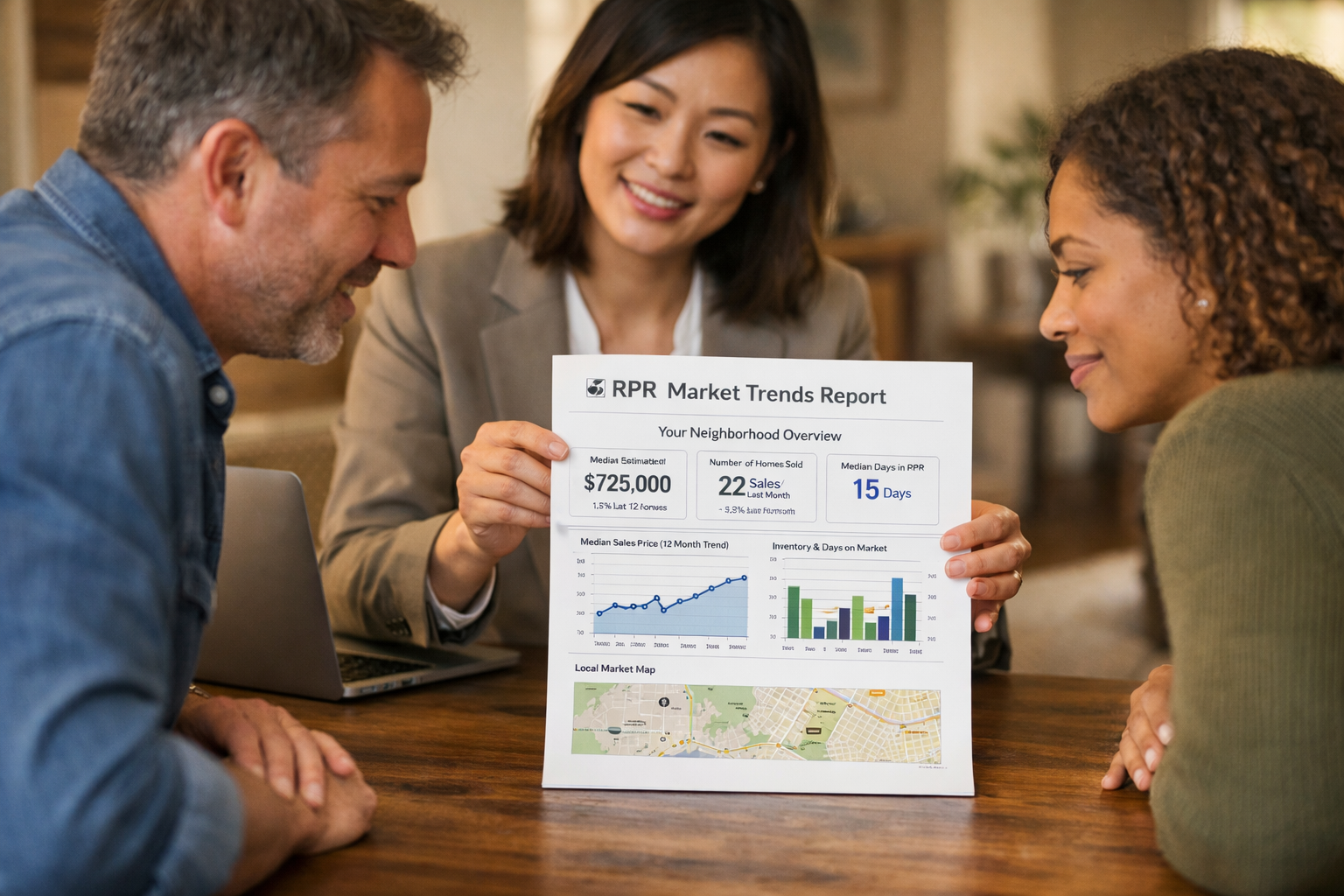
RPR is 100% free for NAR members. No premium tiers, no feature paywalls, no "upgrade to unlock" prompts. Every tool, report, and AI feature is included with your NAR membership.
Here's the cost breakdown:
What you pay: Your annual NAR dues, which range from $150 to $185 depending on your local and state association fees. This covers your NAR membership, which includes RPR access, legal hotline, Code of Ethics training, and other member benefits.
What you don't pay: Nothing extra for RPR. No monthly subscription, no per-report fees, no credit system. You can generate unlimited property reports, CMAs, and AI scripts without hitting a paywall.
Hidden costs? None. There are no upsells, no "pro" version, no premium data packages. NAR funds RPR development through member dues, so the platform stays free for all members.
The catch: You have to be a NAR member. If you're not a Realtor (maybe you're a licensed agent who opted out of NAR membership), you can't access RPR. There's no workaround, no guest access, no trial period. NAR membership is the price of admission.
Is it worth the NAR dues? If you're only joining NAR for RPR, probably not. But if you're already paying NAR dues (and most agents are, because most brokerages require it), then RPR is extraordinary value. You're already paying for it, you're just not using it.
Compare that to third-party tools:
- Cloud CMA: $50,$75/month for comparable presentation tools
- HouseCanary: $99/month for property data and analytics
- Reonomy: $150+/month for ownership and mortgage data
- ChatGPT Plus: $20/month for AI scriptwriting (and it's not trained on real estate data)
RPR bundles all of that functionality for $0 beyond your existing NAR dues. If you're paying for any of the tools above while ignoring RPR, you're doubling up on costs.
What about data accuracy? RPR pulls from public records, tax assessors, and proprietary databases. The data is generally reliable, but it's not perfect. Property details (square footage, bed/bath counts) can be outdated or incorrect, especially in rural areas where assessor records are sparse. Always verify critical details with your MLS or a title company before presenting to clients.
Bottom line: RPR is free, full-featured, and funded by your NAR dues. The only cost is the time it takes to learn the platform, and that's an investment, not an expense.
What Can RPR AI Do That Zillow or Realtor.com Can't
Zillow and Realtor.com are built for consumers. RPR is built for professionals. That's the fundamental difference, and it shapes everything the platform does.
1. Off-market property data. Zillow shows you what's for sale. RPR shows you everything, listed, sold, and off-market. You can pull ownership history, mortgage balances, and lien data for any property, even if it hasn't been on the market in 20 years. This is gold for prospecting expired listings, FSBOs, and absentee owners.
2. AI Market Trends ScriptWriter. Zillow doesn't write your social media captions for you. RPR does. Input a ZIP code or neighborhood, and the AI generates ready-to-post content about price trends, inventory levels, and buyer demand. It's like having a ChatGPT scriptwriter trained on your local market data.
3. Customizable CMA templates. Zillow's "Zestimate" is a black box. RPR lets you build professional CMAs with your branding, custom comps, and neighborhood context. You control the narrative, and the output looks like you spent hours on it (even though it took 10 minutes).
4. Shareable market trend reports. RPR generates one-page market snapshots you can email to your sphere or post on social media. Zillow's market data is buried in blog posts and consumer-facing charts. RPR packages it for professional use.
5. Neighborhood demographics and school data. Zillow shows you school ratings. RPR shows you enrollment trends, test scores, district boundaries, and demographic shifts. This is the context that helps buyers make informed decisions and positions you as the local expert.
6. Environmental and hazard data. RPR includes flood zones, earthquake risk, wildfire history, and proximity to hazardous sites. Zillow doesn't surface this unless you dig through third-party links. RPR puts it front and center.
7. Mobile app with on-site access. Zillow's app is for browsing. RPR's app is for working. You can pull property data, generate reports, and share presentations from your phone during showings or open houses.
What Zillow and Realtor.com do better:
- Consumer reach. Zillow has 200+ million monthly visitors. RPR has zero consumer traffic because it's agent-only. If you're trying to attract buyers, Zillow wins.
- User experience. Zillow's interface is polished and intuitive. RPR's interface is functional but clunky. It's built for data, not design.
- Real-time listing updates. Zillow syndicates MLS data in near real-time. RPR's listing data lags because it's not the primary focus.
The smart play: Use Zillow and Realtor.com for consumer-facing marketing and lead capture. Use RPR for research, client presentations, and content creation. They're complementary tools, not competitors.
For agents building a newsletter for real estate agents or a content-driven marketing strategy, RPR is the data source that keeps your content fresh and credible. Zillow gives you surface-level stats. RPR gives you the story behind the numbers.
Why Don't More Real Estate Agents Use RPR AI
If RPR is free, powerful, and backed by NAR, why do so few agents use it? The reasons are part psychology, part workflow inertia, and part marketing failure.
1. Nobody knows it exists. NAR doesn't market RPR aggressively. There's no onboarding email when you join NAR. No tutorial video in your new agent training. No push notifications reminding you it's there. It's a member benefit buried in a benefits portal most agents never visit.
2. The interface looks intimidating. RPR's dashboard is dense. Lots of tabs, dropdowns, and data fields. For newer agents already overwhelmed by MLS training, CRM setup, and lead-gen tactics, RPR feels like one more thing to learn. So they don't.
3. Agents stick with what they know. You've been using Zillow since before you got licensed. You know where the buttons are. RPR is unfamiliar, and unfamiliar feels risky when you're trying to close deals and pay bills. Switching tools requires upfront effort with delayed payoff, and most agents are optimizing for today, not next quarter.
4. Brokerages don't push it. Your brokerage makes money when you close deals, not when you use NAR tools. They'd rather you master their proprietary CRM or lead platform. RPR doesn't generate brokerage revenue, so it doesn't make the training agenda.
5. The name is forgettable. "Realtors Property Resource" sounds like a library catalog, not a cutting-edge AI tool. Compare that to "ChatGPT" or "Canva", names that signal what they do and feel modern. RPR's branding is stuck in 2010.
6. Agents underestimate the value of content. Most agents think "content creation" means posting listing photos on Instagram. They don't see the ROI in market trend reports, neighborhood guides, or data-driven social posts. So they don't invest time in tools like RPR that make content creation easier.
7. Fear of looking dumb. Newer agents especially are terrified of using a tool wrong and looking incompetent in front of clients. It's easier to avoid RPR than risk generating a report with bad data or a confusing layout. This is the same reason agents avoid AI tools for real estate, they're scared of the learning curve.
The irony: RPR is one of the easiest tools to learn. The AI scriptwriter is literally point-and-click. The CMA templates are pre-formatted. The mobile app is more intuitive than most MLS apps. But perception beats reality, and the perception is that RPR is complicated.
What would change the game: If NAR sent every new member a 5-minute video tutorial and a 30-day email drip campaign with use cases, adoption would triple. If brokerages included RPR training in onboarding, it would become standard practice. If top-producing agents posted about RPR on social media, it would go from "that thing I've heard of" to "the tool everyone uses."
Until then, RPR remains the free NAR tool most agents never open, which means it's a competitive advantage for the agents who do.
How to Use RPR AI: Step-by-Step Tutorial for Agents
Here's the practical, no-fluff guide to using RPR AI. We'll cover three client-facing use cases: listing presentations, buyer education, and social media farming posts.
Use Case 1: Building a Listing Presentation with RPR
Step 1: Log into RPR at narrpr.com and enter the property address in the search bar.
Step 2: Click "Create Report" and select "Seller Report" from the dropdown menu.
Step 3: Customize the report. RPR auto-populates property details, tax data, and neighborhood stats. Add your branding (logo, contact info) in the "Customize" tab.
Step 4: Review the "Market Activity" section. RPR shows recent sales, active listings, and price trends for the neighborhood. This is your CMA foundation.
Step 5: Add the "Ownership & Mortgage" section. This shows the seller how much equity they have and what their payoff might look like. It's a trust-builder.
Step 6: Generate the report as a PDF. Click "Download" and save it to your device. You can also email it directly to the seller from RPR.
Step 7: Use the AI Market Trends ScriptWriter to create talking points. Navigate to "Market Activity Reports" > "AI ScriptWriter." Input the property's ZIP code. RPR generates a script highlighting why now is a good time to sell, what buyers are looking for, and how the neighborhood is trending.
Step 8: Print the report and bring it to your listing appointment. Walk the seller through each section, using the AI-generated script as your guide. This positions you as the data-driven expert who did their homework.
Time investment: 10-15 minutes. Compare that to manually pulling comps, formatting a CMA in Word, and writing your own market analysis. RPR cuts the work by 75%.
Use Case 2: Educating Buyers with RPR Neighborhood Reports
Step 1: Ask your buyer which neighborhoods they're considering. Input those ZIP codes or city names into RPR.
Step 2: Run a "Neighborhood Report" for each area. RPR generates a one-page snapshot with demographics, school ratings, crime stats, and market trends.
Step 3: Compare the reports side by side. Show your buyer how School District A has rising test scores while School District B is declining. Or how Neighborhood X has 30 days of inventory while Neighborhood Y has 90 days (a buyer's market).
Step 4: Use the "Environmental Hazards" tab to flag flood zones, wildfire risk, or proximity to industrial sites. This is due diligence most agents skip, and it builds trust.
Step 5: Email the reports to your buyer. RPR lets you send directly from the platform, or you can download PDFs and attach them to your CRM follow-up sequence.
Why this works: Buyers are drowning in Zillow listings. They need context, not more photos. RPR gives you the data to say, "Here's why Neighborhood A is a better long-term investment than Neighborhood B," and back it up with numbers.
Use Case 3: Creating Social Media Farming Posts with the AI ScriptWriter
Step 1: Choose your farm area. This could be a ZIP code, subdivision, or school district you're targeting.
Step 2: Navigate to "Market Activity Reports" > "AI ScriptWriter" in RPR.
Step 3: Input your farm area and select "Social Media Caption" as the output format.
Step 4: RPR analyzes recent sales, inventory levels, and price trends, then generates a ready-to-post caption. Example output: "Homes in [Neighborhood] are selling 15% faster this month than last quarter. Inventory is tight, and buyers are competing. If you've been thinking about selling, now's the time. DM me for a free market analysis."
Step 5: Copy the caption and paste it into your social scheduler (Buffer, Hootsuite, or just post it manually). Pair it with a photo of the neighborhood or a screenshot of RPR's market trend chart.
Step 6: Repeat weekly. RPR updates its data regularly, so you can generate fresh captions every week without repeating yourself.
Pro tip: Use RPR's shareable market trends reports as lead magnets. Post the caption on Instagram or Facebook, then offer to send the full report to anyone who DMs you. This turns social engagement into email list growth.
Time investment: 5 minutes per post. Compare that to staring at a blank screen trying to think of something interesting to say about your market. RPR does the heavy lifting.
Common Mistakes Agents Make When Using RPR AI
Even agents who use RPR often use it wrong. Here are the most common mistakes and how to avoid them.
Mistake 1: Treating RPR as an MLS replacement. RPR doesn't have real-time listing data. If you try to pull active listings or write an offer based on RPR data, you'll miss critical details. Use RPR for research and presentation, not transaction work.
Mistake 2: Ignoring the AI scriptwriter. Most agents pull reports and stop there. They miss the AI-generated talking points, social captions, and client scripts. The scriptwriter is the most underused feature in RPR, and it's the one that saves you the most time.
Mistake 3: Not customizing reports. RPR's default templates are functional but generic. Add your logo, contact info, and a personalized cover page. This takes 30 seconds and makes the report look like you built it from scratch.
Mistake 4: Skipping the mobile app. The RPR mobile app lets you pull property data on-site during showings or open houses. Agents who only use the desktop version miss opportunities to impress buyers in real time.
Mistake 5: Assuming the data is perfect. RPR pulls from public records, which can be outdated or incomplete. Always verify square footage, bed/bath counts, and property boundaries with your MLS or a title company before presenting to clients.
Mistake 6: Not using RPR for prospecting. RPR's off-market data is perfect for finding expired listings, FSBOs, and absentee owners. Most agents only use RPR for active clients, missing the prospecting goldmine.
Mistake 7: Overcomplicating it. RPR has a lot of features, and new agents try to learn them all at once. Start with one use case (listing presentations or social posts), master it, then add more. Don't let feature overload paralyze you.
Mistake 8: Not sharing reports with your sphere. RPR reports are designed to be shared. Email them to past clients, post them on social media, include them in your newsletter. Most agents generate reports and never distribute them.
Mistake 9: Forgetting to update your farm area. RPR customizes your dashboard based on your primary market area. If you move or expand your farm, update your settings so RPR pre-loads the right data.
Mistake 10: Giving up after one try. RPR has a learning curve. Your first report will take 20 minutes and feel clunky. Your tenth report will take 5 minutes and feel effortless. Let it cook before you see results.
Is RPR AI Worth Learning for New Real Estate Agents

Short answer: yes, especially if you're building your business on a budget.
New agents face a brutal reality: you need to look credible before you've closed a deal. You need marketing materials, client presentations, and social content, but you don't have the budget for designers, copywriters, or premium tools. RPR solves this.
Why RPR is perfect for new agents:
1. It's free. You're already paying NAR dues. RPR doesn't add to your overhead.
2. It makes you look experienced. A polished RPR report signals "I know what I'm doing" even if you've never closed a deal. Clients can't tell the difference between a report you generated in 10 minutes and one a veteran agent spent an hour building.
3. It fills knowledge gaps. New agents don't have years of market data in their heads. RPR gives you instant access to neighborhood trends, price history, and demographic shifts. You can speak confidently about a market you just started farming.
4. It's a content factory. New agents struggle with "what do I post?" RPR's AI scriptwriter answers that question every week. You'll never run out of market updates, neighborhood spotlights, or buyer tips.
5. It builds your database. Use RPR reports as lead magnets. Offer free market analyses, neighborhood guides, or school district comparisons in exchange for email addresses. This is how you build a sphere from scratch.
The learning curve is manageable. You don't need to master every feature on day one. Start with one use case, say, generating a seller report for a listing presentation. Do that five times, and it becomes muscle memory. Then add the AI scriptwriter. Then the mobile app. Layer skills over time.
Compare RPR to the alternatives:
- Hiring a designer for listing presentations: $200,$500 per project
- Paying for a CMA tool: $50,$75/month
- Buying market data from a third-party provider: $100+/month
- Using RPR: $0
For new agents on a tight budget, RPR is the highest-ROI tool in your tech stack. It's not flashy, but it's impeccable at what it does.
One caveat: RPR won't generate leads for you. It's a research and presentation tool, not a lead-gen platform. You still need to prospect, network, and market yourself. But when you land a buyer consultation or listing appointment, RPR ensures you show up prepared and professional.
If you're a new agent serious about building a real estate business without burning cash on ads, RPR is non-negotiable. Learn it now, and it'll pay dividends for your entire career.
RPR AI Alternatives for Non-NAR Members
If you're not a NAR member, you can't access RPR. There's no trial, no guest login, no workaround. NAR membership is the only way in.
But if you're a licensed agent who opted out of NAR (or you're considering it), here are the best RPR alternatives:
1. Zillow Premier Agent. Costs $20,$2,000+/month depending on your market. Gives you lead generation, CRM tools, and access to Zillow's property database. Not as data-rich as RPR, but better for consumer-facing marketing.
2. Realtor.com Connections Plus. Similar to Zillow Premier Agent. Costs vary by market. Includes lead gen and property data, but no AI scriptwriter or off-market ownership data.
3. Cloud CMA. $50,$75/month. Excellent for building professional CMAs and listing presentations. Doesn't include off-market data or AI tools, but the templates are polished and customizable.
4. HouseCanary. $99/month. Provides property valuations, market analytics, and neighborhood data. More expensive than RPR, but the data quality is high and the interface is modern.
5. Reonomy. $150+/month. Focuses on ownership data, mortgage info, and off-market properties. Built for commercial agents and investors, but useful for residential prospecting.
6. ChatGPT Plus + public data sources. $20/month for ChatGPT Plus. Use it to generate social captions and client scripts, then pull property data from free sources like county assessor websites and Zillow. This is the DIY approach, more work, but budget-friendly.
7. Your MLS + Canva. Most MLS systems include basic CMA tools. Pair that with Canva (free or $13/month for Pro) to design client presentations. You won't get off-market data or AI scripts, but you can build something functional.
The cost comparison:
- RPR (NAR members): $0 beyond NAR dues
- Cloud CMA: $600,$900/year
- HouseCanary: $1,188/year
- Reonomy: $1,800+/year
- ChatGPT + Canva: $156/year (DIY approach)
If you're paying for any of these tools and you're already a NAR member, you're wasting money. RPR does 80% of what these platforms do, and it's free.
Should you join NAR just for RPR? Probably not. NAR dues run $150,$185/year, and RPR alone doesn't justify that cost. But if you're already a NAR member (or considering joining for other reasons), RPR is a massive bonus benefit most agents ignore.
Can RPR AI Help with CMA and Market Analysis
Absolutely. RPR's CMA tools are one of its strongest features, and they're built specifically for agent workflows.
Here's what RPR includes for CMAs:
1. Automated comp selection. Input a subject property, and RPR pulls comparable sales based on location, size, age, and features. You can adjust the search radius, date range, and property criteria to refine the comps.
2. Customizable CMA templates. RPR offers multiple report layouts, single-page summaries, detailed multi-page CMAs, and seller net sheets. You can add your branding, adjust the data fields, and reorder sections.
3. Market trend charts. RPR auto-generates charts showing price trends, days-on-market, and inventory levels for the neighborhood. These visuals make your CMA more persuasive and easier to understand.
4. Ownership and mortgage data. RPR shows the seller's purchase price, current mortgage balance, and estimated equity. This helps you frame the conversation around net proceeds, not just list price.
5. Neighborhood context. RPR includes school ratings, crime stats, and demographic data in the CMA. This positions you as the expert who understands the bigger picture, not just the comps.
6. AI-generated pricing recommendations. RPR's AI analyzes the comps and suggests a list price range. You can override it, but it's a helpful starting point.
How RPR CMAs compare to MLS CMAs:
- MLS CMAs are faster for pulling active listings and recent sales. They're the gold standard for transaction work.
- RPR CMAs add context, branding, and off-market data. They're better for client presentations and listing appointments.
The best approach: Pull comps from your MLS, then build the presentation in RPR. This gives you the accuracy of MLS data with the polish of RPR's templates.
One limitation: RPR's comp selection isn't as precise as a human agent's judgment. It might pull properties that are technically comparable but don't match the subject property's condition, location, or appeal. Always review the comps and remove outliers before presenting to clients.
For market analysis: RPR's Market Activity Reports are extraordinary for tracking trends over time. You can generate monthly snapshots for your farm area, compare year-over-year data, and identify emerging patterns. This is perfect for building a newsletter for real estate agents or posting data-driven market updates on social media.
Does RPR AI Work Well in Rural Markets or Small Towns
Yes, but with caveats. RPR's data quality depends on the availability of public records, and rural markets often have sparse or outdated records.
Where RPR shines in rural markets:
1. Off-market property data. Even in small towns, RPR can pull ownership history, tax assessor data, and mortgage info. This is useful for prospecting land sales, estate properties, and absentee owners.
2. Demographic and school data. RPR aggregates census data, school district info, and crime stats for rural areas. This helps buyers relocating from urban markets understand what they're moving into.
3. Environmental hazards. RPR's flood zone, wildfire, and earthquake data is especially relevant in rural areas where natural hazards are more common.
Where RPR struggles in rural markets:
1. Limited comp data. If your market has low transaction volume, RPR might not find enough recent sales to generate a meaningful CMA. You'll need to supplement with MLS data or manual research.
2. Outdated property details. Rural tax assessors update records infrequently. RPR might show incorrect square footage, bed/bath counts, or lot sizes. Always verify with the MLS or a site visit.
3. Sparse market trend data. RPR's AI scriptwriter and market reports rely on transaction volume. In markets with only a handful of sales per month, the trends might not be statistically significant.
Workarounds for rural agents:
- Expand your search radius. If your immediate area has limited data, pull comps from neighboring towns or counties. RPR lets you adjust the radius up to 50 miles.
- Use RPR for prospecting, not CMAs. Focus on off-market data and ownership research. Use your MLS for comps and pricing.
- Combine RPR with local knowledge. RPR gives you the data framework, but you provide the context. Explain to clients why a property 20 miles away isn't truly comparable, even if RPR includes it.
Bottom line: RPR works in rural markets, but it's not a magic bullet. It's most effective when paired with local expertise and MLS data. If you're a rural agent, RPR is still worth using, just set realistic expectations about data completeness.
RPR AI Not Working or Won't Load: Troubleshooting
If RPR isn't loading or you're getting error messages, here's how to fix it:
Problem 1: "Invalid credentials" or "Access denied"
- Cause: Your NAR membership is inactive or your NRDS number isn't synced.
- Fix: Log into your local or state association portal and verify your dues are current. Contact your association if your NRDS number isn't showing as active.
Problem 2: RPR won't load or times out
- Cause: Browser cache, outdated browser, or network restrictions.
- Fix: Clear your browser cache and cookies. Try a different browser (Chrome or Safari work best). If you're on a brokerage network, ask IT to whitelist narrpr.com.
Problem 3: Reports won't generate or download
- Cause: Pop-up blocker or browser extension interference.
- Fix: Disable your pop-up blocker for narrpr.com. Turn off browser extensions (especially ad blockers) and try again.
Problem 4: Mobile app won't sync
- Cause: Outdated app version or login credential mismatch.
- Fix: Update the RPR Mobile app to the latest version. Log out and log back in using your web credentials (not your email, use your NRDS number).
Problem 5: Data looks wrong or outdated
- Cause: Public records haven't been updated, or the property isn't in RPR's database.
- Fix: Verify the address is correct. Check your MLS or county assessor website for updated info. If the property is new construction or recently subdivided, RPR might not have it yet.
Problem 6: AI scriptwriter isn't generating content
- Cause: Insufficient data for the selected area, or the feature is temporarily down.
- Fix: Try a different ZIP code or expand your search area. If the problem persists, contact RPR support at rpr@narrpr.com.
Still stuck? RPR offers live chat support and a help center at narrpr.com/support. Response times are usually under 24 hours.
Best Features in RPR AI That Agents Should Actually Use
RPR has dozens of features, but most agents only need a handful. Here are the ones worth your time:
1. AI Market Trends ScriptWriter. Generates social media captions, video scripts, and client talking points based on local market data. This is the feature that saves you the most time.
2. Seller Reports. Pre-formatted listing presentations with property details, comps, and neighborhood context. Add your branding and you're done.
3. Neighborhood Reports. One-page snapshots with demographics, schools, crime, and market trends. Perfect for buyer education and farming posts.
4. Ownership & Mortgage Data. Shows who owns a property, when they bought it, and what they owe. Gold for prospecting and pricing conversations.
5. Mobile App. Pull property data and generate reports on-site during showings or open houses. Makes you look like a tech-savvy pro.
6. Shareable Market Trends. One-click reports you can email to your sphere or post on social media. Great for staying top-of-mind.
7. Environmental Hazards. Flood zones, wildfire risk, earthquake data. This is due diligence most agents skip, and it builds trust.
Features you can skip (for now):
- Commercial property data. Unless you're a commercial agent, this is overkill.
- Advanced analytics. The deep-dive charts and regression models are interesting but not necessary for most agents.
- RVM integration. RPR integrates with some real estate virtual assistant tools, but the setup is clunky and most agents won't use it.
Pro tip: Master one feature at a time. Start with the AI scriptwriter or seller reports, use it for a month, then add another feature. Don't try to learn everything at once.
Frequently Asked Questions
What is RPR AI and who can access it?
RPR AI is the Realtors Property Resource platform with AI-powered tools for market analysis, scriptwriting, and client presentations. Only NAR members can access it, there's no trial or guest login. If your NAR dues are current, you have full access at no additional cost.
How much does RPR AI cost?
RPR is 100% free for NAR members. There are no premium tiers, hidden fees, or per-report charges. Your NAR membership dues (typically $150,$185/year) cover full access to every feature.
Can I use RPR AI if I'm not a NAR member?
No. RPR is an exclusive NAR member benefit. If you're not a NAR member, you'll need to use alternatives like Cloud CMA, HouseCanary, or free tools like Zillow and county assessor websites.
Is RPR data as accurate as MLS data?
RPR and MLS pull from different sources. MLS data is more accurate for active listings and recent sales. RPR is better for off-market properties, ownership history, and neighborhood context. Always verify critical details (square footage, bed/bath counts) with your MLS or a title company.
Does RPR work on mobile devices?
Yes. RPR offers a mobile app for iOS and Android. The app syncs with your web account and lets you pull property data, generate reports, and share presentations from your phone.
Can RPR AI write social media posts for me?
Yes. The AI Market Trends ScriptWriter generates ready-to-post captions based on local market data. You can customize the output or use it as-is. It's one of RPR's most underused features.
How do I log into RPR for the first time?
Visit narrpr.com and click "Sign In." Use your NRDS number (National Realtor Database System ID) or the email associated with your NAR membership. If you've never logged in, click "Forgot Password" to set up your account.
What's the difference between RPR and Zillow?
Zillow is built for consumers and focuses on active listings and home shopping. RPR is built for agents and includes off-market data, ownership history, AI scriptwriting, and professional presentation tools. They serve different purposes.
Can I use RPR to generate CMAs?
Yes. RPR includes customizable CMA templates with automated comp selection, market trend charts, and neighborhood data. It's best used alongside your MLS, pull comps from the MLS, then build the presentation in RPR.
Does RPR work in rural markets?
Yes, but data quality varies. Rural markets often have sparse public records, so RPR's comp data and market trends might be limited. It's still useful for off-market research, demographics, and environmental data.
Why isn't RPR loading or working?
Common causes: outdated browser, pop-up blocker, inactive NAR membership, or network restrictions. Clear your cache, try a different browser, and verify your NAR dues are current. Contact RPR support at rpr@narrpr.com if the problem persists.
Can I share RPR reports with clients?
Yes. RPR reports are designed to be shared. You can email them directly from the platform, download PDFs, or print hard copies. Add your branding to make them look professional.
Conclusion
RPR AI is the free NAR tool most agents never open, and that's a shame, because it's one of the most powerful resources in your tech stack. It won't replace your MLS or generate leads on autopilot, but it will make you look more credible, save you hours of research time, and give you a steady stream of content for your marketing.
If you're a NAR member and you've never logged into RPR, do it today. Spend 10 minutes pulling a property report or generating a social media caption. Let it cook before you see results, this isn't an overnight transformation. But over time, RPR becomes the tool you wonder how you ever worked without.
For new agents building a business on a budget, RPR is non-negotiable. For experienced agents looking to streamline their workflow, it's the efficiency hack hiding in plain sight. And for agents serious about positioning themselves as market experts, it's the data engine that makes you sound extraordinary every time you open your mouth.
Stop gatekeeping your own success. Open RPR. Learn one feature. Use it. Repeat.
The tool is free. The data is fresh. The results are impeccable. The only thing standing between you and a more professional, more efficient real estate business is the login button you've been ignoring.
SEO Meta Title: RPR AI: The Free NAR Tool Most Agents Never Open
Tags: RPR AI, Realtors Property Resource, NAR member benefits, real estate AI tools, CMA tools for agents, real estate market analysis, AI scriptwriter for agents, free real estate tools, agent tech stack, real estate automation, property data tools, MLS alternatives