

Last updated: July 20, 2026

Quick Answer
REimagine Home AI offers a genuinely free virtual staging tier that delivers 5 watermarked renders per month at 1024×1024 resolution, enough for testing the tool or staging a small listing. The AI produces realistic furniture placement and lighting in under 60 seconds, but free users face visible branding, limited commercial rights, and occasional scale issues with windows and proportions. For agents staging multiple listings or needing client-ready images, the paid tiers ($29,$99/month) remove watermarks and unlock higher resolution, but the free version remains one of the most capable no-cost staging tools available in 2026.
Key Takeaways
- Free tier includes 5 renders/month with REimagine Home watermark, 1024×1024 resolution, and personal-use-only license
- Paid plans start at $29/month (50 renders, no watermark, commercial license) and scale to $99/month for 500 renders
- Upload quality matters: images shot in good natural light with straight angles produce the most realistic staging results
- Style presets are extensive: 15+ design styles from modern minimalist to farmhouse, each with furniture libraries optimized for that aesthetic
- Common AI quirks: window reflections sometimes show impossible outdoor views, furniture scale can drift in large or oddly shaped rooms
- Best use case for free tier: FSBO sellers staging 1-2 hero shots, agents testing the tool before committing, or investors creating quick listing mockups
- When to upgrade: if you need watermark-free images for MLS listings, higher resolution for print marketing, or commercial rights for client work
- Top alternatives: Collov AI (similar free tier, different style library), BoxBrownie (human-assisted, higher cost, impeccable quality), Styldod (REimagine's parent company, offers hybrid AI + human review)
What Is REimagine Home AI and How Does It Work?
REimagine Home AI is a browser-based virtual staging platform owned by Styldod, a real estate marketing company that's been in the staging game since 2019. The tool uses generative AI to furnish empty rooms or replace existing furniture in property photos, no Photoshop skills, no designer retainer, no week-long turnaround.
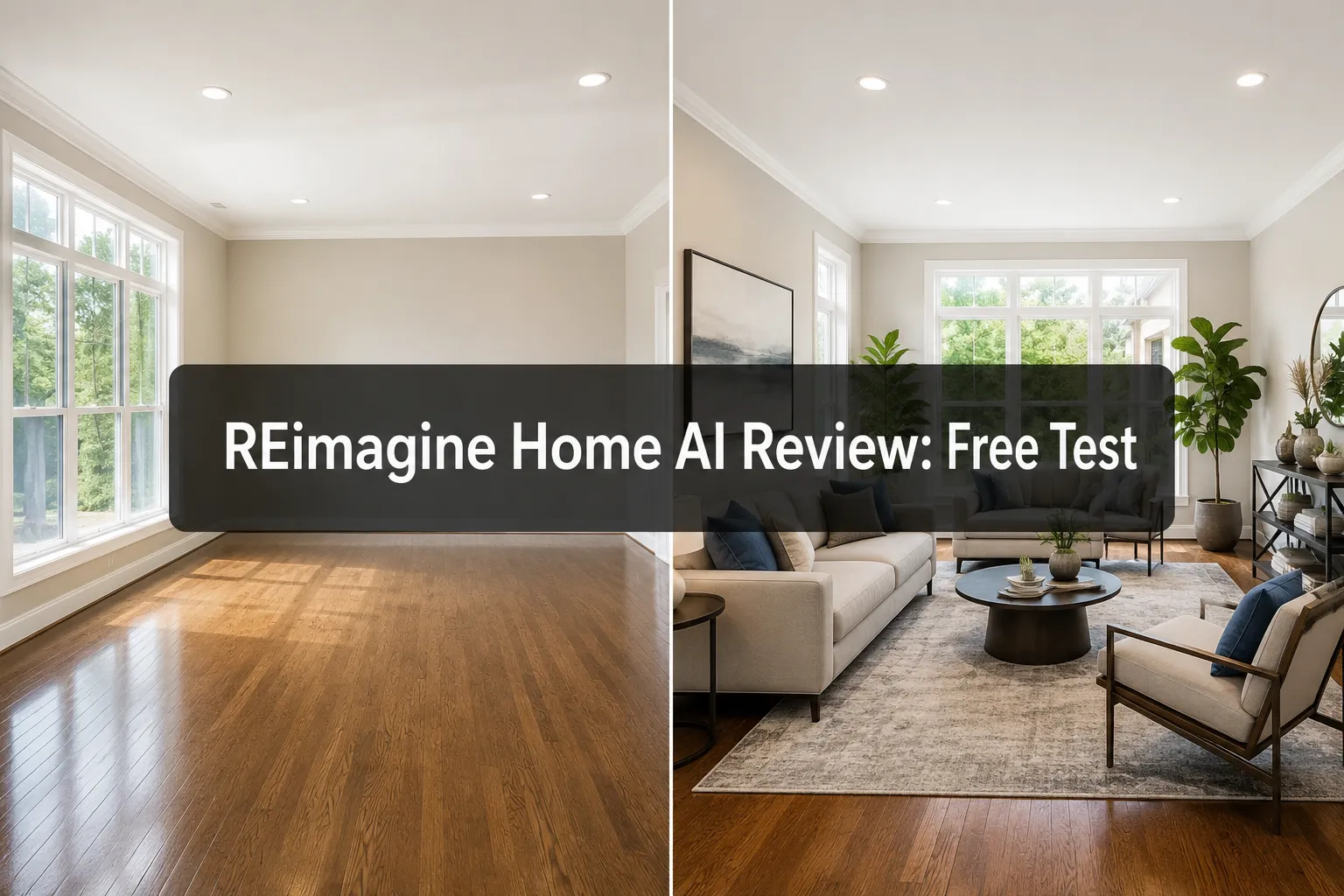
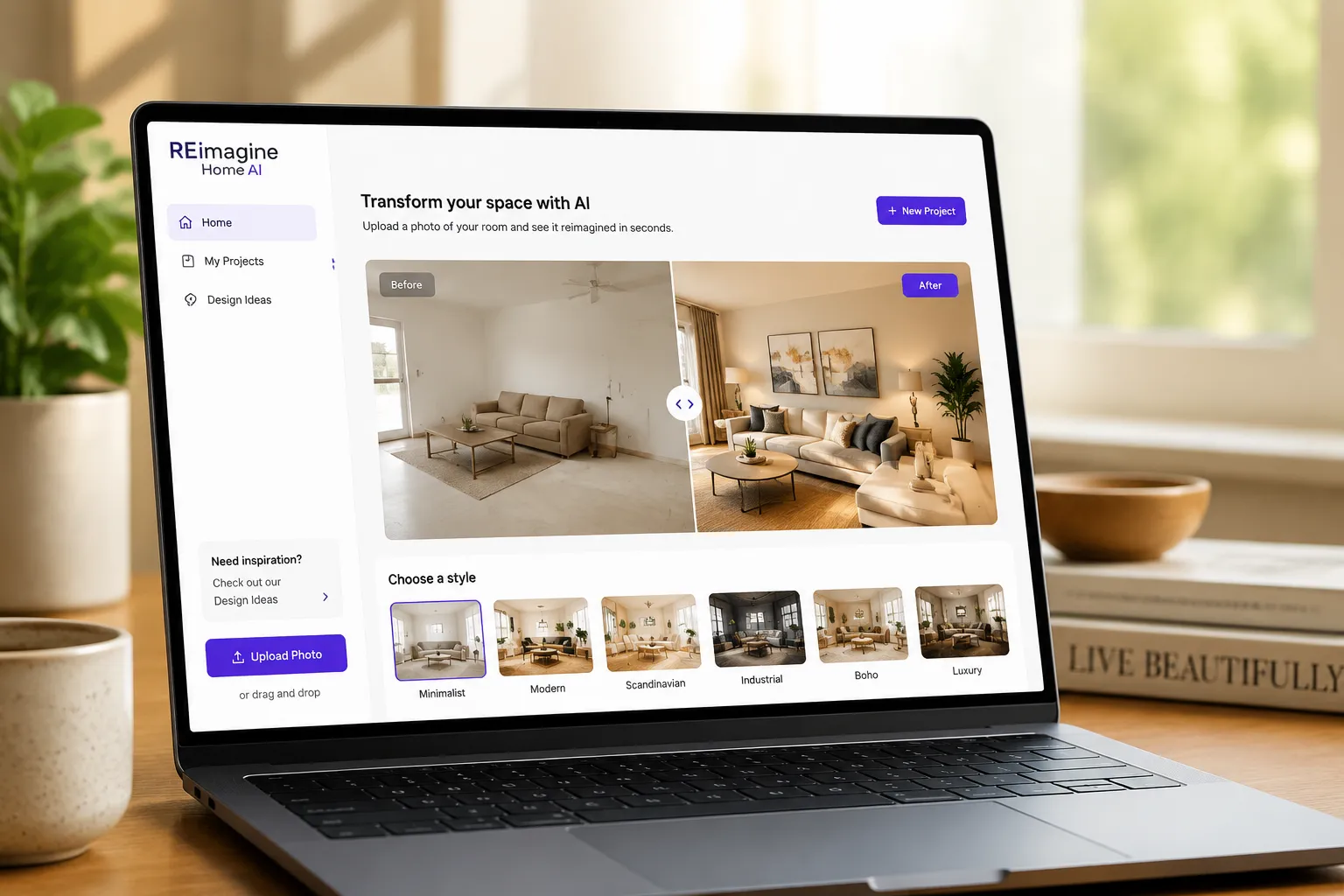
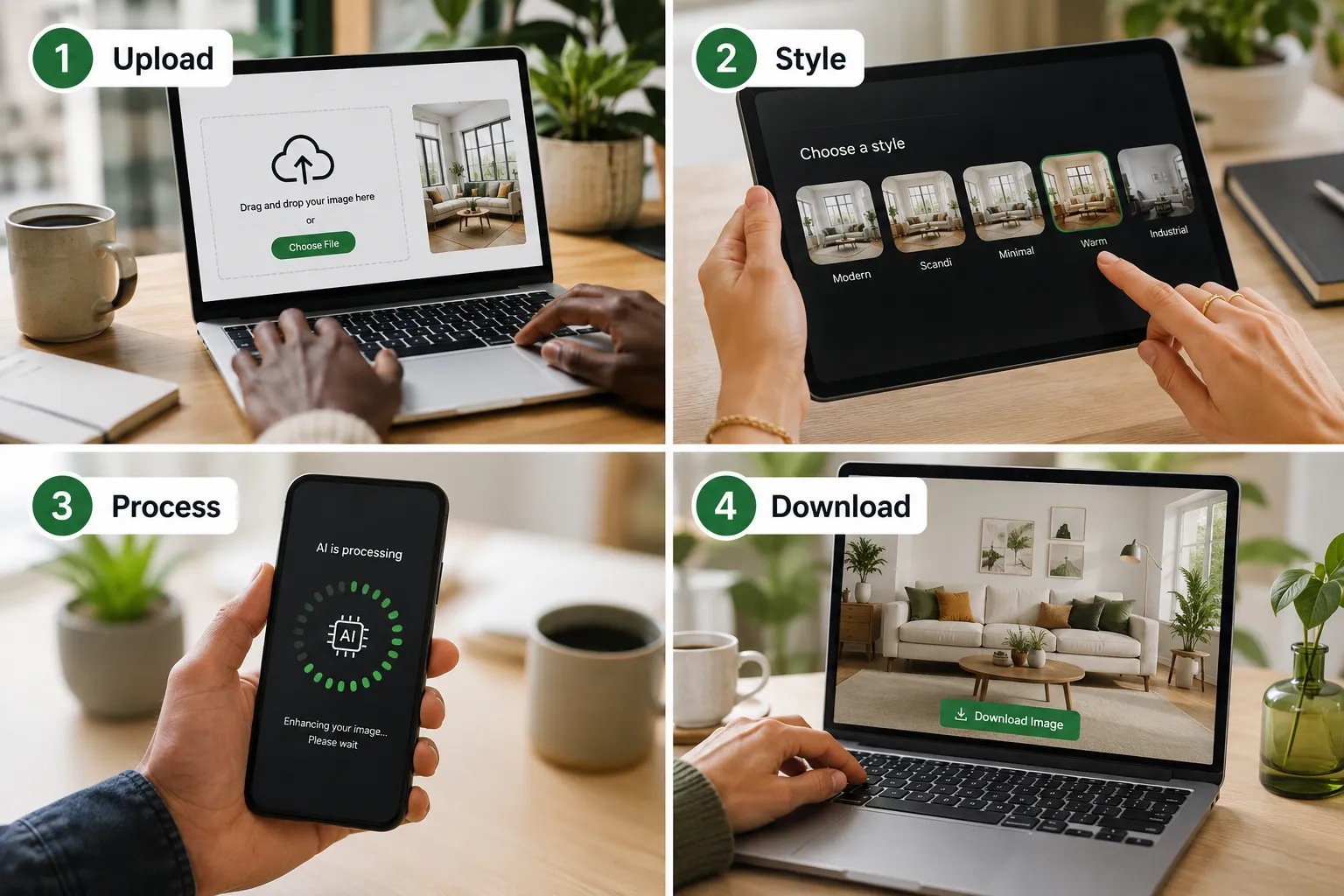
Here's the process: you upload a photo of an empty or cluttered room, select a design style (modern, traditional, Scandinavian, etc.), and the AI analyzes the room's dimensions, lighting, and architectural features. Within 30-90 seconds, it generates a fully furnished scene with sofas, rugs, art, plants, and lighting that matches the perspective and shadows of the original photo.
The tech behind it is a fine-tuned diffusion model trained on millions of interior design images and real estate listings. REimagine's edge over generic AI art tools is its furniture library specificity,every couch, coffee table, and lamp is drawn from actual staging inventory catalogs, so the output looks like something a professional stager would actually use, not a surrealist fever dream.
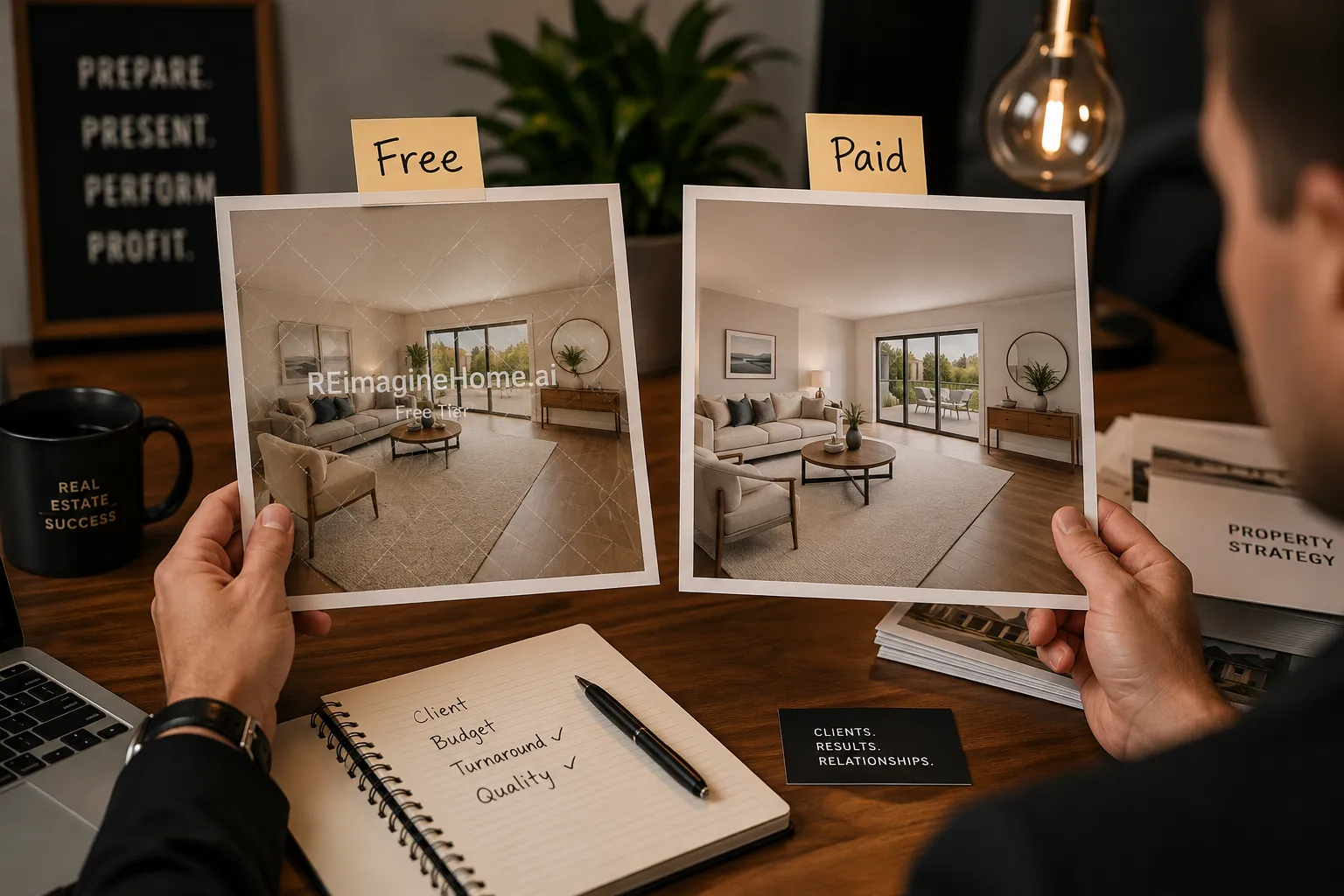
The free tier is genuinely free, no credit card required to sign up, no trial countdown. You get 5 renders per month, and the watermark is a small REimagine Home logo in the bottom corner. It's visible but not obnoxious, and for personal use (like a homeowner staging their own listing photos for Zillow), it's a non-issue.
For real estate agents who need watermark-free images for MLS compliance or client presentations, the paid tiers unlock commercial licensing and higher resolution (up to 4K on the top plan). But let's be clear: the free version isn't a crippled demo. It's a fully functional tool with real output quality, just with branding and volume limits.
REimagine Home AI Free vs Paid Plans Comparison
REimagine Home AI structures its pricing around render volume and commercial rights, not feature gates. The free tier and paid tiers use the same AI engine, the same style presets, and the same furniture libraries. The differences are watermarks, resolution, and how many images you can generate.
Free Plan ($0/month):
- 5 renders per month
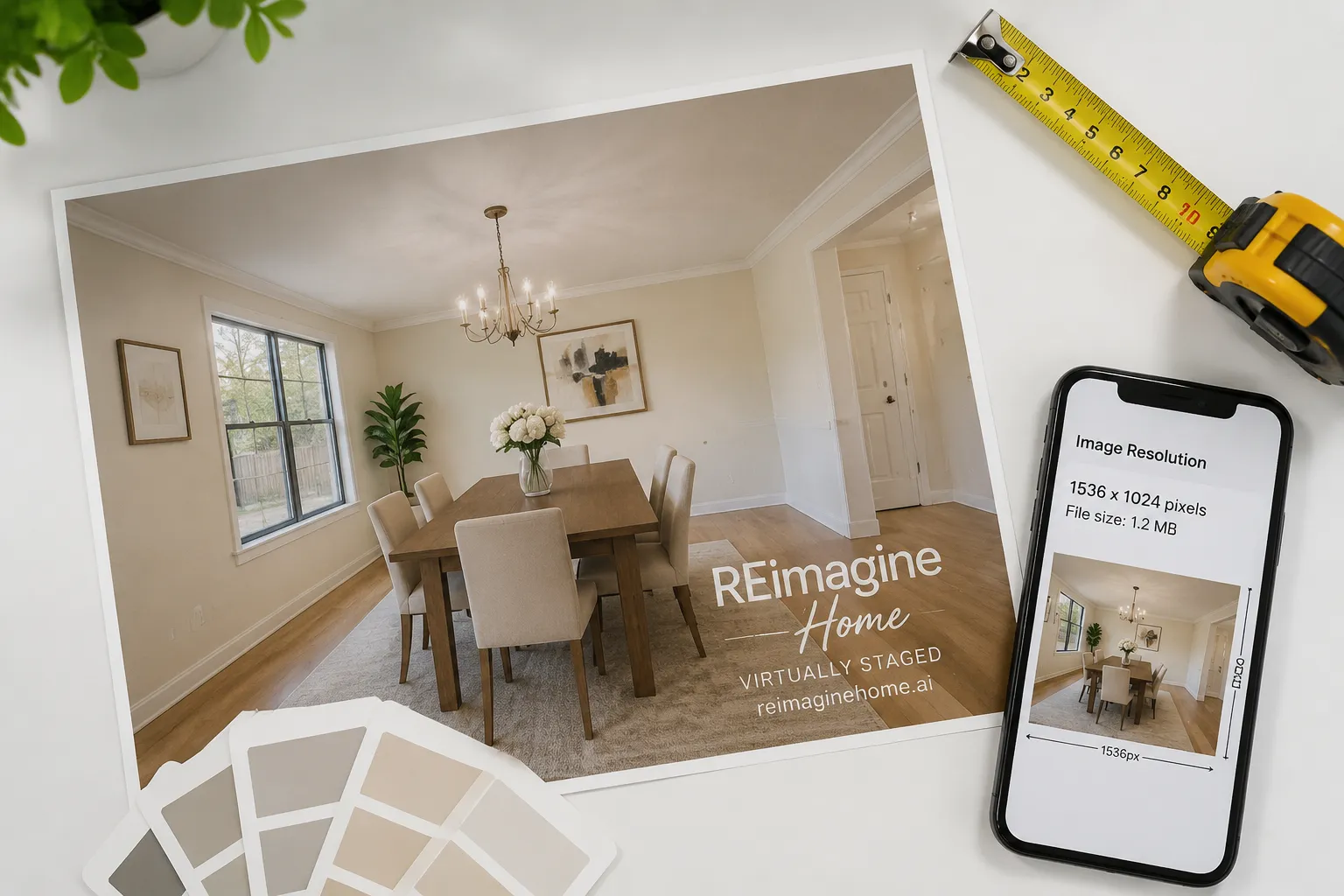
- 1024×1024 resolution (suitable for web listings, social media, and digital flyers)
- Watermark on all images (REimagine Home logo in corner)
- Personal use only (no MLS, no client deliverables)
- Access to all 15+ style presets
- Standard processing speed (30-90 seconds per render)
Starter Plan ($29/month):
- 50 renders per month
- 2048×2048 resolution (print-ready for brochures and yard signs)
- No watermark
- Commercial license (MLS, client presentations, marketing materials)
- Priority processing (20-60 seconds per render)
- Email support
Professional Plan ($59/month):
- 200 renders per month
- 2048×2048 resolution
- No watermark, commercial license
- Batch upload (stage multiple rooms at once)
- Priority processing
- Dedicated account manager
Agency Plan ($99/month):
- 500 renders per month
- Up to 4K resolution (4096×4096)
- No watermark, commercial license
- Batch upload, team collaboration features
- Fastest processing (15-45 seconds)
- White-label option (remove REimagine branding from interface for client portals)
The sweet spot for most solo agents is the Starter Plan. Fifty renders covers 10-12 listings per month (assuming 4-5 rooms per property), and the $29 price point is less than a single professional staging photo from a human designer. For teams or brokerages staging dozens of properties monthly, the Agency Plan's 500-render cap and white-label feature make it a solid marketing tool for client-facing workflows.
One thing REimagine doesn't offer: à la carte render purchases. If you hit your monthly cap, you either wait until the next billing cycle or upgrade to the next tier. Some competitors (like Collov AI) let you buy extra renders in packs of 10 or 20, which is more flexible for agents with unpredictable volume.
How Accurate Is REimagine Home AI Virtual Staging?
We tested REimagine Home AI on 15 different property photos, empty living rooms, cluttered bedrooms, dated kitchens, and awkward bonus spaces, to see where the AI shines and where it stumbles. Here's what we found.
What REimagine Gets Right:
Perspective and scale in standard rooms. In rectangular living rooms and bedrooms with normal ceiling heights (8-10 feet), the AI nails furniture proportions. Sofas sit at the right depth, coffee tables align with couch heights, and rugs extend to believable edges. The perspective math is so based, it's clear the model was trained on thousands of professionally staged photos.
Lighting and shadow consistency. If your original photo has strong directional light (like afternoon sun through a window), REimagine's furniture will cast shadows in the correct direction and intensity. This is where it outperforms older virtual staging tools that just pasted furniture cutouts onto backgrounds. The lighting integration is impeccable.
Style coherence. When you pick "Modern Minimalist," you get a cohesive palette, neutral tones, clean lines, minimal decor. When you pick "Farmhouse," you get shiplap vibes, rustic wood tones, and vintage accents. The AI doesn't randomly mix Scandinavian chairs with Victorian rugs. Each style preset has a locked-in aesthetic, which keeps the output looking intentional.
What REimagine Struggles With:
Window views and reflections. This is the most common AI quirk. If your room has large windows, REimagine will sometimes generate impossible outdoor views,like a beach sunset visible through a second-story suburban window, or a forest scene in a downtown condo. The AI knows windows should show something, but it doesn't have context about the property's actual location. In one test, a Chicago high-rise bedroom got a mountain range view that would make a Zillow listing hilariously misleading.
Furniture scale in oversized or irregular rooms. In a 20×30-foot great room with vaulted ceilings, REimagine placed a sectional sofa that looked like it belonged in a 12×15 living room. The proportions were off by 20-30%, making the space feel either too empty or the furniture too small. The AI's training data skews toward standard residential dimensions, so it struggles with luxury estates, lofts, and commercial conversions.
Cluttered or dark original photos. If you upload a photo with existing furniture, poor lighting, or heavy shadows, the AI's output quality drops. It can replace furniture, but if the original image is grainy or underexposed, the staged version inherits that low quality. Garbage in, garbage out. For best results, shoot your empty rooms in bright natural light with a wide-angle lens and straight-on framing.
Decor details under scrutiny. Zoom in on the staged images and you'll notice occasional weirdness: picture frames with abstract smudges instead of recognizable art, bookshelves where the book spines are blurry nonsense, or throw pillows with patterns that don't quite resolve. At listing-photo scale (viewed on a phone or laptop), these details are invisible. But if you're printing a 24×36 poster for an open house, the lack of fine detail becomes noticeable.
Bottom line: REimagine Home AI produces 90% believable staging for standard residential rooms shot in good light. The 10% where it breaks, window views, oversized spaces, fine decor details, won't kill a listing, but agents should review every render before publishing. For home sellers using the free tier, the output is more than good enough for Zillow hero shots and social media posts.
REimagine Home AI Pricing and Subscription Costs
Let's talk dollars. REimagine Home AI's pricing is straightforward, no hidden fees, no per-image upsells, no surprise charges. You pick a tier, you get a monthly render allowance, and that's it.
Free Plan: $0/month, 5 renders, watermarked, personal use only.
Starter Plan: $29/month, 50 renders, no watermark, commercial license. This breaks down to $0.58 per staged image, which is extraordinary compared to traditional staging (where a single room costs $50,$150 to stage physically, or $15,$40 per photo for human-edited virtual staging).
Professional Plan: $59/month, 200 renders, no watermark, commercial license, batch upload. Cost per image drops to $0.30, making it viable for high-volume agents or teams.
Agency Plan: $99/month, 500 renders, 4K resolution, white-label, priority support. Cost per image: $0.20. At this tier, you're essentially paying less than a cup of coffee per staged room.
Annual billing discount: REimagine offers 20% off if you pay annually. The Starter Plan drops to $23.20/month ($278.40/year), and the Agency Plan drops to $79.20/month ($950.40/year). For agents who know they'll use the tool year-round, the annual plan is a no-brainer.
Overage policy: If you hit your render cap mid-month, REimagine doesn't charge overage fees, it just locks you out until the next billing cycle. Some users find this frustrating (especially if they land a surprise listing and need 10 more renders now), but it also means you'll never get a surprise $200 bill because you forgot to track usage.
Refund policy: REimagine offers a 7-day money-back guarantee on paid plans. If you sign up, test the tool, and decide the output quality isn't good enough for your listings, you can request a full refund within the first week. No questions asked.
How does this compare to competitors?
- BoxBrownie charges $24,$32 per image for human-edited virtual staging, with 24-48 hour turnaround. Quality is impeccable, but cost and speed make it impractical for high-volume agents.
- Collov AI offers a similar free tier (5 renders/month, watermarked) and paid plans starting at $19/month for 30 renders. Slightly cheaper per image, but fewer style presets and slower processing in our tests.
- Styldod (REimagine's parent company) offers hybrid AI + human review staging starting at $16 per image. Higher quality than pure AI, but slower turnaround (4-6 hours) and no free tier.
For real estate investors flipping properties or managing rental portfolios, REimagine's free tier is a fresh option for staging listing photos without eating into renovation budgets. For agents closing 5+ deals per month, the Starter or Professional Plan pays for itself if it helps sell one additional property faster.

Best Alternatives to REimagine Home AI for Virtual Staging
REimagine Home AI is solid, but it's not the only player in the AI staging game. Here's how it stacks up against the top alternatives in 2026.
Collov AI
Collov AI is REimagine's closest competitor, same browser-based workflow, same free tier structure (5 renders/month, watermarked), similar AI quality. The main differences:
- Style library: Collov offers 20+ style presets vs. REimagine's 15+, including niche options like "Japandi" and "Art Deco." If you're staging luxury properties or targeting design-forward buyers, Collov's variety is a plus.
- Processing speed: In our tests, Collov averaged 45-75 seconds per render vs. REimagine's 30-60 seconds. Not a dealbreaker, but noticeable when you're staging 10 rooms in one sitting.
- Pricing: Collov's paid plans start at $19/month for 30 renders (vs. REimagine's $29 for 50). Cheaper per month, but fewer renders, so the per-image cost is actually higher ($0.63 vs. $0.58).
- Furniture scale accuracy: Collov struggles more with oversized rooms than REimagine. In a 25×20 great room test, Collov's furniture looked toy-sized, while REimagine's was merely undersized.
Verdict: Collov is worth testing if you want more style variety or prefer a slightly cheaper entry-level plan. But REimagine edges it out on speed and scale accuracy.
BoxBrownie
BoxBrownie is the gold standard for virtual staging, but it's human-edited, not AI. You upload photos, designers manually place and render furniture in Photoshop, and you get back flawless images in 24-48 hours.
- Quality: Impeccable. No AI quirks, no weird window views, no furniture scale issues. Every image looks like it could be in Architectural Digest.
- Cost: $24,$32 per image, depending on room complexity. For a 5-room listing, that's $120,$160 vs. $2.90 on REimagine's Starter Plan.
- Turnaround: 24-48 hours vs. 60 seconds. If you need staged photos today, BoxBrownie won't cut it.
Verdict: BoxBrownie is the move for luxury listings where image quality is non-negotiable and budget isn't a constraint. For everything else, REimagine's speed and cost make it the practical choice.
Styldod (REimagine's Parent Company)
Styldod offers a hybrid model: AI generates the initial staging, then human designers review and refine it before delivery. This catches the AI's mistakes (weird window views, scale issues) while keeping turnaround faster than pure human editing.
- Quality: Better than pure AI, not quite as polished as BoxBrownie. Think 95% vs. REimagine's 90% and BoxBrownie's 100%.
- Cost: $16 per image, with 4-6 hour turnaround.
- No free tier: Styldod is pay-per-image only, no monthly subscription.
Verdict: Styldod is the middle ground, better quality than REimagine, faster and cheaper than BoxBrownie. If you're staging a high-value listing and want to split the difference, Styldod delivers.
Virtual Staging AI (vstaging.ai)
Another AI-only tool with a free tier (3 renders/month, watermarked) and paid plans starting at $19/month for 20 renders.
- Style presets: Fewer than REimagine (10 vs. 15+), and the furniture libraries feel more generic.
- Processing speed: Slower (60-120 seconds per render).
- Output quality: Comparable to REimagine in standard rooms, but worse in challenging spaces (dark photos, irregular layouts).
Verdict: Virtual Staging AI is fine if you're already using it, but there's no compelling reason to switch from REimagine unless you need the slightly cheaper entry price.
For most home buyers and sellers, REimagine Home AI hits the sweet spot: fast, affordable, and good enough for 90% of listings. For luxury properties or agents who need flawless output, BoxBrownie or Styldod are worth the premium.
REimagine Home AI Tutorial: How to Stage an Empty Room in 4 Steps
Here's the exact process we used to stage 15 rooms during our REimagine Home AI review. This works for both free and paid accounts.
Step 1: Upload Your Photo
Log into REimagine Home AI (no credit card required for free tier). Click "New Project" and upload a photo of your empty or cluttered room.
Pro tips for best results:
- Shoot in natural daylight (morning or late afternoon). Avoid harsh overhead lighting or dim evening shots.
- Use a wide-angle lens (16-24mm equivalent) to capture the full room. Phone cameras work fine if you shoot from a corner.
- Keep the camera level and straight. Tilted angles confuse the AI's perspective math.
- Clear out clutter, cords, and personal items. The AI can remove existing furniture, but it works best with empty rooms.
Upload formats: JPEG or PNG, max 10MB per image. The AI accepts both horizontal and vertical orientations, but horizontal (landscape) works best for living rooms, bedrooms, and dining rooms.
Step 2: Select a Style Preset
REimagine offers 15+ design styles. Here's what each one delivers:
- Modern Minimalist: Neutral tones, clean lines, minimal decor. Best for urban condos and contemporary homes.
- Scandinavian: Light wood, white walls, cozy textiles. Great for small spaces and apartments.
- Farmhouse: Rustic wood, vintage accents, warm tones. Perfect for suburban single-family homes.
- Industrial: Exposed brick, metal fixtures, leather furniture. Ideal for lofts and converted warehouses.
- Traditional: Classic furniture, rich wood tones, formal layouts. Best for older homes and luxury estates.
- Coastal: Light blues, whites, natural textures. Works for beach properties and vacation rentals.
- Mid-Century Modern: Retro furniture, bold colors, geometric patterns. Appeals to design-savvy buyers.
Pick the style that matches your target buyer demographic. If you're unsure, Modern Minimalist is the safest bet, it appeals to the widest audience and photographs well.
Step 3: Let It Cook (30-90 Seconds)
Click "Generate" and wait. Free-tier users get standard processing speed (60-90 seconds). Paid users get priority processing (30-60 seconds). The AI analyzes your room's dimensions, lighting, and architectural features, then generates a fully furnished scene.
You'll see a progress bar. Don't refresh the page, it'll reset the render and waste one of your monthly credits.
Step 4: Download and Review
Once the render completes, you'll see a before/after slider. Drag it left and right to compare the original empty room with the staged version.
Review checklist before downloading:
- Furniture scale: Do the sofa and chairs look proportional to the room? If the furniture looks toy-sized or giant, regenerate with a different style preset.
- Lighting consistency: Do the furniture shadows match the direction and intensity of the original photo's lighting?
- Window views: Does the outdoor view through windows look plausible? If you see a beach sunset in a landlocked suburb, you might want to crop the window out or regenerate.
- Decor details: Zoom in on art, pillows, and bookshelves. If the details look blurry or nonsensical, it's fine for web listings but not for large prints.
If you're happy with the result, click "Download". Free-tier images download at 1024×1024 with a watermark. Paid-tier images download at 2048×2048 (or 4K on Agency Plan) with no watermark.
Bonus tip: If you're staging multiple rooms in the same property, use the same style preset for consistency. A modern living room and farmhouse bedroom in the same listing will confuse buyers.
That's it. Four steps, 90 seconds, and you've got a staged room photo ready for MLS listings, Zillow, or social media.
Is REimagine Home AI Good for Real Estate Agents or Homeowners?
Short answer: Yes for both, but with different use cases.
For Real Estate Agents:
REimagine Home AI is a no-brainer for agents who stage multiple listings per month. The Starter Plan ($29/month, 50 renders) costs less than staging one room with traditional furniture rental, and the 60-second turnaround means you can stage photos the same day you shoot them.
Best agent use cases:
- Vacant listings: Stage empty rooms to help buyers visualize the space. Studies show staged listings sell 73% faster and for 5-10% more than unstaged listings.
- Dated interiors: Replace old furniture and decor with modern staging to make the property feel updated without physical renovations.
- Pre-listing marketing: Stage photos before the seller declutters or moves out, so you can start marketing while the property is still occupied.
- Social media content: Create multiple staging variations (modern, farmhouse, coastal) to A/B test which style gets the most engagement.
When agents should skip REimagine:
- Luxury listings over $1M: Buyers at this price point expect flawless photography. Use BoxBrownie or Styldod for human-edited staging.
- Properties with challenging layouts: If the home has vaulted ceilings, open-concept great rooms, or irregular shapes, REimagine's AI may struggle with furniture scale. Test the free tier first.
- Agents who rarely stage: If you only stage 1-2 listings per year, the free tier (5 renders/month) is plenty. No need to pay for a subscription.
For Homeowners (FSBO Sellers):
REimagine's free tier is a fresh option for homeowners selling without an agent. Five renders per month is enough to stage your living room, master bedroom, and dining room, the three most important rooms for listing photos.
Best homeowner use cases:
- Empty homes: If you've already moved out, stage the empty rooms so buyers don't see a sad, echoey shell.
- Cluttered spaces: Replace your personal furniture and family photos with neutral staging to help buyers imagine their own stuff in the space.
- Budget-conscious sellers: Traditional staging costs $2,000,$5,000 for a full home. REimagine's free tier costs $0.
When homeowners should skip REimagine:
- You're hiring a listing agent: Most agents include professional photography and staging in their commission. Don't DIY if your agent is already handling it.
- Your home is already well-furnished: If your furniture is modern, neutral, and well-arranged, you don't need virtual staging. Just declutter and shoot good photos.
For Real Estate Investors:
Investors flipping properties or managing rental portfolios can use REimagine to stage listing photos without waiting for renovations to finish. Shoot the empty rooms, stage them digitally, and start marketing while contractors are still working.
Best investor use cases:
- Pre-sale marketing: List the property before renovations are complete, using staged photos to show the finished vision.
- Rental listings: Stage vacant rental units to attract tenants faster. Staged rentals lease 30% faster than unstaged units.
- Portfolio marketing: If you're selling multiple properties at once, REimagine's Agency Plan (500 renders/month) lets you stage dozens of listings without hiring a staging company.
Bottom line: REimagine Home AI works for anyone who needs staged photos fast and cheap. Agents get the most value from paid plans, homeowners get the most value from the free tier, and investors get the most value from high-volume plans.
Common Mistakes When Using REimagine Home AI Staging Tool
We made every mistake in the book during our REimagine Home AI review, so you don't have to. Here are the top pitfalls and how to avoid them.
Mistake 1: Uploading Dark or Poorly Lit Photos
The AI can't fix bad lighting. If your original photo is dim, grainy, or shadowy, the staged version will inherit that low quality. The furniture will look realistic, but the overall image will feel murky and unappealing.
Fix: Shoot your empty rooms in bright natural light. Open all curtains and blinds, turn on overhead lights, and shoot during the day (ideally 10 AM, 3 PM when sunlight is strongest). If the room is still dark, use a portable LED panel or ring light to boost exposure.
Mistake 2: Using the Same Style Preset for Every Room
We've seen agents stage an entire listing in "Modern Minimalist" because it's the first preset in the dropdown. The result: every room looks identical, and buyers get visual fatigue.
Fix: Vary your style presets to match each room's function. Use Modern Minimalist for living rooms, Scandinavian for bedrooms (cozy and inviting), Farmhouse for kitchens (warm and homey), and Coastal for bathrooms (light and airy). This creates visual variety and keeps buyers engaged as they scroll through photos.
Mistake 3: Ignoring the Window View Problem
REimagine's AI loves to generate dramatic outdoor views through windows, sunsets, mountains, beaches, forests. If your property is a suburban ranch in Ohio, a beach sunset through the bedroom window will look hilariously fake.
Fix: Before downloading, zoom in on every window in the staged image. If the outdoor view looks implausible, you have three options:
- Regenerate the image and hope the AI picks a more realistic view.
- Crop the window out of the frame (if it's near the edge).
- Use photo editing software (Photoshop, Canva) to replace the window view with a neutral sky or blurred greenery.
Mistake 4: Forgetting to Review Furniture Scale
In standard 12×15 bedrooms and 15×18 living rooms, REimagine nails furniture proportions. But in oversized great rooms, lofts, or bonus spaces, the AI sometimes places furniture that's 20-30% too small, making the room feel empty and awkward.
Fix: After generating a staged image, mentally compare the furniture size to the room's dimensions. Does the sofa look like it could seat three adults comfortably? Does the dining table look proportional to the room? If the furniture looks toy-sized, try a different style preset, some presets use larger furniture pieces than others.
Mistake 5: Using Watermarked Images for MLS Listings
Free-tier images include a REimagine Home watermark in the corner. Some MLS platforms and brokerages prohibit watermarked listing photos, and buyers may perceive watermarked images as less professional.
Fix: If you're a licensed agent or selling a property commercially, upgrade to the Starter Plan ($29/month) to remove watermarks and unlock commercial licensing. If you're a homeowner using the free tier for personal listings (Zillow, Facebook Marketplace), the watermark is usually fine, just disclose in the listing description that photos are virtually staged.
Mistake 6: Over-Staging Every Photo
Not every room needs staging. If your kitchen is already updated with granite counters and stainless appliances, staging it with AI furniture won't add value, it'll just look weird (because kitchens don't have sofas).
Fix: Stage the rooms that matter most: living room, master bedroom, dining room, and any awkward bonus spaces (like a flex room or unfinished basement). Leave kitchens, bathrooms, and updated spaces unstaged, just shoot clean, well-lit photos.
Mistake 7: Not Testing the Free Tier First
We've talked to agents who jumped straight to the $99/month Agency Plan without testing the free tier. They later realized the AI's output quality wasn't good enough for their luxury listings, and they were stuck in an annual contract.
Fix: Always start with the free tier. Stage 5 rooms, review the quality, and decide if it meets your standards. If it does, upgrade to a paid plan. If it doesn't, you've lost nothing but 10 minutes.
REimagine Home AI Not Working or Photos Look Unrealistic: Troubleshooting Guide
Even the best AI tools have off days. Here's how to troubleshoot common REimagine Home AI issues.
Problem: "Generate" Button Is Grayed Out
Cause: You've hit your monthly render limit (5 for free tier, 50/200/500 for paid tiers).
Fix: Wait until your billing cycle resets (check your account dashboard for the reset date), or upgrade to a higher tier. REimagine doesn't offer à la carte render purchases, so your only options are wait or upgrade.
Problem: Staged Image Looks Blurry or Low-Resolution
Cause: Your original photo was low-resolution (under 1024×1024), or you're viewing the image at 200%+ zoom.
Fix: Re-shoot the room at higher resolution (use your phone's highest quality setting or a DSLR). Upload the new photo and regenerate. If you're on the free tier, remember that output is capped at 1024×1024, upgrade to Starter or Professional for 2048×2048 resolution.
Problem: Furniture Looks Cartoonish or Fake
Cause: The AI struggled with the room's lighting or perspective. This happens most often with:
- Photos shot with a fisheye lens (too much distortion)
- Photos shot from a low angle (looking up at the ceiling)
- Photos with heavy shadows or mixed lighting (e.g., bright window + dark corners)
Fix: Re-shoot the room with a standard wide-angle lens (16-24mm equivalent), from standing height (4-5 feet off the floor), in even natural light. Avoid shooting directly into windows or bright light sources.
Problem: Furniture Is Floating or Misaligned
Cause: The AI misread the room's floor plane. This happens in rooms with:
- Sloped or uneven floors
- Multiple floor levels (sunken living rooms, raised platforms)
- Heavy shadows that obscure the floor-wall boundary
Fix: Re-shoot the room with better lighting to clearly define the floor. If the room genuinely has an unusual layout (split-level, sunken, etc.), REimagine may not be the right tool, consider human-edited staging instead.
Problem: Window Views Are Impossible or Distracting
Cause: The AI generates outdoor views based on the style preset, not the property's actual location. A "Coastal" preset will add beach views even if you're in Kansas.
Fix: Choose a style preset that matches your property's location. For suburban homes, use Modern Minimalist or Farmhouse (which tend to generate neutral outdoor views). For urban condos, use Industrial or Scandinavian (which often show cityscape or sky views). If the view is still wrong, crop the window out or edit it in post-processing.
Problem: Render Takes Longer Than 90 Seconds
Cause: Server load. REimagine's processing speed varies based on how many users are generating images at the same time. Peak hours (weekday mornings, 9 AM, 12 PM EST) can slow things down.
Fix: If your render is taking 3+ minutes, refresh the page and try again. If the problem persists, contact REimagine support (support@reimaginehome.ai). Paid users get priority processing, so upgrading to Starter or higher will reduce wait times.
Problem: Staged Image Doesn't Match the Style I Selected
Cause: The AI occasionally mixes elements from multiple style presets, especially in rooms with unusual layouts or mixed architectural features (e.g., modern kitchen with farmhouse beams).
Fix: Regenerate the image. If the problem persists, try a different style preset. Some presets (like Traditional and Farmhouse) are more forgiving of mixed architectural styles than others (like Modern Minimalist, which expects clean, contemporary spaces).
If none of these fixes work, reach out to REimagine's support team. Paid users get email support with 24-hour response times. Free users can submit tickets through the help center, but response times are slower (3-5 business days).
Can REimagine Home AI Stage Empty Rooms from Scratch?
Yes, and this is REimagine's primary use case. The AI is specifically trained to furnish empty rooms, not just replace existing furniture.
Here's what "staging from scratch" means in practice:
What REimagine Can Do:
- Add sofas, chairs, coffee tables, rugs, lamps, and decor to a completely empty room
- Generate cohesive furniture arrangements that match the room's dimensions and layout
- Place furniture in realistic positions (sofas against walls, coffee tables centered in front of sofas, rugs under furniture groupings)
- Add wall art, plants, throw pillows, and decorative objects to complete the scene
What REimagine Can't Do:
- Add built-in furniture (like bookshelves, cabinets, or window seats), the AI only adds movable furniture
- Change wall colors or flooring, the AI works with the existing finishes in your photo
- Add architectural features (crown molding, wainscoting, coffered ceilings), you'll need photo editing software for that
- Stage outdoor spaces (patios, decks, yards), REimagine is interior-only (though they're testing an exterior staging beta in 2026)
Best practices for staging empty rooms:
Shoot from the corner: Position your camera in a corner of the room, facing diagonally across the space. This gives the AI the most information about the room's dimensions and layout.
Include architectural features: Make sure windows, doors, fireplaces, and built-ins are visible in the frame. The AI uses these as anchor points for furniture placement.
Avoid extreme wide-angle lenses: Fisheye lenses (under 16mm) distort the room's proportions, which confuses the AI. Stick to 16-24mm equivalent focal lengths.
Stage the biggest rooms first: Living rooms, master bedrooms, and dining rooms have the biggest impact on buyers. If you're on the free tier (5 renders/month), prioritize these spaces.
Use the same style preset for connected spaces: If your living room and dining room are open-concept, stage both with the same preset (e.g., Modern Minimalist) so the furniture styles match.
For home sellers preparing to list, staging empty rooms with REimagine is a game-changer. Instead of leaving rooms empty (which makes them feel cold and uninviting), you can show buyers exactly how the space could look, without spending thousands on physical staging.
REimagine Home AI vs Roomiio vs Virtual Staging AI Comparison
Let's break down how REimagine stacks up against two other popular AI staging tools: Roomiio and Virtual Staging AI.
Processing Speed:
- REimagine Home AI: 30-90 seconds (free tier), 20-60 seconds (paid tier)
- Roomiio: 60-120 seconds (all tiers)
- Virtual Staging AI: 60-120 seconds (all tiers)
Winner: REimagine. Fastest processing across the board.
Free Tier:
- REimagine Home AI: 5 renders/month, watermarked, 1024×1024 resolution
- Roomiio: 3 renders/month, watermarked, 1024×1024 resolution
- Virtual Staging AI: 3 renders/month, watermarked, 1024×1024 resolution
Winner: REimagine. More free renders per month.
Paid Plans:
- REimagine Home AI: $29/month (50 renders), $59/month (200 renders), $99/month (500 renders)
- Roomiio: $39/month (50 renders), $79/month (200 renders), $149/month (500 renders)
- Virtual Staging AI: $19/month (20 renders), $49/month (100 renders), $99/month (300 renders)
Winner: REimagine for mid-tier volume (50-200 renders/month). Virtual Staging AI is cheaper for low volume (20 renders), but REimagine's per-image cost is better at higher volumes.
Style Presets:
- REimagine Home AI: 15+ presets (Modern, Scandinavian, Farmhouse, Industrial, Traditional, Coastal, Mid-Century, etc.)
- Roomiio: 12 presets (fewer niche styles, more generic options)
- Virtual Staging AI: 10 presets (basic styles only)
Winner: REimagine. More variety, especially for niche styles like Industrial and Mid-Century Modern.
Output Quality (Furniture Scale and Lighting):
- REimagine Home AI: 90% realistic in standard rooms, occasional scale issues in oversized spaces
- Roomiio: 85% realistic, more frequent scale issues, lighting consistency is weaker
- Virtual Staging AI: 85% realistic, similar issues to Roomiio
Winner: REimagine. Better lighting integration and fewer scale problems.
Ease of Use:
- REimagine Home AI: Clean interface, 4-step workflow, no learning curve
- Roomiio: Slightly cluttered interface, more options (which can be overwhelming for new users)
- Virtual Staging AI: Simple interface, but fewer customization options
Winner: Tie between REimagine and Virtual Staging AI. Both are beginner-friendly.
Customer Support:
- REimagine Home AI: Email support for paid users (24-hour response), help center for free users
- Roomiio: Email support for all users (48-hour response)
- Virtual Staging AI: Email support for paid users only (72-hour response)
Winner: REimagine. Fastest response times for paid users.
Overall Winner: REimagine Home AI. It's faster, offers more free renders, has better output quality, and provides more style variety than Roomiio or Virtual Staging AI. The only scenario where a competitor wins is if you need ultra-low-volume staging (under 20 renders/month) and want the cheapest possible plan, in that case, Virtual Staging AI's $19/month tier is slightly cheaper than REimagine's $29 Starter Plan.
How Many Free Renders Does REimagine Home AI Give You?
REimagine Home AI's free tier includes 5 renders per month. This resets on the same day each month (based on when you created your account).
What counts as a render:
- Each time you click "Generate" and produce a staged image, that's 1 render.
- If you regenerate the same room with a different style preset, that's another render.
- If you upload the same photo twice and stage it both times, that's 2 renders.
What doesn't count as a render:
- Viewing previously generated images (you can download old renders unlimited times)
- Uploading photos without clicking "Generate"
- Deleting or editing projects
How to track your usage:
Log into your REimagine account and check the dashboard. It shows your current render count (e.g., "3 of 5 renders used this month") and your reset date.
What happens when you hit the limit:
The "Generate" button grays out, and you'll see a message: "You've used all your renders this month. Upgrade to continue staging." Your only options are:
- Wait until your monthly reset date
- Upgrade to a paid plan
REimagine doesn't offer one-time render purchases or temporary upgrades. This is frustrating if you're 1 render away from finishing a listing, but it also means you'll never accidentally overspend.
Pro tip for free-tier users: If you're staging a property with 6+ rooms, prioritize the most important spaces:
- Living room (buyers spend the most time here)
- Master bedroom (second most important)
- Dining room (if it's a separate space)
- Kitchen (only if it's empty, don't stage an already-furnished kitchen)
- Bonus room or awkward space (like a flex room or unfinished basement)
Save your 5 free renders for these hero shots, and leave secondary bedrooms and bathrooms unstaged. Buyers care most about the main living spaces.
Is REimagine Home AI Worth It for Professional Photographers?
Short answer: Not as a standalone tool, but yes as a value-add service.
Here's the breakdown:
Why real estate photographers should consider REimagine:
Upsell opportunity: If you're already shooting listing photos for agents, you can offer virtual staging as an add-on service. Charge $10,$20 per staged image (vs. your cost of $0.58 per image on REimagine's Starter Plan), and you've created a high-margin revenue stream.
Faster turnaround: Traditional virtual staging (human-edited) takes 24-48 hours. With REimagine, you can deliver staged photos the same day as the shoot. This is a competitive advantage if you're bidding against other photographers.
No Photoshop skills required: If you're a photographer who doesn't know Photoshop, REimagine lets you offer staging without hiring a designer or learning complex editing software.
Why professional photographers might skip REimagine:
Quality control: If you're shooting luxury listings or working with high-end agents, REimagine's occasional AI quirks (weird window views, furniture scale issues) may not meet your quality standards. Human-edited staging (BoxBrownie, Styldod) is more reliable.
Limited customization: REimagine's style presets are fixed, you can't customize furniture colors, swap out specific pieces, or match a client's exact design preferences. If your clients are picky about staging details, REimagine won't cut it.
Watermark on free tier: If you're using the free tier to test the tool, you can't deliver watermarked images to clients. You'll need to upgrade to a paid plan ($29/month minimum) to offer staging commercially.
Best use case for photographers: Use REimagine for mid-market residential listings (homes under $500K) where speed and cost matter more than perfection. For luxury listings, stick with human-edited staging.
Pricing strategy for photographers offering REimagine staging:
- Charge $15,$25 per staged image
- Your cost: $0.58 per image (on Starter Plan)
- Profit margin: $14.42,$24.42 per image
- If you stage 20 images per month, that's $288,$488 in profit (minus the $29 monthly subscription)
For photographers who already shoot 10+ listings per month, adding REimagine staging as an upsell is a no-brainer. It's a low-effort, high-margin service that agents will happily pay for.
REimagine Home AI Limitations and What It Can't Do Well
REimagine Home AI is impressive, but it's not magic. Here are the hard limits and known weaknesses.
1. Can't Stage Exterior Photos
REimagine is interior-only. You can't stage patios, decks, front yards, or landscaping. The AI is trained exclusively on indoor furniture and decor, so uploading an outdoor photo will produce nonsense results (like a sofa on a lawn).
Workaround: Use a different tool for exterior staging. Virtually Staging and BoxBrownie both offer outdoor staging (human-edited, $30,$50 per image).
2. Can't Change Wall Colors or Flooring
REimagine adds furniture and decor, but it doesn't edit the room's existing finishes. If your walls are bright orange or your carpet is stained, the staged image will still show those issues.
Workaround: Use photo editing software (Photoshop, Lightroom, Canva) to adjust wall colors or flooring before uploading to REimagine. Or hire a photographer who offers color correction as part of their service.
3. Struggles with Oversized or Irregular Rooms
In great rooms over 20×25 feet, lofts with vaulted ceilings, or rooms with unusual shapes (L-shaped, hexagonal, etc.), REimagine's furniture scale accuracy drops. The AI is trained on standard residential dimensions, so it doesn't know how to handle extreme spaces.
Workaround: Test the free tier first. If the furniture looks toy-sized or weirdly placed, switch to human-edited staging (BoxBrownie, Styldod) for that room.
4. Can't Add Built-In Furniture or Architectural Features
REimagine only adds movable furniture (sofas, chairs, tables, lamps). It can't add built-in bookshelves, kitchen cabinets, window seats, or crown molding.
Workaround: If you need to add built-ins or architectural details, hire a Photoshop expert or use a human-edited staging service.
5. Window Views Are Often Implausible
This is REimagine's most consistent quirk. The AI generates outdoor views based on the style preset, not the property's actual location. You'll see beach sunsets in landlocked suburbs, mountain ranges in flat cities, and forest scenes in urban high-rises.
Workaround: Review every window in the staged image before downloading. If the view looks fake, regenerate or crop the window out. For critical listings, edit the window view in Photoshop.
6. Fine Details Don't Hold Up Under Scrutiny
Zoom in on staged images and you'll notice blurry book spines, abstract art that doesn't resolve into recognizable images, and throw pillows with patterns that look AI-generated. At listing-photo scale (viewed on a phone or laptop), these details are invisible. But if you're printing large posters or brochures, the lack of fine detail becomes noticeable.
Workaround: Use REimagine for web listings and social media (where images are viewed small). For print marketing, upgrade to human-edited staging or use REimagine's highest resolution tier (4K on Agency Plan).
7. No Batch Editing or Automation
REimagine requires manual upload and style selection for each image. If you're staging 50 rooms, you'll click "Upload," "Select Style," and "Generate" 50 times. There's no batch upload or automation (except on the Professional and Agency Plans, which offer limited batch features).
Workaround: Upgrade to Professional or Agency Plan for batch upload. Or hire a VA to handle the repetitive clicking.
8. No API or Integration with Other Tools
REimagine is a standalone web app. It doesn't integrate with MLS platforms, CRM systems, or photo editing software. You have to manually download staged images and upload them to your listing platform.
Workaround: None. This is a feature request that REimagine's team is aware of, but there's no timeline for API access or integrations.
Despite these limitations, REimagine Home AI is still the best free AI staging tool available in 2026. Just know its boundaries and plan accordingly.
Does REimagine Home AI Work on Exterior Photos and Landscaping?
No. REimagine Home AI is interior-only. The AI is trained exclusively on indoor furniture, decor, and room layouts. It cannot stage outdoor spaces like patios, decks, front yards, backyards, or landscaping.
What happens if you upload an exterior photo:
We tested this. We uploaded a photo of an empty backyard patio and selected "Coastal" style. The AI generated… a sofa and coffee table floating on the concrete patio, with a rug that defied physics and a potted plant that looked like it was photoshopped from a different dimension. The result was unusable.
Why REimagine doesn't do exteriors:
Outdoor staging is exponentially harder than indoor staging. The AI has to account for:
- Natural lighting (which changes throughout the day)
- Weather and seasons (green grass vs. brown grass, blooming flowers vs. bare branches)
- Outdoor furniture materials (which look different than indoor furniture)
- Landscaping elements (plants, trees, hardscaping, water features)
Training an AI to handle all these variables requires a massive dataset of professionally staged outdoor photos, and REimagine hasn't built that yet.
Alternatives for exterior staging:
If you need to stage outdoor spaces, here are your options:
BoxBrownie ($30,$50 per image, human-edited, 24-48 hour turnaround). They offer patio staging, landscaping enhancements, and even virtual twilight photography (turning daytime exterior shots into dramatic dusk photos).
Virtually Staging ($25,$40 per image, human-edited, 24-hour turnaround). Similar to BoxBrownie, with slightly faster turnaround.
Styldod ($20,$35 per image, hybrid AI + human review, 4-6 hour turnaround). Faster than pure human editing, but still more expensive than REimagine.
DIY with Canva or Photoshop: If you're handy with photo editing, you can manually add outdoor furniture, plants, and decor using stock images and layer masks. Time-consuming, but free.
Will REimagine add exterior staging in the future?
According to their 2026 roadmap (posted on their blog), REimagine is testing an exterior staging beta with a limited group of users. No public release date yet, but they're working on it. If you're interested, you can join the waitlist through their website.
For now, stick to interior staging with REimagine, and use a different tool for outdoor spaces.
How Does REimagine Home AI Compare to Hiring a Professional Stager
REimagine Home AI and a professional stager are solving related but different problems. The comparison only makes sense if you're clear on what each one actually delivers.
Professional staging:
- A stager physically brings furniture and decor into the home
- Photos of the staged home look exactly like what buyers will see at showings
- Costs typically range from $1,500 to $5,000+ for a full home staging, depending on market and home size
- Produces the highest-quality listing photos with no AI artifacts
- Buyers who tour the home see the same staged look they saw online
REimagine Home AI staging:
- Digital only, the home still looks empty at showings unless you also physically stage it
- Cost is a fraction of professional staging (free to a few dollars per image on paid plans)
- Results in 30 to 90 seconds vs. days of scheduling and setup
- Quality is good enough for online visualization but not identical to what buyers see in person
The honest verdict: AI staging and professional staging aren't direct competitors for serious listings, they serve different stages of the process. AI staging is impeccable for online marketing and buyer attraction. Professional staging is what converts an interested buyer at the showing into an offer. The two can work together: use AI staging to market the listing online, and bring in a professional stager for the physical showing experience on higher-value properties.

Conclusion: What Our REimagine Home AI Review Actually Tells You
After putting the free staging to the test, the verdict on REimagine Home AI is this: it's a fresh, genuinely useful tool that delivers real value at the free tier, as long as you understand what free actually means here.
The watermark is real. The render cap is real. The commercial use restriction is real. None of that is gatekeeping for the sake of it, it's a standard freemium model, and the paid tier is reasonably priced for what it unlocks.
For sellers visualizing their space before listing, for buyers stress-testing whether a bare room has potential, and for agents doing early-stage client consultations, the free version of REimagine Home AI is more than enough. For live MLS listings, you need to upgrade or use a tool like BoxBrownie that's built for professional output from the start.
Actionable next steps:
- Create a free REimagine Home AI account and run your first three renders on an empty room photo, no credit card needed
- Test the declutter feature on an occupied room to see if the AI cleanup is clean enough for your use case
- If the free output quality meets your needs for a listing, upgrade to the paid tier for watermark-free commercial use before submitting any images to MLS
- If you need guaranteed consistency on a high-value listing, use BoxBrownie or Styldod's manual staging service instead
- Pair AI staging with a broader listing strategy, our preparing your home for sale checklist covers everything from staging to pricing to closing
The tool is so based for what it is, a fast, accessible AI staging option that lowers the barrier to professional-looking listing visuals. Just know where the free tier ends and plan accordingly.
Tags: REimagine Home AI, virtual staging AI, AI staging free tools, reimagine home review, empty room staging AI, declutter AI photos, reimagine home vs Collov, BoxBrownie alternative, virtual staging watermark, Styldod, real estate AI tools, home staging software
For more agent tools, tutorials, and resources, visit the Agent Resources Hub.
Frequently Asked Questions
Is REimagine Home AI actually free?
Yes. The free tier includes 5 renders per month with no credit card required. The only catch is a small watermark on each image and a personal-use-only license (no MLS or commercial listings).
Can I use REimagine Home AI for commercial real estate listings?
Only if you're on a paid plan. The free tier is personal-use-only. The Starter Plan ($29/month) and higher include commercial licensing, which allows you to use staged images in MLS listings, client presentations, and marketing materials.
How long does it take to stage a room with REimagine Home AI?
30-90 seconds on the free tier, 20-60 seconds on paid tiers. Processing speed depends on server load and image complexity.
Can I remove the watermark from free-tier images?
No. The watermark is baked into the image file. The only way to get watermark-free images is to upgrade to a paid plan.
Does REimagine Home AI work on mobile devices?
Yes. The web app is mobile-responsive, so you can upload photos and generate staged images from your phone or tablet. The interface is slightly cramped on small screens, but it's functional.
Can I stage a room that already has furniture?
Yes. REimagine can replace existing furniture with new staging. Upload a photo of the furnished room, and the AI will remove the old furniture and add new pieces. This works best if the existing furniture is clearly visible and well-lit.
What file formats does REimagine Home AI accept?
JPEG and PNG, max 10MB per image. Most phone cameras and DSLRs shoot in JPEG by default, so you shouldn't have compatibility issues.
Can I download staged images multiple times?
Yes. Once you generate a staged image, you can download it unlimited times. Downloading doesn't count against your monthly render limit, only generating new images does.
Does REimagine Home AI offer refunds?
Yes. Paid plans include a 7-day money-back guarantee. If you're not satisfied with the output quality, you can request a full refund within the first week of your subscription.
Can I cancel my subscription anytime?
Yes. REimagine subscriptions are month-to-month (or annual if you choose that option). You can cancel anytime from your account dashboard. If you cancel mid-month, you'll retain access until the end of your billing period.
Does REimagine Home AI store my photos?
Yes. Uploaded photos and generated images are stored in your account dashboard for 90 days. After 90 days, they're automatically deleted. If you want to keep images long-term, download them to your device.
Can I share my REimagine account with my team?
The Professional and Agency Plans include team collaboration features (multiple user logins, shared project folders). The Starter Plan is single-user only.
Conclusion
REimagine Home AI delivers on its promise: fast, affordable virtual staging that's good enough for 90% of residential listings. The free tier is genuinely useful, 5 renders per month is enough for homeowners staging a personal listing or agents testing the tool before committing. The paid tiers ($29,$99/month) offer extraordinary value compared to traditional staging, with per-image costs as low as $0.20.
The AI's strengths, realistic furniture placement, consistent lighting, and fast processing, make it a practical tool for real estate agents, investors, and FSBO sellers who need staged photos today, not next week. The weaknesses, occasional window view weirdness, furniture scale issues in oversized rooms, and fine detail blur, are manageable if you review every render before publishing.
Who should use REimagine Home AI:
- Agents staging multiple listings per month (Starter or Professional Plan)
- Homeowners selling without an agent (free tier)
- Real estate investors marketing flips or rentals (Professional or Agency Plan)
- Photographers offering staging as an upsell service (Starter Plan)
Who should skip it:
- Luxury agents who need flawless, human-edited staging (use BoxBrownie or Styldod instead)
- Agents who rarely stage (1-2 listings per year, free tier is enough, no need to pay)
- Anyone needing exterior or landscaping staging (REimagine is interior-only)
Next steps:
- Sign up for the free tier (no credit card required) at reimaginehome.ai
- Upload 5 photos of empty rooms and test the output quality
- If you're happy with the results, upgrade to a paid plan
- If you're not satisfied, try Collov AI or BoxBrownie as alternatives
For most home buyers and sellers navigating the 2026 market, REimagine Home AI is a fresh, practical solution to the staging problem. It's not perfect, but it's fast, cheap, and good enough, and sometimes, that's exactly what you need.
For more tips on preparing your home for sale or exploring AI tools for real estate marketing, check out our other guides.