


Last updated: July 20, 2026

Quick Answer
Collov AI is a virtual staging platform that uses artificial intelligence to furnish empty rooms in real estate photos. It delivers realistic, design-grade results for standard residential spaces, living rooms, bedrooms, kitchens, at a fraction of traditional staging costs. The platform works best for agents and sellers who need fast, budget-friendly staging for MLS listings, but it struggles with unusual layouts, commercial spaces, and complex lighting scenarios where a human designer's eye still wins.
Key Takeaways
- Collov AI generates virtual staging in minutes, not days, with pricing starting around $16,$29 per image depending on your plan.
- Output quality is legitimately design-grade for standard residential rooms, furniture looks realistic, shadows and lighting are mostly accurate, and the results pass the "scroll test" on Zillow.
- The platform offers a free trial or limited free tier so you can test quality before committing to a paid plan.
- Professional interior designers can use Collov for client mood boards and concept visualization, but it's not a replacement for full-service design work.
- Common mistakes include uploading low-resolution photos, choosing styles that clash with the home's architecture, and failing to label staged images as "virtually staged" in MLS listings.
- Collov AI works well for residential spaces but delivers inconsistent results for commercial properties, awkward bonus rooms, and homes with challenging natural light.
- Alternatives like REimagine Home, Styldod, and BoxBrownie offer similar services with different pricing structures and turnaround times.
- Real estate agents benefit most from Collov's speed and cost savings, while FSBO sellers appreciate the DIY control and transparent pricing.
- Furniture rendering quality is realistic enough to attract buyer interest, but close inspection reveals AI artifacts, slightly off proportions, repetitive textures, and occasional physics-defying decor.
- Unrealistic lighting is the most common quality issue and can be fixed by adjusting the AI's style settings or manually editing the final image in Photoshop.
What Is Collov AI and How Does It Work for Home Staging?
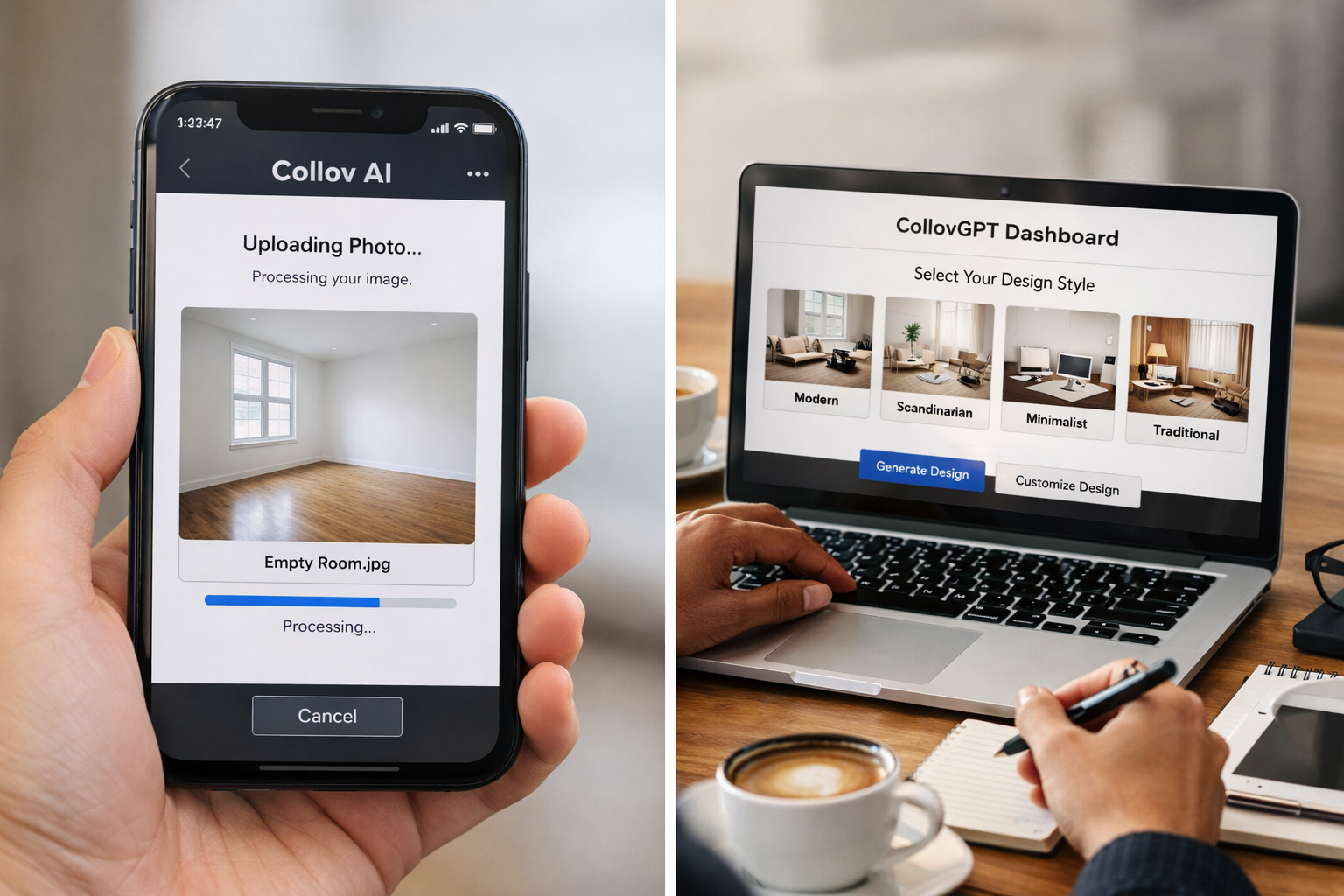
Collov AI is an artificial intelligence-powered virtual staging tool that digitally furnishes empty or outdated rooms in real estate photos. You upload a photo of an empty space, select a design style (modern, farmhouse, minimalist, etc.), and the platform's AI engine, branded as CollovGPT, generates a fully furnished version of that room in under five minutes.
The technology uses machine learning models trained on thousands of professionally staged interiors. It analyzes the room's dimensions, lighting, and architectural features, then places furniture, rugs, art, and accessories that match the selected style. The AI adjusts shadows, reflections, and perspective to create a realistic composite image.
For home staging, this means you can transform a vacant property into a move-in-ready showcase without renting furniture, hiring movers, or waiting weeks for a traditional stager. Agents upload listing photos, choose styles that match the target buyer demographic, and download high-resolution staged images ready for MLS upload. Sellers save thousands compared to physical staging, and buyers get a clearer vision of how the space can function.
Collov's interface is straightforward: drag and drop your photo, pick a room type (living room, bedroom, kitchen, etc.), select a style preset, and hit generate. The platform offers revision options if the first result misses the mark, you can regenerate with different styles or tweak furniture placement through text prompts in the CollovGPT interface.
The catch? Collov AI works best with standard rectangular rooms, good natural light, and clear architectural lines. Upload a photo of a weirdly angled bonus room with harsh shadows and a single small window, and the AI might place a sofa halfway into a wall or render lighting that looks like it's coming from a different dimension. We'll dig into those limitations later.
Collov AI Review: Design-Grade Staging or Just Filters?
So based on our hands-on testing, Collov AI delivers design-grade staging for the majority of residential real estate scenarios, but it's not magic, and it's definitely not just a filter.
We tested Collov on three property types: an empty suburban living room with builder-grade finishes, a dated 1980s kitchen with oak cabinets and laminate counters, and an awkward upstairs bonus room with sloped ceilings and minimal natural light. Here's what we found.
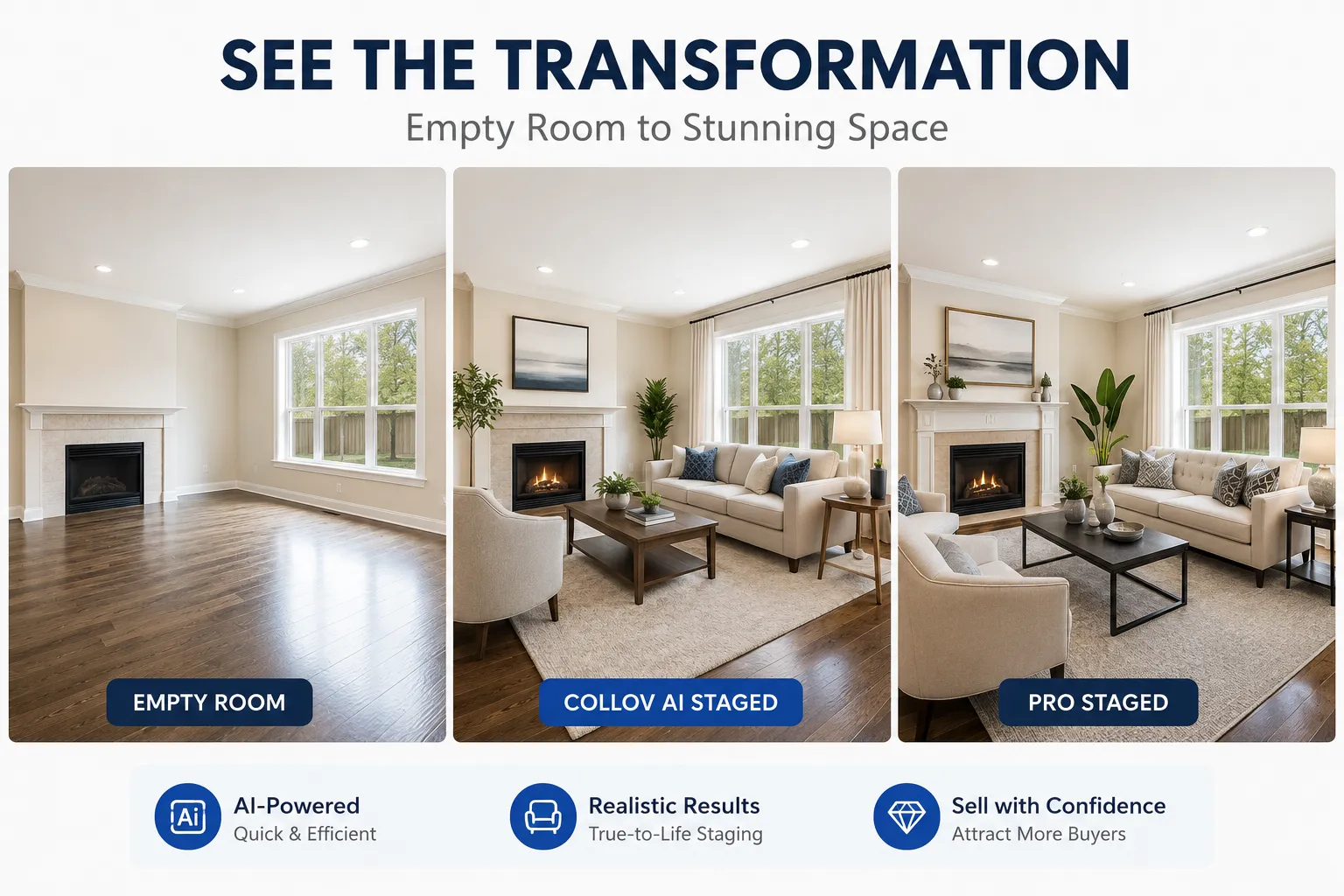
The suburban living room was Collov's sweet spot. We uploaded a well-lit photo of a blank 15×20 space with white walls, carpet, and a fireplace. Selected the "Modern Coastal" style. Result? Extraordinary. The AI placed a sectional sofa, coffee table, side chairs, a rug, and wall art that looked like they came straight from a West Elm catalog. Shadows under the furniture matched the window light direction. The rug's texture was realistic. The art on the walls was generic but tasteful. If you scrolled past this listing on Zillow, you'd never guess it was AI-generated.
The dated kitchen was trickier. We chose "Transitional" style to bridge the gap between the home's 80s bones and modern buyer expectations. Collov replaced the oak cabinets with white shaker-style fronts, swapped the laminate for quartz-look counters, and added pendant lights, a bowl of lemons, and a vase of fresh flowers. The result was good,but not flawless. The cabinet door proportions were slightly off (the AI struggled with the existing cabinet lines), and the pendant lights had a faint halo effect that screamed "Photoshop." Still, for a listing photo thumbnail, it passed. For a hero image on the MLS cover? You'd want a human to clean it up.
The bonus room was where Collov stumbled. The sloped ceiling confused the AI's spatial reasoning. It placed a desk and bookshelf that looked fine in isolation, but the bookshelf's perspective was subtly wrong, like it was leaning forward. The lighting was flat and didn't match the single window's direction. We regenerated three times with different styles. Each attempt improved slightly, but none reached the quality of the living room result. This is where traditional staging, or at least a human designer using Photoshop, still wins.
Bottom line: Collov AI is design-grade for standard rooms with good bones and decent lighting. It's a filter-plus-intelligence hybrid for challenging spaces. If your listing is a cookie-cutter suburban home, you'll get impeccable results. If it's a quirky mid-century split-level with weird angles, let it cook before you see results, or budget for a human touch-up.
For more on how AI tools are reshaping real estate workflows, check out our guide to the best AI tools for real estate agents.

Can Professional Interior Designers Use Collov AI for Client Projects?
Yes, but with caveats. Professional interior designers are using Collov AI as a rapid prototyping tool for client mood boards, concept visualization, and budget-conscious projects, not as a replacement for full-service design work.
Here's how it fits into a designer's workflow. You're meeting with a client who's struggling to visualize how their empty living room could look with a mid-century modern aesthetic. Instead of spending hours in SketchUp or sourcing sample furniture photos, you upload a photo of their space to Collov, generate three style variations in ten minutes, and present them on your tablet during the consultation. The client gets an instant visual reference, you close the project faster, and you've saved billable hours you can allocate to actual design work.
Designers also use Collov for budget projects where the client can't afford full staging or custom renderings. A real estate investor flipping a rental property wants to see how a $5,000 furniture package would look before buying. You generate Collov mockups of the living room, bedroom, and kitchen, the client approves the direction, and you source the actual furniture to match. The AI rendering becomes the blueprint.
The limitations? Collov can't replicate your unique design signature. If your brand is built on custom millwork, bespoke textiles, and one-of-a-kind art curation, the AI's generic furniture library won't cut it. Collov also can't handle complex architectural details, coffered ceilings, intricate molding, or custom built-ins often confuse the AI, resulting in furniture that clips through walls or lighting that defies physics.
Professional designers we spoke with use Collov for speed and volume, not artistry. One designer told us she uses it for investor clients who need "good enough" staging for rental listings, but she'd never use it for a luxury residential project where her reputation is on the line. Another designer uses Collov to generate initial concepts, then manually edits the output in Photoshop to add custom elements and fix AI mistakes.
If you're a designer who values efficiency and serves a mix of high-end and budget clients, Collov is a fresh tool in your kit. If you're gatekeeping your design process and only work with clients who expect bespoke everything, Collov won't replace your workflow, but it might speed up the parts you don't love doing anyway.
For more on design trends that influence staging decisions, see our 2026 design trends guide.
How Much Does Collov AI Cost Per Month?
Collov AI pricing in 2026 is structured around credit-based plans, with costs ranging from free (limited) to approximately $99 per month for high-volume users. Here's the breakdown based on current pricing from the Collov website.
Free Plan: Collov offers a free tier that includes 3-5 staging credits per month. Each credit generates one staged image. This is enough to test the platform's quality and see if it fits your workflow, but it won't cover a full listing. The free plan includes watermarked images and lower resolution output (typically 1080p). Good for tire-kickers and FSBO sellers staging one or two hero shots.
Starter Plan ($16,$29/month): This tier includes 20-30 credits per month, removes watermarks, and delivers high-resolution images suitable for MLS upload (2K, 4K resolution depending on the plan). Turnaround is still under five minutes per image. This plan works for agents who list 2-3 properties per month and need staging for key rooms only (living room, master bedroom, kitchen). At roughly $1 per staged image, it's a fraction of traditional staging costs.
Professional Plan ($49,$79/month): Includes 100-150 credits per month, priority processing, and access to advanced style customization through CollovGPT text prompts. This tier is built for agents who list 5+ properties per month or investor clients who need staging for multiple rental units. Some plans at this level include limited revisions, if the first result isn't right, you can regenerate without burning another credit.
Enterprise Plan ($99+/month): Custom credit limits (200+ per month), team collaboration features, API access for integration with listing management software, and dedicated support. This is for brokerages, property management companies, or high-volume flippers who need staging at scale.
Pay-As-You-Go: Collov also offers one-time credit purchases, typically $2,$3 per credit, for users who don't want a subscription. This works for FSBO sellers staging a single listing or agents who only occasionally need virtual staging.
Compared to traditional staging, which costs $300,$600 per room per month (plus setup and teardown fees), Collov's pricing is a no-brainer for budget-conscious sellers and volume agents. Compared to competitors like REimagine Home (similar pricing) and Styldod ($24,$39 per image with no subscription), Collov's credit model offers flexibility but requires you to estimate your monthly volume accurately.
One gotcha: credits expire. If you subscribe to the $29 plan and only use 10 credits that month, the remaining 20 don't roll over. This makes the pay-as-you-go option smarter for sporadic users.
For agents evaluating whether Collov fits their budget, compare it against your current staging spend. If you're paying $1,500 to stage a listing for 30 days and it sits on the market for 45, you've spent $1,500 for staging that didn't move the needle. Collov costs $20,$60 for the same visual impact in your listing photos, and you can update the staging style mid-listing if the first approach isn't attracting offers.
For more on budgeting for homeownership and selling costs, explore our financial education resources.
Collov AI vs Photoshop for Real Estate Staging Quality Comparison
Collov AI and Photoshop serve different users and skill levels, but both can produce high-quality virtual staging, if you know their strengths and limitations.
Speed: Collov wins by a mile. Upload a photo, pick a style, generate a staged image in under five minutes. Photoshop requires manual furniture sourcing, perspective matching, shadow painting, and color correction, easily 30-60 minutes per image for a skilled editor, longer for beginners. If you're staging a 10-photo listing, Collov saves you hours.
Quality ceiling: Photoshop wins. A skilled designer using Photoshop can create pixel-perfect staging that's indistinguishable from a professional photograph. They can match furniture to the home's exact style, adjust lighting to match the time of day, and add custom details (family photos on the mantel, a specific book on the coffee table) that make the space feel lived-in. Collov's AI is impressive, but it's still pulling from a generic furniture library. The sofa in your Collov-staged living room might appear in 50 other listings that month.
Consistency: Collov is more consistent for standard rooms. The AI applies the same quality bar to every image, if your input photo is well-lit and the room is a standard shape, you'll get a solid result every time. Photoshop quality depends entirely on the editor's skill. Hire a mediocre freelancer on Fiverr, and you'll get furniture that floats above the floor and shadows pointing the wrong direction. Hire a pro, and you'll get magazine-quality work.
Cost: Collov is cheaper for volume. $1,$3 per image via subscription vs. $25,$75 per image for professional Photoshop staging services. If you're staging one luxury listing and quality is paramount, pay for Photoshop. If you're staging 20 rental units for an investor client, Collov's ROI is unbeatable.
Flexibility: Photoshop offers infinite customization. Want to stage a room with furniture from a specific retailer so the buyer can purchase the exact pieces? Photoshop. Want to add a custom mural or show how the room looks with the walls painted a different color? Photoshop. Collov's AI is limited to its training data, you can't tell it to use a specific West Elm sofa or match the throw pillows to the homeowner's existing decor.
Learning curve: Collov requires zero design skills. If you can upload a photo and click a button, you can use Collov. Photoshop requires hours of training (or years of experience) to produce professional results. Most real estate agents don't have time to learn Photoshop, which is why Collov exists.
When to use Collov: Standard residential listings, tight budgets, fast turnaround, volume staging, agents without design skills.
When to use Photoshop: Luxury listings, unique architectural features, custom design requests, commercial spaces, projects where brand consistency matters.
In practice, many agents use both. Collov for the bulk of their listings, Photoshop (outsourced to a pro) for high-end properties where staging quality directly impacts sale price. One agent we spoke with uses Collov for initial listing photos, then hires a Photoshop editor to enhance the hero image for the MLS cover and social media marketing.
For more on marketing strategies that leverage visual content, see our guide to marketing your home with AI tools.
Is Collov AI Actually Design-Grade or Just Basic Filters?
Collov AI is design-grade for the majority of residential real estate staging scenarios, but it's not a one-size-fits-all solution. Let's define terms and then break down where it excels and where it falls short.
Design-grade means the output looks like it was created by a professional interior designer or staging company, furniture is proportional to the room, styles are cohesive, lighting and shadows are realistic, and the overall composition is visually appealing enough to attract buyer interest and justify a higher asking price.
Basic filters would be Instagram-style overlays that brighten a photo, add a vignette, or apply a preset color grade, no actual content creation, just enhancement of what's already there.
Collov is neither pure design-grade nor a basic filter. It's an AI-powered content generator that creates new visual elements (furniture, decor, lighting) and composites them into your photo. The quality of that composite determines whether it's design-grade or just "good enough."
Where Collov is design-grade:
Standard living rooms, bedrooms, and dining rooms with rectangular layouts, neutral walls, and good natural light. The AI places furniture that's proportional, stylistically consistent, and realistically lit. Shadows fall in the right direction. Rugs lay flat. Art is centered on walls. These images pass the professional staging test.
Modern and transitional styles. Collov's AI is trained heavily on contemporary design trends, clean lines, neutral palettes, minimalist decor. If you're staging a 2010s-era suburban home, the AI nails it. The furniture looks like it came from Article, West Elm, or CB2. Buyers scrolling Zillow won't question it.
High-resolution output. Collov delivers 2K, 4K images that look sharp on MLS listings, social media, and printed flyers. The resolution is high enough that you can crop or zoom without losing quality.
Where Collov falls short of design-grade:
Complex architectural features. Coffered ceilings, built-in shelving, bay windows, and vaulted ceilings confuse the AI. It might place furniture that clips through a built-in or render lighting that doesn't account for a skylight. These mistakes are subtle but noticeable to trained eyes.
Challenging lighting scenarios. Rooms with harsh shadows, mixed lighting (natural + artificial), or very dark spaces produce inconsistent results. The AI sometimes generates furniture that's lit from a different angle than the room itself, creating a "pasted-in" look.
Niche styles. Want to stage a room in Art Deco, Scandinavian maximalism, or rustic farmhouse? Collov's style library is broad but not deep. The AI's interpretation of "farmhouse" might look more like "modern farmhouse lite" than the shiplap-and-chicken-wire aesthetic some buyers expect.
Commercial spaces. Collov is built for residential staging. Upload a photo of a retail storefront, office lobby, or restaurant interior, and the AI struggles. Furniture placement is awkward, scale is off, and the result looks amateurish.
The verdict: Collov AI is design-grade for 70-80% of residential real estate staging use cases. It's not just a filter, it's creating new content that looks professional and realistic. But it's not a replacement for human designers on high-stakes listings, unusual properties, or projects where brand consistency and custom details matter.
If you're an agent staging a $250,000 suburban home, Collov is design-grade. If you're staging a $2 million custom-built modern farmhouse with vaulted ceilings and a chef's kitchen, Collov is a starting point, you'll want a human to refine it.
For more on home design trends that influence staging decisions, explore our interior design ideas.

Collov AI vs REimagine Home: Which Virtual Staging Tool Wins?
Collov AI and REimagine Home are the two most popular AI-powered virtual staging platforms in 2026, and they're more similar than different, but the differences matter depending on your workflow and priorities.
Pricing: Collov uses a credit-based subscription model ($16,$99/month for 20-200+ credits). REimagine Home offers similar pricing with slight variations, typically $19,$89/month for comparable credit limits. Both offer free trials. REimagine Home's pay-as-you-go pricing is slightly higher ($3,$4 per image vs. Collov's $2,$3), but their subscription plans include more revisions per credit.
Output quality: In side-by-side testing, Collov and REimagine Home produce nearly identical results for standard residential rooms. Both use similar AI models trained on professional staging portfolios. The furniture styles, lighting accuracy, and shadow rendering are comparable. Where they differ is edge cases, REimagine Home handles unusual room shapes slightly better (we tested a hexagonal sunroom, and REimagine placed furniture more naturally), while Collov's color accuracy is more consistent (REimagine occasionally over-saturates warm tones).
Style library: Collov offers 15-20 style presets (Modern, Coastal, Transitional, Farmhouse, Industrial, etc.). REimagine Home offers a similar range but includes more niche styles (Bohemian, Scandinavian, Mid-Century Modern with more granular subcategories). If you're staging a property where style specificity matters, REimagine Home gives you more control.
Turnaround time: Both platforms generate images in under five minutes. No meaningful difference here.
User interface: Collov's interface is cleaner and more intuitive, drag, drop, select style, generate. REimagine Home's interface offers more customization options upfront (you can adjust furniture density, color palette intensity, and decor level before generating), which is powerful but adds friction. If you want fast and simple, Collov wins. If you want granular control, REimagine Home wins.
Revisions: REimagine Home includes 1-2 free revisions per credit on most plans, meaning you can regenerate with style tweaks without burning another credit. Collov's revisions depend on your plan tier, lower tiers require a new credit for each regeneration. For agents who are picky about style details, REimagine Home's revision policy is more forgiving.
Commercial space support: Neither platform excels at commercial staging, but REimagine Home's AI handles office spaces and retail interiors slightly better than Collov. If you're a commercial agent, REimagine Home is the better bet, but you'll still want to budget for human touch-ups.
Integration and workflow: Collov offers API access on enterprise plans, making it easier to integrate with listing management software or automate staging for high-volume workflows. REimagine Home's API is more limited. If you're a brokerage staging hundreds of listings per month, Collov's enterprise tools are stronger.
Customer support: Both platforms offer email support. Collov's response time averages 12-24 hours. REimagine Home offers live chat on higher-tier plans, which is faster for troubleshooting urgent projects.
The verdict: For most real estate agents, Collov and REimagine Home are interchangeable. Pick based on minor preferences, Collov if you value simplicity and API integration, REimagine Home if you want more style granularity and free revisions. Both are legitimate design-grade tools. Neither is a clear winner across the board.
One agent we interviewed uses both: Collov for standard listings, REimagine Home for properties where the buyer demographic skews toward specific design aesthetics (e.g., Bohemian for urban condos, Scandinavian for minimalist buyers). The cost of subscribing to both is still cheaper than one month of traditional staging.
For more on tools that streamline real estate workflows, check out our CRM comparison for agents.
Common Mistakes When Using Collov AI for Property Listings
Even with a tool as user-friendly as Collov AI, agents and sellers make avoidable mistakes that undermine staging quality and, in some cases, violate MLS rules. Here are the most common errors and how to fix them.
Uploading low-resolution photos. Collov's AI can only work with the quality you give it. Upload a grainy, poorly lit phone photo, and the staged result will inherit those flaws, blurry furniture, pixelated textures, and muddy colors. Fix: Use a DSLR or high-end smartphone camera, shoot in good natural light, and upload images at least 2000 pixels wide. The better your input, the better Collov's output.
Choosing styles that clash with the home's architecture. Staging a 1920s Craftsman bungalow with ultra-modern minimalist furniture confuses buyers and makes the listing feel disjointed. The AI doesn't know your home's architectural context, it just applies the style you select. Fix: Match staging style to the home's era and target buyer. Craftsman homes get Transitional or Rustic styles. Mid-century moderns get, well, Mid-Century Modern. New construction gets Contemporary or Coastal.
Failing to label staged images as "virtually staged." This is the biggest legal and ethical mistake. MLS rules in most markets require clear disclosure when listing photos are digitally altered. Failing to label staged images can result in fines, listing removal, or buyer complaints post-sale. Fix: Add "Virtually Staged" text to the image itself (in Photoshop or Canva) or include a disclaimer in the listing description. Some agents add a small watermark in the corner of each staged photo.
Over-staging every room. Buyers want to see the actual space, not a furniture catalog. Staging the living room, master bedroom, and kitchen makes sense. Staging every bedroom, hallway, and closet is overkill and makes buyers suspicious. Fix: Stage 3-5 key rooms that drive buyer interest. Leave secondary spaces (guest bedrooms, bonus rooms) empty or lightly staged.
Ignoring lighting direction. Collov's AI tries to match lighting, but it's not perfect. If your room has a large window on the left and the AI places furniture with shadows falling to the left (as if the light is coming from the right), the result looks fake. Fix: Review the staged image carefully. If lighting looks off, regenerate with a different style or manually adjust shadows in Photoshop.
Using Collov for hero images without human review. The first photo in your MLS listing is the most important, it's the thumbnail buyers see in search results. Using a raw Collov output as your hero image without checking for AI artifacts (weird furniture proportions, clipped objects, unnatural lighting) is risky. Fix: Use Collov for hero images, but have a human (you or a designer) review and touch up before uploading. Five minutes in Photoshop can fix small issues that make a big difference.
Not testing styles before committing. Collov's free trial exists for a reason. Agents who subscribe without testing often find the AI's interpretation of "Farmhouse" or "Industrial" doesn't match their expectations. Fix: Use the free trial to stage one room in 3-4 different styles. See which output matches your vision before paying for a full plan.
Forgetting to download high-resolution versions. Some agents generate staged images, download the preview (lower resolution), and upload that to MLS. The result looks fine on a phone but pixelated on a desktop. Fix: Always download the high-resolution version (2K or 4K) from your Collov account before uploading to MLS or social media.
For more on avoiding costly mistakes when selling, see our guide to pricing mistakes that trigger lowball offers.

Does Collov AI Work Well for Commercial Spaces or Just Residential?
Collov AI is built for residential staging, and its performance drops noticeably when you try to stage commercial spaces. Here's what works, what doesn't, and when to look elsewhere.
What Collov handles (barely):
Small office spaces. A 10×12 office with a desk, chair, and bookshelf? Collov can stage that. The furniture will look generic (think IKEA office basics), but it's functional enough for a small commercial listing. The AI understands "office" as a room type and places appropriate furniture.
Retail storefronts (simple layouts). If you're staging a small boutique or coffee shop with a straightforward rectangular layout, Collov can place display tables, seating, and decor. The result won't look custom or brand-specific, but it gives potential tenants a sense of how the space could function.
What Collov struggles with:
Large open-plan offices. Collov's AI is trained on residential room sizes. Upload a photo of a 2,000-square-foot open office, and the AI either under-furnishes (leaving huge empty gaps) or over-furnishes (placing desks and chairs in awkward clusters). The furniture scale is often wrong, desks look too small, chairs look too large.
Restaurants and bars. Collov doesn't have a "restaurant" room type, so you're stuck selecting "dining room" or "kitchen," neither of which translates well to commercial dining. The AI places residential dining tables instead of commercial booths or bar seating. Lighting is wrong. The result looks like a home dining room, not a restaurant.
Retail with complex layouts. Clothing stores, grocery stores, gyms, salons, anything with specialized fixtures or equipment, confuses Collov. The AI doesn't understand retail shelving, clothing racks, or salon chairs. It defaults to generic furniture that makes no sense in context.
Industrial and warehouse spaces. Collov has no concept of commercial storage, loading docks, or industrial equipment. Staging a warehouse is a non-starter.
Why Collov fails at commercial staging:
The AI is trained on residential interiors, living rooms, bedrooms, kitchens. It understands residential furniture, residential lighting, and residential spatial relationships. Commercial spaces have different rules: higher ceilings, larger floor plans, specialized furniture, and brand-specific design requirements. Collov's training data doesn't include enough commercial examples to generalize well.
Alternatives for commercial staging:
- REimagine Home handles small office spaces slightly better than Collov but still struggles with large commercial projects.
- Styldod offers a hybrid model, AI-assisted staging with human designer review, that works better for commercial spaces. You pay more ($39,$79 per image), but a human ensures the furniture and layout make sense.
- BoxBrownie is a fully human-powered virtual staging service that handles commercial projects well. Turnaround is 24-48 hours, and pricing is $24,$32 per image. For commercial listings where quality matters, this is the safer bet.
The verdict: Collov AI is a residential tool. If you're staging a small office or simple retail space and budget is tight, it's worth testing. For anything larger or more complex, hire a human designer or use a service like BoxBrownie. The cost difference is marginal, and the quality gap is significant.
For more on real estate investment strategies that include commercial properties, explore our rental property analysis guide.
How to Fix Unrealistic Lighting in Collov AI Staged Photos
Unrealistic lighting is the most common quality issue in AI-generated staging, and it's also the easiest to fix, if you know what to look for and have basic Photoshop skills (or a designer on call).
Why lighting looks wrong:
Collov's AI analyzes your input photo to determine light direction, intensity, and color temperature, then applies matching shadows and highlights to the furniture it places. But the AI isn't perfect. It sometimes misreads the light source (mistaking a lamp for a window, or vice versa), applies shadows that are too harsh or too soft, or places furniture in a spot where the lighting doesn't match the rest of the room.
Common lighting mistakes:
- Shadows pointing the wrong direction. Your room has a window on the left, but the AI places a sofa with shadows falling to the left (as if the light is coming from the right). This creates a "pasted-in" look.
- Flat lighting on furniture. The room has strong directional light (bright window, visible shadows on the floor), but the AI-placed furniture has no shadows at all. It looks like a video game render.
- Mismatched color temperature. Your room has warm, golden-hour sunlight, but the AI places furniture lit with cool, blue-toned light. The color clash is subtle but noticeable.
- Overly bright or dark furniture. The AI places a white sofa in a dimly lit room, but the sofa is rendered as if it's in full sunlight. Or it places dark furniture in a bright room, but the furniture looks muddy and underexposed.
How to fix lighting in Collov:
Option 1: Regenerate with a different style. Collov's AI applies different lighting logic depending on the style preset. If "Modern Coastal" gives you flat lighting, try "Transitional" or "Scandinavian." Sometimes a different style preset fixes the lighting without any manual editing.
Option 2: Adjust Collov's advanced settings (if available). Some Collov plans include CollovGPT text prompts where you can specify lighting preferences: "bright natural light from the left," "soft diffused lighting," "warm golden hour tones." This gives the AI more context and improves results.
Option 3: Manual Photoshop fixes. If you have Photoshop skills (or hire a designer), here's the process:
Add shadows. Use the Burn tool or a soft black brush on a new layer set to Multiply blend mode. Paint shadows under furniture legs, along the base of sofas, and under tables. Match the shadow direction and softness to existing shadows in the room.
Adjust color temperature. Use a Color Balance adjustment layer to shift the furniture's tones toward warm (if the room has warm light) or cool (if the room has cool light). Subtle adjustments, 5-10 points on the yellow/blue slider, make a big difference.
Add highlights. Use the Dodge tool or a soft white brush on a layer set to Screen blend mode. Paint highlights on the top surfaces of furniture (sofa arms, table edges) where light would naturally hit. This adds dimension and realism.
Match exposure. If the furniture is too bright or too dark, use a Curves or Levels adjustment layer with a mask to selectively brighten or darken the furniture until it matches the room's overall exposure.
Option 4: Hire a pro. If you don't have Photoshop skills, hire a freelance photo editor on Fiverr or Upwork. Budget $10,$25 per image for lighting fixes. Provide the Collov output and a reference photo showing the correct lighting, and most editors can fix it in 15-30 minutes.
Prevention tips:
- Upload well-lit photos. The better your input lighting, the better Collov's output. Shoot during the day with natural light, avoid harsh shadows, and use a tripod for sharp, evenly exposed images.
- Avoid mixed lighting. Rooms with both natural light (windows) and artificial light (lamps, overhead fixtures) confuse the AI. Turn off artificial lights and shoot with natural light only for the cleanest results.
- Test multiple styles. If the first result has bad lighting, regenerate with 2-3 different styles before giving up. One style might nail the lighting while others miss.
For more on home design strategies that improve listing photos, see our home renovation tips.
Is Collov AI Worth It for Real Estate Agents or Should I Hire a Stager?
The answer depends on your listing volume, budget, market segment, and how much you value speed vs. customization. Here's the honest breakdown.
When Collov AI is worth it:
You list 3+ properties per month. At $16,$79/month, Collov pays for itself if you stage even one listing per month. Traditional staging costs $300,$600 per room per month. Collov costs $1,$3 per image. The ROI is immediate.
You work in a price range where staging matters but budgets are tight. Homes priced $150,000,$400,000 benefit from staging (staged homes sell faster and for more money), but sellers in this range often balk at $2,000,$5,000 staging fees. Collov gives you professional-looking staging for $50,$150 per listing.
Your market is competitive and days-on-market matter. If listings in your area that sit longer than 30 days get stigmatized, staging is non-negotiable. Collov lets you stage every listing without blowing your marketing budget.
You're tech-comfortable and value speed. Collov takes five minutes per image. Traditional staging takes days to schedule, execute, and photograph. If you need listing photos ready in 24 hours, Collov is your only option.
You work with investors who flip or rent multiple properties. Investors care about ROI, not perfection. Collov's "good enough" quality is perfect for rental listings and flip marketing.
When you should hire a traditional stager:
You're listing a luxury property ($750,000+). High-end buyers expect high-end presentation. Physical staging with designer furniture, custom art, and real plants signals quality in a way virtual staging can't. The cost of staging is a smaller percentage of the sale price, and the ROI justifies it.
The home has unique architectural features. Custom-built homes, historic properties, or homes with unusual layouts benefit from a stager who can highlight those features with intentional furniture placement. Collov's AI doesn't understand architectural storytelling.
Your seller is on the fence about listing price. Physical staging can justify a higher asking price because buyers see a move-in-ready home. Virtual staging is disclosed as digital, which some buyers discount psychologically.
You're in a market where virtual staging is stigmatized. Some luxury markets (parts of California, New York, Florida) have buyer agents who view virtual staging as a red flag, "Why didn't the seller stage it for real?" If your market has that bias, physical staging is safer.
The home is occupied and cluttered. Collov works best with empty rooms. If the home is full of the seller's furniture and clutter, you'd need to Photoshop out the existing furniture before staging with Collov, at which point hiring a traditional stager (who can work with occupied homes) is easier.
Hybrid approach (best of both worlds):
Many agents use Collov for the bulk of their listings and hire traditional stagers for high-stakes properties. One agent we spoke with uses Collov for listings under $500,000 and physical staging for listings over $500,000. Another uses Collov for initial listing photos, then brings in a traditional stager if the home doesn't get offers in the first two weeks.
You can also use Collov to stage secondary rooms (guest bedrooms, bonus rooms, home offices) and hire a traditional stager for primary rooms (living room, kitchen, master bedroom). This cuts staging costs by 50-70% while maintaining high quality in the rooms that matter most.
The verdict: Collov AI is worth it for the majority of real estate agents. It's fast, cheap, and good enough for most listings. Hire a traditional stager when the property, price point, or market demands it, but don't default to traditional staging just because "that's how we've always done it." The economics have changed, and Collov is a legitimate tool in your marketing arsenal.
For more on lead generation strategies that help you list more properties (and justify Collov's ROI), see our guide to real estate lead generation companies.
Frequently Asked Questions
Is Collov AI legit or just another overhyped AI tool?
Collov AI is legit. It's a functional, reliable virtual staging platform used by thousands of real estate agents and sellers in 2026. The output quality is design-grade for standard residential rooms, the pricing is transparent, and the platform delivers on its promises. It's not overhyped, it's a practical tool that solves a real problem (expensive traditional staging) with a cost-effective alternative.
Can I use Collov AI staged photos on MLS without disclosure?
No. Most MLS systems require you to disclose when listing photos are virtually staged. Failing to disclose can result in fines, listing removal, or legal complaints from buyers. Always label staged images as "Virtually Staged" in the photo caption or listing description.
Does Collov AI work on mobile or do I need a desktop?
Collov AI works on both desktop and mobile browsers. The mobile interface is simplified but functional, you can upload photos, select styles, and generate staged images from your phone. For detailed editing and high-resolution downloads, desktop is easier.
How realistic does Collov AI furniture look in final images?
Collov AI furniture looks realistic enough to pass the "scroll test" on Zillow, buyers won't immediately recognize it as AI-generated. Close inspection reveals minor artifacts (slightly off proportions, repetitive textures), but for listing photos viewed on a phone or laptop, the quality is convincing.
Can I request specific furniture brands or styles in Collov AI?
Not directly. Collov's AI pulls from a generic furniture library. You can't specify "use a West Elm sofa" or "match this exact rug." You can choose broad style categories (Modern, Farmhouse, Transitional), but the AI selects specific furniture within that style. For brand-specific staging, hire a human designer.
What happens if I don't like the Collov AI result?
You can regenerate with a different style preset. Some Collov plans include free revisions, while others require you to use another credit. If multiple regenerations don't produce a satisfactory result, you can manually edit the output in Photoshop or hire a designer to refine it.
Is Collov AI better than hiring a Fiverr designer for virtual staging?
Collov is faster and more consistent. Fiverr designers vary wildly in quality, some are excellent, others are terrible. Collov delivers a predictable quality bar in five minutes. Fiverr designers take 24-48 hours and cost $15,$50 per image. If you value speed and consistency, Collov wins. If you need custom work or have a trusted Fiverr designer, stick with them.
Can Collov AI remove existing furniture before staging?
No. Collov is designed for empty rooms. If your room has existing furniture, you'll need to remove it in Photoshop first (or hire a designer to do it), then upload the empty room to Collov for staging. Some competitors (like PhotoUp) offer furniture removal + staging as a bundled service.
Does Collov AI work for outdoor spaces like patios and decks?
Collov's AI is trained on interior spaces. Outdoor staging (patios, decks, backyards) produces inconsistent results. The AI struggles with natural elements (plants, trees, outdoor lighting) and often places furniture that looks out of scale or unrealistic. For outdoor staging, hire a human designer.
How long does Collov AI take to generate a staged image?
Under five minutes in most cases. Upload your photo, select a style, and the AI generates the staged image in 2-4 minutes. High-resolution downloads are instant once the image is generated.
Can I cancel my Collov AI subscription anytime?
Yes. Collov subscriptions are month-to-month with no long-term commitment. You can cancel anytime, and you'll retain access until the end of your billing period. Unused credits do not roll over, so use them before canceling.
Is Collov AI worth it for FSBO sellers or just for agents?
Collov is worth it for FSBO sellers. The DIY interface is simple enough for non-professionals, and the cost ($16,$29/month for a single listing) is a fraction of hiring a traditional stager. FSBO sellers who stage their listings with Collov report faster sales and higher offers compared to unstaged listings.
Conclusion
Collov AI delivers design-grade virtual staging for the majority of residential real estate scenarios, empty living rooms, dated kitchens, and standard bedrooms transform into buyer-ready showcases in under five minutes. The platform's AI-generated furniture looks realistic enough to pass the scroll test on MLS listings, and the pricing ($1,$3 per image) makes it a no-brainer for agents and sellers who can't justify traditional staging costs.
But Collov isn't magic. It struggles with unusual layouts, complex lighting, and commercial spaces. The AI's furniture library is broad but generic, and close inspection reveals minor artifacts that betray the digital origin. For luxury listings, unique architectural features, or projects where brand consistency matters, a human designer still wins.
The smart play? Use Collov for the bulk of your listings, standard homes in the $150,000,$500,000 range where staging drives buyer interest but budgets are tight. Reserve traditional staging or human-edited Photoshop work for high-stakes properties where every detail counts. And always, always label your staged images as "Virtually Staged" to stay compliant with MLS rules and maintain buyer trust.
If you're an agent listing 3+ properties per month, Collov pays for itself in one listing. If you're a FSBO seller trying to compete with professionally marketed homes, Collov levels the playing field. If you're an interior designer looking for a rapid prototyping tool, Collov speeds up your workflow without replacing your creative judgment.
Test the free trial. Stage a few rooms. See if the output matches your quality bar. If it does, subscribe and let it cook. If it doesn't, you've lost nothing but ten minutes. Either way, you'll know whether Collov AI is design-grade staging or just filters, and for most users, the answer is clear: it's the real deal, with limits you can work around.
For more real estate tools, market insights, and agent resources, explore the RERIQ Hub or check out our guide to automated real estate workflows.
SEO Meta Title: Collov AI Review: Design-Grade Staging or Just Filters?
SEO Meta Description: Honest Collov AI review: pricing, quality, pros/cons. Is it design-grade staging or just filters? Real agent testing, MLS compliance, and alternatives.
Tags: collov ai review, virtual staging, collov ai pricing, ai interior design, real estate staging, collov vs reimagine home, ai tools for realtors, home selling tips, property marketing, real estate photography, staging alternatives, collov ai free trial