

Last updated: July 20, 2026

Quick Answer
RPR AI (Realtors Property Resource AI Assistant) is a free, comprehensive property research and market analysis platform included with your NAR membership that most real estate agents never use, despite offering AI-powered scriptwriting, customizable CMAs, shareable market reports, and property data that rivals paid platforms. The tool combines property records, market trends, demographics, and an AI scriptwriter to help agents create listing presentations, buyer education materials, and social media content in minutes. If you're paying NAR dues but not using RPR, you're leaving money on the table.
Key Takeaways
- RPR AI is completely free for all NAR members and includes property data, market analytics, and an AI-powered scriptwriter for social media and client communications
- The platform offers three core tools agents actually use: property reports for CMAs, shareable market trend reports for farming, and the AI Market Trends ScriptWriter for instant social captions
- RPR data differs from MLS, it pulls from public records, tax assessments, and aggregated sources, so it won't show active listings or real-time MLS updates, but excels at historical trends and neighborhood analytics
- Most agents never log in because they assume it's complicated, but the interface is more intuitive than Zillow and takes under 10 minutes to learn
- Best use cases include listing presentations (instant property history reports), buyer education (neighborhood comparisons with school and crime data), and social media farming posts (AI-generated captions with local market stats)
- The tool works in all 50 states, though data depth varies, urban and suburban markets have richer datasets than rural areas
- Common mistakes include treating RPR like an MLS replacement (it's not), ignoring the AI scriptwriter (the most underrated feature), and never customizing reports with your branding
What Is RPR AI and How Does It Work for Real Estate Agents
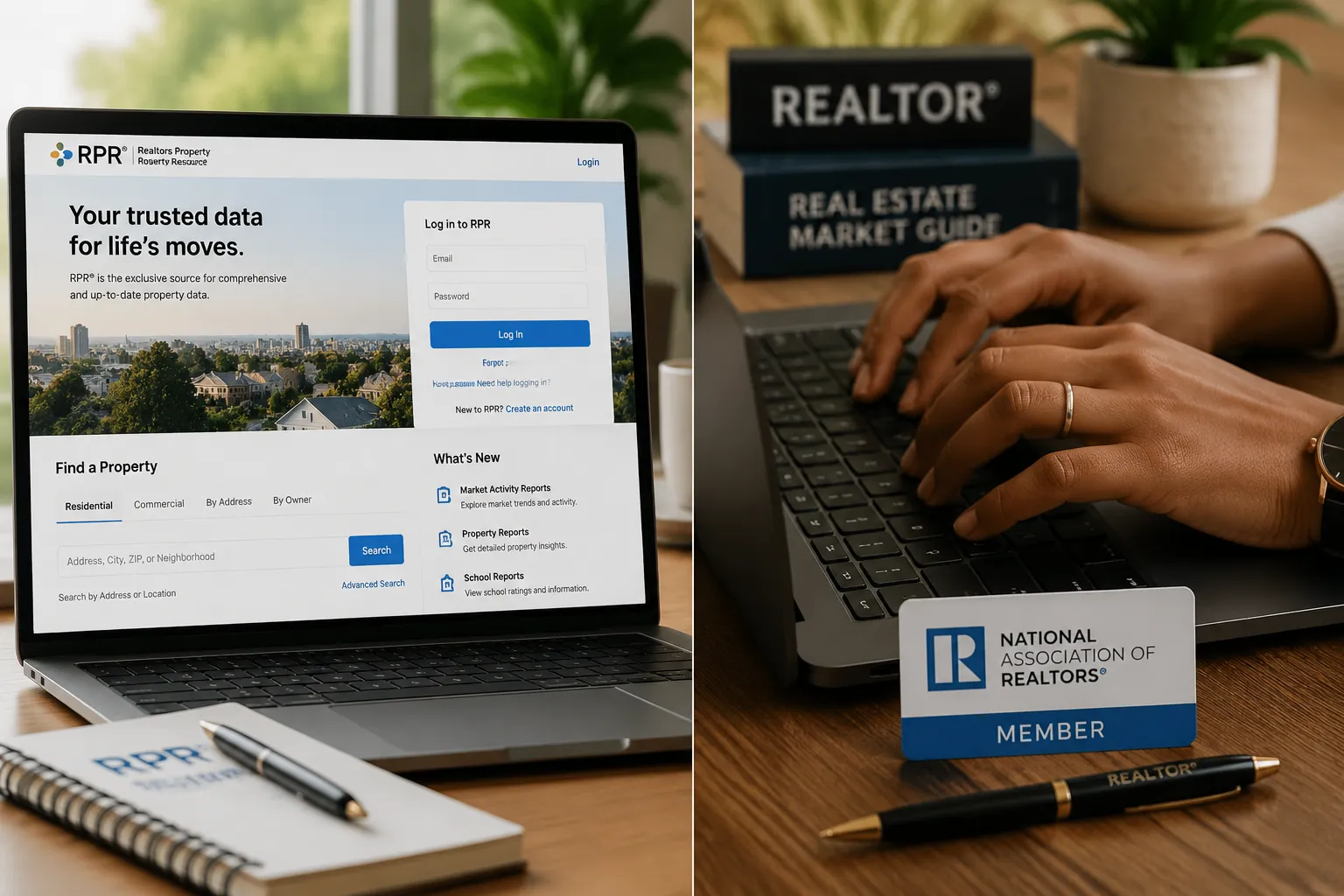
RPR AI (Realtors Property Resource) is a property intelligence platform built exclusively for NAR members by the National Association of Realtors. Think of it as the real estate industry's answer to Zillow, except it's designed for professionals, not consumers, and it's packed with tools that actually help you close deals instead of generating leads for your competitors.
The platform aggregates data from over 164 million properties across the United States, pulling from public records, tax assessments, MLS feeds (in participating markets), foreclosure databases, and demographic sources. What sets RPR apart from consumer-facing sites is the depth of analytics: you get property history timelines, ownership records, mortgage information, neighborhood trend reports, school ratings, environmental risk scores, and comparable sales data all in one dashboard.
The "AI" component refers to the RPR AI Market Trends ScriptWriter, a ChatGPT-style tool integrated into the platform that generates social media captions, email copy, and client-facing scripts based on the market data you're viewing. Pull up a neighborhood report showing median home prices rising 8% year-over-year, click the AI assistant, and it'll write you three Instagram captions, a Facebook post, and an email subject line in seconds. It's like having a copywriter who actually understands real estate data.
Here's how agents use it in practice: You're preparing for a listing appointment in a neighborhood you don't farm regularly. Instead of spending an hour Googling comps and school ratings, you log into RPR, enter the address, and generate a comprehensive property report with sales history, tax records, and neighborhood analytics in under five minutes. You customize the report with your headshot and brokerage logo, export it as a PDF, and walk into that appointment looking like you've been farming that area for years.
The platform also includes mobile apps for iOS and Android, so you can pull property data while standing in a driveway during a showing. The interface is cleaner than most MLS systems and more intuitive than Zillow's agent tools, if you can navigate Amazon, you can navigate RPR.
For agents who want to level up their tech stack without paying for expensive third-party tools, RPR AI is the most underutilized free resource in the industry. It's already paid for through your NAR dues, and it's sitting there waiting for you to log in. Most agents never do.
How to Access RPR AI If I'm a NAR Member
Accessing RPR is straightforward, but many agents get stuck at the login screen because they've never set up their account. Here's the step-by-step process to get in:
Step 1: Go to narrpr.com (the official RPR login portal). Do not Google "RPR login" and click random links, scam sites love to mimic real estate platforms.
Step 2: Click "Sign In" in the top right corner. If this is your first time logging in, you'll need to create an account using your NRDS number (National REALTOR Database System ID). Your NRDS number is on your NAR membership card or in your local association's member portal. If you can't find it, call your local board, they can look it up in 30 seconds.
Step 3: Enter your NRDS number and follow the prompts to create a username and password. RPR will verify your NAR membership status in real time. If it says you're not eligible, your dues are either lapsed or your local association hasn't synced your membership data with NAR. Call your board office.
Step 4: Once you're in, complete the quick profile setup. Add your headshot, brokerage logo, and contact information. This matters because every report you generate can be customized with your branding, skip this step and your CMAs will look generic.
Step 5: Download the RPR mobile app (iOS or Android) and log in with the same credentials. The mobile app is impeccable for pulling property data during showings or open houses.
Step 6: Bookmark the dashboard. Most agents log in once, get overwhelmed by the interface, and never come back. Spend 10 minutes clicking around. The learning curve is shorter than learning a new CRM.
If you're still having trouble logging in, RPR offers live chat support Monday through Friday, 8 a.m. to 8 p.m. ET. The support team is faster than most MLS help desks and actually knows the platform.
One common issue: agents who are NAR members through a secondary association (like a commercial board) sometimes don't have automatic RPR access. If that's you, contact NAR member support directly at 800-874-6500 and ask them to manually activate your account.
Once you're in, the platform remembers your login for 30 days, so you won't have to dig up your NRDS number every time. Set a calendar reminder to log in at least once a month, if you don't use it, you'll forget it exists.
RPR AI vs MLS Tools: Which Is Better for Agents
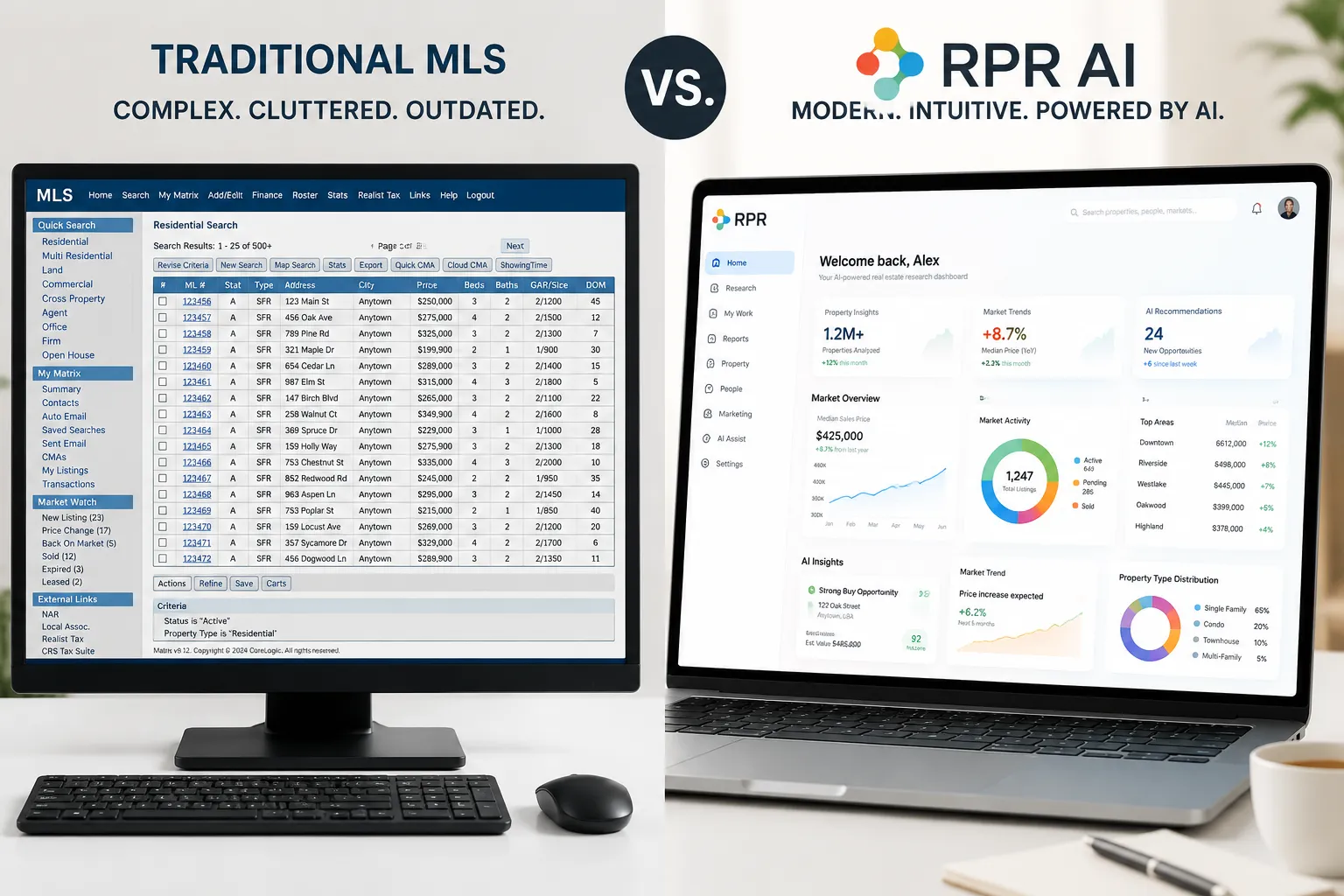
This is the question that trips up most agents: "If I have MLS access, why do I need RPR?" The answer is that RPR and your MLS serve different purposes, and the best agents use both strategically.
What RPR does better than MLS:
RPR excels at historical data, neighborhood analytics, and client-facing reports. If you need to show a buyer how a neighborhood's median home price has trended over the past 10 years, RPR visualizes that data in clean, colorful charts that clients actually understand. MLS data is dense, agent-focused, and not designed for presentations. RPR reports look like something you'd see in a Forbes article, professional, branded, and easy to digest.
RPR also includes data your MLS doesn't track: school ratings, crime statistics, environmental risk scores (flood zones, earthquake risk, wildfire exposure), walkability scores, and demographic breakdowns. If you're working with out-of-state buyers who need to compare neighborhoods they've never visited, RPR gives you a 360-degree view of each area in one dashboard.
The AI scriptwriter is another RPR-exclusive feature. Your MLS doesn't write Instagram captions for you. RPR does.
What MLS does better than RPR:
Your MLS is the source of truth for active listings, pending sales, and real-time market activity. RPR pulls MLS data in some markets, but there's often a lag, sometimes 24 to 48 hours. If you're pricing a listing or writing an offer, you need live MLS data, not yesterday's numbers.
MLS systems also include agent-only notes, showing history, and proprietary fields that RPR doesn't access. If you need to know how many times a listing has been price-reduced or which agent represented the buyer in a comp sale, that's MLS territory.
The smart play:
Use MLS for active market research and pricing strategy. Use RPR for client education, listing presentations, and social media content. When you're preparing a CMA, pull comps from your MLS and supplement the report with RPR's neighborhood analytics and trend charts. Your clients don't care about MLS listing IDs, they care about whether the neighborhood is appreciating and whether the schools are good. RPR answers those questions better than any MLS report.
One more thing: RPR works nationwide. If you're licensed in multiple states or you're helping a client relocate across the country, RPR gives you property data in markets where you don't have MLS access. That's a game-changer for referral agents and teams with multi-state operations.
For agents who want to automate more of their workflow, pairing RPR with real estate AI tools can save hours every week on research and content creation.
Is RPR AI Really Free or Are There Hidden Costs

RPR is 100% free for NAR members. No trial period, no premium tiers, no surprise charges. Your NAR dues cover the entire platform, and you get unlimited access to every feature, property reports, market analytics, mobile apps, and the AI scriptwriter.
There are no hidden costs, but there are a few things RPR doesn't include that agents sometimes expect:
What's NOT included:
RPR doesn't provide lead generation tools. It won't capture buyer or seller leads for you like Zillow Premier Agent or Realtor.com's paid programs. It's a research and reporting platform, not a lead funnel.
RPR doesn't include CRM functionality. You can't manage your client database or automate follow-up emails inside RPR. For that, you'll need a dedicated CRM for real estate agents.
RPR doesn't offer transaction management or e-signature tools. It's not trying to replace Dotloop or DocuSign, it's focused on property intelligence and market reporting.
What you get for free:
- Unlimited property reports with your custom branding
- Unlimited market trend reports for any neighborhood in the U.S.
- AI-generated social media captions and email copy
- Mobile apps for iOS and Android
- Nationwide property data (164+ million properties)
- Demographic and school data
- Environmental risk scores
- Comparable sales analysis
- Ownership and mortgage history
- Foreclosure and distressed property alerts
The value proposition is extraordinary: you're already paying NAR dues, so RPR is effectively a sunk cost. Most agents pay $50 to $200 per month for third-party property research tools that do less than RPR. If you're paying for a service like PropertyShark, CoreLogic, or even some MLS add-ons, check whether RPR covers the same data before renewing.
One caveat: some local associations charge separate dues on top of NAR dues, and a handful of smaller boards don't automatically activate RPR access for their members. If you're in that situation, call NAR member support and ask them to manually enable your account. It's still free, you just have to request it.
What Can RPR AI Do That Zillow or Realtor.com Can't
Zillow and Realtor.com are built for consumers. RPR is built for professionals. That distinction matters because the tools you need to run your business are fundamentally different from the tools a buyer uses to browse listings on a Sunday afternoon.
RPR's professional advantages:
1. Customizable, branded reports. Every report you generate in RPR can include your headshot, brokerage logo, and contact information. When you hand a buyer a neighborhood comparison report or email a seller a property history analysis, it looks like you spent hours building it from scratch. Zillow and Realtor.com don't let you brand anything, their reports are generic and covered in competitor ads.
2. Historical ownership and mortgage data. RPR shows you who owned a property, when they bought it, how much they paid, and what their mortgage balance was at the time of sale. This is gold for investors analyzing flip potential or agents researching distressed properties. Zillow's "Zestimate" history is a joke compared to RPR's transaction timeline.
3. Environmental risk scores. RPR includes flood zone maps, earthquake risk ratings, wildfire exposure data, and air quality scores. If you're working with out-of-state buyers who don't know the local geography, this data builds trust fast. Zillow mentions flood zones in passing; RPR gives you a full risk assessment with sources cited.
4. Demographic and economic trends. RPR breaks down neighborhood demographics (age, income, education, household size) and economic indicators (employment rates, income growth, population trends). This is the data investors and relocating executives actually care about. Zillow's "neighborhood" tab is a Wikipedia summary; RPR's demographic reports are based on census data and updated quarterly.
5. The AI scriptwriter. This is the feature that separates RPR from every consumer-facing platform. You pull up a market trends report showing that your farm area's median home price increased 6% in the last quarter, and the AI assistant writes you three social media posts, an email subject line, and a script for an RVM (ringless voicemail) campaign. Zillow doesn't write your marketing copy for you. RPR does.
What Zillow and Realtor.com do better:
Consumer reach. If you're trying to generate buyer leads, Zillow and Realtor.com have the traffic. RPR doesn't compete in that lane, it's not trying to. Zillow is where buyers start their search; RPR is where agents do their homework before meeting those buyers.
For agents who want to combine RPR's research power with automated marketing, check out marketing automation for real estate to see how the pros connect data to outreach.
Why Don't More Real Estate Agents Use RPR AI
The short answer: most agents don't know it exists, and the ones who do assume it's too complicated or not worth the effort. Both assumptions are wrong, but they're based on real friction points in how NAR has marketed (or failed to market) the platform.
Reason 1: NAR doesn't promote it aggressively. RPR is buried in the "member benefits" section of NAR's website, sandwiched between discounts on rental cars and continuing education courses. There's no onboarding email when you join NAR that says, "Here's your free $200/month property research tool, log in now." Most agents discover RPR by accident, if at all.
Reason 2: The name is forgettable. "Realtors Property Resource" sounds like a boring database, not a game-changing AI tool. Compare that to "ChatGPT" or "Canva", names that tell you what the product does. RPR's branding is so bland that agents scroll past it without a second thought.
Reason 3: Agents are overwhelmed by tools. The average real estate agent juggles an MLS, a CRM, an email platform, a transaction management system, a social media scheduler, and a dozen other apps. Adding another login feels like homework. Unless someone shows them how RPR saves time (not adds to their workload), they won't bother.
Reason 4: The learning curve myth. Agents assume RPR is complicated because it's a "professional" tool. In reality, the interface is cleaner and easier to navigate than most MLS systems. But perception beats reality, if agents think it's hard, they won't try.
Reason 5: Brokerages don't train on it. Most brokerages focus training on their proprietary tools (the brokerage CRM, the brokerage marketing platform, the brokerage transaction software). RPR is a NAR tool, not a brokerage tool, so it doesn't get airtime in onboarding or team meetings. New agents never learn it exists; veteran agents never learn it's improved.
Reason 6: It's free, so it must be inferior. This is the dumbest reason, but it's real. Agents assume that if RPR were actually good, it would cost money. Free tools are for beginners; pros pay for premium platforms. Except RPR is funded by NAR dues, which means you're already paying for it, you're just not using it.
The irony is that the agents who complain most about lead costs and marketing expenses are the same ones ignoring a free tool that could replace half their paid subscriptions. RPR won't generate leads for you, but it will make you look like the most prepared agent in the room when you're competing for a listing or educating a buyer. That's worth more than a Zillow lead.

How to Log Into RPR for the First Time
If you've never logged into RPR, here's the exact process, no fluff, no skipped steps.
Step 1: Open your browser and go to narrpr.com. Bookmark this URL. Do not Google "RPR login" and click the first result, there are scam sites that mimic the RPR interface to harvest login credentials.
Step 2: Click the "Sign In" button in the top right corner of the homepage.
Step 3: If this is your first time, click "Create Account" (usually a small link below the login fields).
Step 4: Enter your NRDS number. This is your National REALTOR Database System ID, a unique number assigned to every NAR member. You can find it on your NAR membership card, in your local association's member portal, or on any email from NAR. If you can't find it, call your local board office, they can look it up in seconds.
Step 5: Enter your email address (use the same email associated with your NAR membership to avoid verification issues).
Step 6: Create a username and password. RPR requires a strong password (at least 8 characters, one uppercase letter, one number, one special character). Write it down or save it in a password manager, you'll need it every time you log in until you enable "Remember Me."
Step 7: Verify your email. RPR will send a confirmation email to the address you provided. Click the link in that email to activate your account. Check your spam folder if you don't see it within five minutes.
Step 8: Complete your profile. Once you're logged in, RPR will prompt you to add your headshot, brokerage logo, and contact information. Do not skip this step. Every report you generate will include this branding, and it's the difference between looking like a pro and looking like you Googled some comps five minutes before the appointment.
Step 9: Take the 5-minute tour. RPR offers an optional guided tour of the dashboard when you first log in. Take it. The platform is intuitive, but the tour shows you where the most useful features are hidden (like the AI scriptwriter and the mobile app download links).
Step 10: Download the mobile app. Go to the App Store (iOS) or Google Play (Android), search "RPR Mobile," and download the official app. Log in with the same credentials you just created. The mobile app is clutch for pulling property data during showings or open houses.
Troubleshooting common login issues:
- "NRDS number not recognized": Your NAR membership might be lapsed, or your local association hasn't synced your data with NAR. Call your board office to confirm your membership status.
- "Email already in use": You (or someone at your brokerage) may have created an RPR account years ago and forgotten about it. Click "Forgot Password" and reset it using your email.
- "Account not activated": Check your spam folder for the verification email. If it's been more than 24 hours, contact RPR support at 877-977-7576.
Once you're in, set a calendar reminder to log in at least once a month. If you don't use RPR regularly, you'll forget it exists, and that's exactly why most agents never open it.
RPR AI Not Working or Won't Load: Troubleshooting
RPR is a web-based platform, so most "not working" issues are browser-related, not platform-related. Here's how to fix the most common problems:
Issue 1: RPR won't load or shows a blank screen.
Fix: Clear your browser cache and cookies. RPR uses a lot of JavaScript and map-rendering tools, and cached data from an old session can break the interface. In Chrome, go to Settings > Privacy and Security > Clear Browsing Data, select "Cached images and files," and clear the last 24 hours. Then refresh RPR.
Fix 2: Try a different browser. RPR works best in Chrome and Safari. If you're using Internet Explorer (please stop) or an outdated version of Firefox, the platform may not load correctly. Download Chrome if you don't have it.
Fix 3: Disable browser extensions. Ad blockers, privacy extensions, and script blockers can interfere with RPR's map and data visualization tools. Disable extensions one by one and refresh RPR to see if that fixes the issue.
Issue 2: Property reports won't generate or export.
Fix: Make sure pop-ups are enabled for narrpr.com. RPR generates reports in a new browser tab, and if your browser is blocking pop-ups, the report will fail silently. Check your browser's address bar for a "pop-up blocked" icon and allow pop-ups for RPR.
Fix 2: Check your internet connection. RPR reports pull data from multiple sources in real time, and a slow or unstable connection can cause the export to time out. If you're on public Wi-Fi, switch to your phone's hotspot and try again.
Issue 3: The AI scriptwriter isn't generating captions.
Fix: The AI scriptwriter requires you to have a property or market report open before it can generate copy. You can't just click "AI assistant" from the homepage and expect it to write something. Pull up a neighborhood report or property analysis first, then click the AI icon in the top right corner.
Fix 2: If the AI assistant is grayed out or unresponsive, log out and log back in. This resets your session and usually fixes the issue.
Issue 4: Mobile app won't sync or crashes.
Fix: Update the app. RPR pushes updates regularly, and older versions can become unstable. Go to the App Store or Google Play, search "RPR Mobile," and check for updates.
Fix 2: Reinstall the app. Delete it from your phone, restart your device, and download it fresh. This clears corrupted data that might be causing crashes.
Issue 5: "Session expired" error.
Fix: RPR logs you out after 30 minutes of inactivity for security reasons. Just log back in. If you're getting logged out every few minutes even while actively using the platform, check whether your browser is set to block third-party cookies, RPR uses cookies to maintain your session.
Still not working?
Contact RPR support at 877-977-7576 (Monday, Friday, 8 a.m. to 8 p.m. ET) or use the live chat feature in the bottom right corner of the RPR dashboard. The support team is fast, knowledgeable, and way more helpful than most MLS help desks.
Best Use Cases for RPR AI in Daily Real Estate Work
RPR shines in three specific scenarios: listing presentations, buyer education, and social media farming. Here's how to use it in each context, with step-by-step instructions.
Use Case 1: Listing Presentations
You're competing for a listing in a neighborhood you don't farm regularly. The seller wants to know why they should hire you instead of the agent who sold their neighbor's house last year. RPR gives you the data to look like the local expert, even if you've never closed a deal on that street.
Step 1: Log into RPR and enter the property address in the search bar.
Step 2: Click "Property Report" from the results page. RPR will generate a comprehensive report that includes:
- Property details (square footage, lot size, year built, tax assessment)
- Sales history (every transaction on that property for the last 30+ years)
- Ownership timeline (who owned it and when)
- Neighborhood trends (median home prices, days on market, inventory levels)
- School ratings and crime statistics
- Environmental risk scores (flood zones, wildfire exposure, earthquake risk)
Step 3: Customize the report. Click "Edit Report" in the top right corner and add your headshot, brokerage logo, and a personalized cover page. This takes 60 seconds and makes the report look like you spent an hour building it.
Step 4: Export the report as a PDF. Click "Download" and save it to your device. Print it or email it to the seller before the appointment.
Step 5: Walk the seller through the report during your presentation. Point out the sales history, the neighborhood appreciation trends, and the environmental data. Most agents show up with a CMA and nothing else, you're showing up with a 20-page branded report that covers everything a seller might ask about.
Pro tip: Use the AI scriptwriter to generate a follow-up email. After the appointment, pull up the same property report in RPR, click the AI assistant, and ask it to write a "thank you for meeting with me" email that references the neighborhood data you discussed. Copy, paste, personalize, send. Takes two minutes.
Use Case 2: Buyer Education
You're working with a first-time buyer who's comparing three neighborhoods they've never visited. They want to know which area has the best schools, the lowest crime, and the strongest appreciation potential. RPR answers all three questions in one dashboard.
Step 1: Log into RPR and search for the first neighborhood (enter a zip code, city name, or draw a custom boundary on the map).
Step 2: Click "Market Trends Report." RPR will generate a report that includes:
- Median home prices (current and historical)
- Days on market trends
- Inventory levels (how many homes are for sale)
- Price per square foot
- Demographic data (age, income, education, household size)
- School ratings (elementary, middle, high school)
- Crime statistics (violent crime, property crime, compared to state and national averages)
Step 3: Repeat for the other two neighborhoods.
Step 4: Export all three reports and send them to your buyer with a summary email. Use the AI scriptwriter to draft the email, it'll pull key stats from each report and write a comparison for you.
Step 5: Schedule a call or meeting to walk through the reports together. Point out the trade-offs: Neighborhood A has the best schools but the highest prices. Neighborhood B has the strongest appreciation but higher crime. Neighborhood C is the most affordable but has longer days on market. Your buyer will feel like they're making an informed decision instead of guessing.
Pro tip: Use RPR's mobile app during showings. When your buyer asks, "What's the school rating for this area?" or "How much have home prices gone up here?" you can pull the data in real time instead of saying, "I'll look that up and get back to you."
Use Case 3: Social Media Farming
You want to establish yourself as the local expert in a specific neighborhood, but you don't have time to write a new social media post every week. RPR's AI scriptwriter does it for you.
Step 1: Log into RPR and pull up a market trends report for your farm area.
Step 2: Click the AI assistant icon in the top right corner.
Step 3: Select "Social Media Post" from the dropdown menu. RPR will analyze the data in the report and generate three options:
- A short Instagram caption with a stat and a call to action
- A longer Facebook post with context and a question to drive engagement
- A LinkedIn post with a professional tone and market analysis
Step 4: Copy the caption you like best, paste it into your social media scheduler (or post it directly), and attach a screenshot of the RPR chart or map.
Step 5: Repeat weekly. Pull a new report, generate a new caption, post. It takes five minutes, and it positions you as the agent who knows the market better than anyone else.
Example AI-generated caption (based on real RPR output):
"Median home prices in [Neighborhood] are up 7% year-over-year, and inventory is down 12%. If you've been thinking about selling, now's the time. DM me for a free home valuation. #realestaterankiq"
That's a fresh, data-backed post that took zero creative effort. Let it cook before you see results, consistency matters more than perfection.
For agents who want to scale this strategy across multiple platforms, pairing RPR with email marketing for real estate agents creates a content engine that runs on autopilot.
Is RPR AI Worth Learning for New Agents
Yes, especially if you're a new agent competing against veterans who have years of market knowledge and a deep sphere of influence. RPR levels the playing field by giving you access to the same property data and market analytics that top producers use, without requiring you to pay for expensive third-party tools or spend years building local expertise.
Here's why RPR is so based for newer agents:
1. It makes you look experienced. When you walk into a listing appointment with a branded property report that includes 10 years of sales history, neighborhood trends, school ratings, and environmental data, the seller doesn't know you got your license six months ago. They see a prepared professional who did their homework.
2. It's free. New agents are cash-strapped. You're paying for MLS dues, errors and omissions insurance, marketing materials, and a dozen other expenses. RPR is included with your NAR membership, so it's one less bill to worry about.
3. It's easier to learn than your MLS. Most MLS systems are clunky, outdated, and built for agents who've been using them for 20 years. RPR's interface is modern, intuitive, and designed for people who are comfortable with consumer apps like Zillow or Google Maps. If you can navigate Instagram, you can navigate RPR.
4. It helps you answer client questions confidently. New agents lose deals because they don't know the answers to basic questions: "What's the crime rate in this neighborhood?" "How much have home prices appreciated here?" "What's the school rating?" RPR gives you those answers in seconds, so you never have to say, "I don't know, let me get back to you."
5. It teaches you how to analyze markets. RPR's reports break down market data in a way that's easy to understand, even if you've never taken an economics class. The more you use it, the better you'll get at spotting trends, identifying undervalued neighborhoods, and advising clients on timing. That's the skill set that separates top producers from agents who struggle.
The learning curve is short. Spend one hour clicking through RPR, pull a few property reports, generate a market trends report, play with the AI scriptwriter, and you'll know 80% of what you need. The platform is designed to be self-explanatory, and RPR offers free webinars and video tutorials if you want structured training.
One caveat: RPR won't replace the fundamentals. You still need to learn how to price properties, negotiate offers, and build relationships. But RPR makes you better at all three by giving you the data to back up your recommendations and the tools to present that data professionally.
For new agents building their real estate agent tech stack, RPR should be the first tool you master, before you pay for anything else.
Common Mistakes Agents Make When Using RPR
Even agents who log into RPR regularly make avoidable mistakes that limit the platform's value. Here are the most common errors and how to fix them.
Mistake 1: Treating RPR like an MLS replacement.
RPR is not a substitute for your MLS. It doesn't show active listings in real time, and it doesn't include agent-only notes or showing history. Use RPR for historical data, neighborhood analytics, and client-facing reports. Use your MLS for pricing strategy and active market research.
Fix: Think of RPR as a supplement to your MLS, not a replacement. Pull comps from your MLS, then use RPR to add context (neighborhood trends, school ratings, demographic data) that makes your CMA more compelling.
Mistake 2: Skipping the branding setup.
Agents generate reports in RPR and export them without adding their headshot, logo, or contact information. The result is a generic report that looks like it came from Zillow. The seller or buyer has no reason to associate that report with you.
Fix: Spend five minutes setting up your profile the first time you log in. Add your headshot, brokerage logo, phone number, email, and website. Every report you generate will automatically include this branding, and it makes you look impeccable.
Mistake 3: Ignoring the AI scriptwriter.
The AI scriptwriter is RPR's most underrated feature, and most agents don't even know it exists. They pull a market trends report, screenshot it, and post it to Instagram with a generic caption like "Market update!" That's a wasted opportunity.
Fix: Every time you generate a report, click the AI assistant and let it write your social media caption, email subject line, or client script. It takes 30 seconds, and the output is better than what most agents write on their own.
Mistake 4: Using RPR only for listing presentations.
Agents discover RPR when they're preparing for a listing appointment, use it once, and then forget about it. They miss the fact that RPR is just as valuable for buyer consultations, social media farming, and investor analysis.
Fix: Build RPR into your weekly routine. Pull a market trends report for your farm area every Monday and post it to social media. Use RPR's mobile app during buyer showings to answer questions in real time. Make it a habit, not a one-time tool.
Mistake 5: Assuming rural markets don't have enough data.
Agents in small towns or rural areas assume RPR won't work for them because their markets don't have the same data density as urban areas. That's partially true, RPR's data is richer in cities and suburbs, but even rural markets have enough information to generate useful reports.
Fix: Test it. Pull a property report for a listing in your area and see what data RPR provides. You might be surprised. Even if the neighborhood trends are limited, you'll still get property history, tax records, and environmental data that most rural agents don't bother to research.
Mistake 6: Not customizing reports for the audience.
RPR's default reports include every data point the platform has, sales history, tax assessments, mortgage information, demographic trends, school ratings, crime stats, environmental risks. That's overwhelming for most clients. A first-time buyer doesn't care about the property's 1987 sales price.
Fix: Use the "Edit Report" feature to remove irrelevant sections before you export. If you're working with a buyer, focus on neighborhood trends, schools, and crime. If you're working with an investor, focus on sales history, appreciation trends, and rental comps. Tailor the report to what your client actually needs.
RPR AI Alternatives for Non-NAR Members
If you're not a NAR member (or you're in a market where NAR membership isn't required), you don't have access to RPR. Here are the best alternatives, ranked by cost and functionality.
1. Zillow Premier Agent (Free tier available)
Zillow's free tools include property data, neighborhood stats, and a basic CMA builder. The data isn't as deep as RPR, and you can't customize reports with your branding, but it's better than nothing. The paid Premier Agent tier ($200,$1,000+ per month) adds lead generation, but that's a different product category.
Best for: Agents who need basic property data and don't want to pay for anything.
2. Realtor.com (Free for agents)
Realtor.com offers free property reports and market analytics for agents who create an account. The data is similar to Zillow's, but the interface is cleaner. Like Zillow, you can't brand the reports, and the historical data is limited.
Best for: Agents who want a Zillow alternative with a better user experience.
3. PropertyShark ($50,$150 per month)
PropertyShark is a paid property research platform that offers deeper data than Zillow or Realtor.com, ownership history, mortgage records, foreclosure filings, and building permits. It's popular with investors and agents who specialize in distressed properties.
Best for: Agents who need detailed ownership and mortgage data for investment analysis.
4. CoreLogic ($100,$300+ per month)
CoreLogic is an enterprise-level property data platform used by appraisers, lenders, and institutional investors. It's overkill for most agents, but if you're working in commercial real estate or managing a large portfolio, it's the gold standard.
Best for: Commercial agents and teams with big budgets.
5. Local MLS tools (Varies by market)
Some MLS systems include built-in property research and market analytics tools that rival RPR. Check whether your MLS offers neighborhood reports, demographic data, or CMA builders before paying for a third-party tool.
Best for: Agents who want to maximize the tools they're already paying for.
The bottom line: If you're a NAR member, there's no reason to pay for PropertyShark or CoreLogic when RPR gives you 90% of the same data for free. If you're not a NAR member, Zillow and Realtor.com are your best free options, and PropertyShark is your best paid option.
For agents exploring other AI tools for real estate agents, RPR's AI scriptwriter is one of the few free tools that actually delivers value, most "free" AI tools are just lead magnets for paid upgrades.
Can RPR AI Help with CMA and Property Valuations
Yes, but with caveats. RPR is excellent for gathering data and building context around a property valuation, but it's not a substitute for a full CMA built in your MLS. Here's how to use RPR effectively for pricing strategy.
What RPR does well for CMAs:
1. Historical sales data. RPR shows you every transaction on a property going back decades, including sale prices, dates, and ownership changes. This is useful for identifying patterns (e.g., a property that's been flipped multiple times) or explaining to a seller why their home's value has changed since they bought it.
2. Neighborhood trends. RPR's market trends reports show median home prices, days on market, and inventory levels over time. This gives you the big-picture context you need to explain whether the market is appreciating, flattening, or declining.
3. Comparable sales. RPR pulls comps based on location, square footage, bed/bath count, and other criteria. The comps aren't as precise as MLS comps (because RPR doesn't have access to real-time MLS data in all markets), but they're good enough for a rough valuation or a second opinion.
4. Property details. RPR includes tax assessment data, lot size, year built, and other details that help you compare properties accurately. This is especially useful in markets where MLS data is incomplete or inconsistent.
What RPR doesn't do well for CMAs:
1. Real-time MLS data. RPR's comps are based on public records and aggregated MLS feeds, which means there's often a lag. If a comp sold yesterday, it might not show up in RPR for 24 to 48 hours. For pricing a listing, you need live MLS data.
2. Agent-only insights. Your MLS includes notes on why a property sold below list price, how many offers it received, and whether the seller paid closing costs. RPR doesn't have access to that information.
3. Automated valuation models (AVMs). RPR doesn't generate a "Zestimate"-style automated valuation. It gives you the data to build your own valuation, but it doesn't do the math for you. Some agents see this as a feature, not a bug, AVMs are notoriously inaccurate, and a CMA built by a human is always more reliable.
How to use RPR for CMAs:
Step 1: Pull comps from your MLS first. Use your MLS's CMA tool to identify the three to five best comps based on location, size, condition, and recent sale date.
Step 2: Open RPR and search for the subject property. Generate a property report that includes sales history, tax assessment, and neighborhood trends.
Step 3: Add RPR's neighborhood data to your MLS CMA. Include a chart showing median home price trends over the past 12 months, a demographic breakdown of the area, and school ratings. This adds context that makes your CMA more persuasive.
Step 4: Customize the RPR report with your branding and export it as a supplement to your MLS CMA. Hand the seller two documents: the MLS CMA (with precise comps and your pricing recommendation) and the RPR report (with neighborhood context and historical data).
Pro tip: Use RPR's AI scriptwriter to draft the email you send with the CMA. The AI will pull key stats from the report and write a summary that explains your pricing strategy in plain English.
For agents who want to automate more of their CMA workflow, pairing RPR with automated real estate agent tools can cut your prep time in half.
Does RPR AI Work Well in Rural Markets or Small Towns
RPR works in all 50 states, but the depth and accuracy of the data vary significantly between urban, suburban, and rural markets. Here's what to expect if you're working in a small town or rural area.
What works well in rural markets:
1. Property records. RPR pulls data from county tax assessors, so even in the most remote areas, you'll get basic property details (lot size, square footage, year built, tax assessment). This data is public record, so it's available everywhere.
2. Ownership history. RPR shows you who owned a property and when they bought it, regardless of market size. This is useful for identifying absentee owners, inherited properties, or long-term owners who might be ready to sell.
3. Environmental data. RPR's flood zone maps, wildfire risk scores, and earthquake ratings are based on federal data (FEMA, USGS, etc.), so they're just as accurate in rural areas as they are in cities.
What's limited in rural markets:
1. Comparable sales. In small towns with low transaction volume, RPR might only find a handful of comps, and some of them might be months or years old. If your market sees five sales per year, RPR can't magically generate 20 comps.
2. Neighborhood trends. RPR's market trends reports are most useful in areas with consistent sales activity. In rural markets where sales are infrequent, the trend lines will be choppy and less reliable.
3. Demographic data. RPR's demographic reports are based on census data, which is updated every 10 years. In fast-changing rural areas (e.g., towns experiencing an influx of remote workers), the demographic data might be outdated.
How to use RPR effectively in rural markets:
1. Focus on property-level data, not neighborhood trends. Use RPR to pull detailed property reports (sales history, tax records, ownership timeline) rather than relying on market trends reports that might not have enough data to be meaningful.
2. Supplement RPR with local knowledge. In rural markets, your personal knowledge of the area is more valuable than any data platform. Use RPR to confirm what you already know, not as your primary research tool.
3. Use RPR's mobile app during showings. Even if the data is limited, being able to pull property details in real time (while standing in the driveway) makes you look prepared and professional.
The bottom line: RPR is less powerful in rural markets than in cities or suburbs, but it's still worth using. The property-level data is solid, and the branding features (customizable reports with your logo and headshot) work just as well in a town of 5,000 as they do in a city of 5 million.
For rural agents looking to expand their reach, combining RPR with lead generation strategies can help you dominate a small market.
RPR AI: The Free NAR Tool Most Agents Never Open
Here's the uncomfortable truth: RPR has been sitting in your NAR member benefits portal since you got licensed, and you've probably never clicked it. You're not alone. Industry estimates suggest fewer than 30% of NAR members have logged into RPR in the past year, and fewer than 10% use it regularly.
Why? Three reasons:
First, nobody told you it existed. Your brokerage onboarding covered the MLS, your CRM, and maybe Canva. RPR didn't make the cut because it's not a brokerage tool, it's a NAR tool. Brokerages don't get kickbacks for promoting it, so it falls through the cracks.
Second, the name is terrible. "Realtors Property Resource" sounds like a 2003 government database, not a modern AI-powered platform. It doesn't scream "use me," and the branding hasn't kept pace with the product upgrades.
Third, agents are creatures of habit. You already have a workflow. You pull comps from the MLS, grab listing photos from your phone, and write social posts in the Notes app. Adding a new tool feels like homework, especially when you're already drowning in CRM notifications and Zillow inquiries.
But here's what you're missing: RPR is the only free tool that combines property data, AI content generation, and client presentation templates in one platform. You're paying $150+ per year in NAR dues partly to fund this tool, and you're letting it collect dust while paying $50/month for a third-party CMA platform that does half of what RPR does.
The agents who do use RPR? They're the ones posting fresh, data-backed market updates every week. They're the ones walking into listing appointments with impeccable neighborhood reports that make sellers say, "Wow, you really know this area." They're not smarter than you, they just opened the tool.
If you're serious about building a real estate marketing system that doesn't rely on paid ads, RPR is your content engine. It's so based that NAR doesn't even promote it aggressively, they assume you'll figure it out. Spoiler: most agents don't.
How to Use RPR AI: Step-by-Step Tutorial for Agents
Here's the practical, no-fluff guide to using RPR AI. We'll cover three client-facing use cases: listing presentations, buyer education, and social media farming posts.
Use Case 1: Building a Listing Presentation with RPR
Step 1: Log into RPR at narrpr.com and enter the property address in the search bar.
Step 2: Click "Create Report" and select "Seller Report" from the dropdown menu.
Step 3: Customize the report. RPR auto-populates property details, tax data, and neighborhood stats. Add your branding (logo, contact info) in the "Customize" tab.
Step 4: Review the "Market Activity" section. RPR shows recent sales, active listings, and price trends for the neighborhood. This is your CMA foundation.
Step 5: Add the "Ownership & Mortgage" section. This shows the seller how much equity they have and what their payoff might look like. It's a trust-builder.
Step 6: Generate the report as a PDF. Click "Download" and save it to your device. You can also email it directly to the seller from RPR.
Step 7: Use the AI Market Trends ScriptWriter to create talking points. Navigate to "Market Activity Reports" > "AI ScriptWriter." Input the property's ZIP code. RPR generates a script highlighting why now is a good time to sell, what buyers are looking for, and how the neighborhood is trending.
Step 8: Print the report and bring it to your listing appointment. Walk the seller through each section, using the AI-generated script as your guide. This positions you as the data-driven expert who did their homework.
Time investment: 10-15 minutes. Compare that to manually pulling comps, formatting a CMA in Word, and writing your own market analysis. RPR cuts the work by 75%.
Use Case 2: Educating Buyers with RPR Neighborhood Reports
Step 1: Ask your buyer which neighborhoods they're considering. Input those ZIP codes or city names into RPR.
Step 2: Run a "Neighborhood Report" for each area. RPR generates a one-page snapshot with demographics, school ratings, crime stats, and market trends.
Step 3: Compare the reports side by side. Show your buyer how School District A has rising test scores while School District B is declining. Or how Neighborhood X has 30 days of inventory while Neighborhood Y has 90 days (a buyer's market).
Step 4: Use the "Environmental Hazards" tab to flag flood zones, wildfire risk, or proximity to industrial sites. This is due diligence most agents skip, and it builds trust.
Step 5: Email the reports to your buyer. RPR lets you send directly from the platform, or you can download PDFs and attach them to your CRM follow-up sequence.
Why this works: Buyers are drowning in Zillow listings. They need context, not more photos. RPR gives you the data to say, "Here's why Neighborhood A is a better long-term investment than Neighborhood B," and back it up with numbers.
Use Case 3: Creating Social Media Farming Posts with the AI ScriptWriter
Step 1: Choose your farm area. This could be a ZIP code, subdivision, or school district you're targeting.
Step 2: Navigate to "Market Activity Reports" > "AI ScriptWriter" in RPR.
Step 3: Input your farm area and select "Social Media Caption" as the output format.
Step 4: RPR analyzes recent sales, inventory levels, and price trends, then generates a ready-to-post caption. Example output: "Homes in [Neighborhood] are selling 15% faster this month than last quarter. Inventory is tight, and buyers are competing. If you've been thinking about selling, now's the time. DM me for a free market analysis."
Step 5: Copy the caption and paste it into your social scheduler (Buffer, Hootsuite, or just post it manually). Pair it with a photo of the neighborhood or a screenshot of RPR's market trend chart.
Step 6: Repeat weekly. RPR updates its data regularly, so you can generate fresh captions every week without repeating yourself.
Pro tip: Use RPR's shareable market trends reports as lead magnets. Post the caption on Instagram or Facebook, then offer to send the full report to anyone who DMs you. This turns social engagement into email list growth.
Time investment: 5 minutes per post. Compare that to staring at a blank screen trying to think of something interesting to say about your market. RPR does the heavy lifting.
Best Features in RPR AI That Agents Should Actually Use
RPR has dozens of features, but most agents only need a handful. Here are the ones worth your time:
1. AI Market Trends ScriptWriter. Generates social media captions, video scripts, and client talking points based on local market data. This is the feature that saves you the most time.
2. Seller Reports. Pre-formatted listing presentations with property details, comps, and neighborhood context. Add your branding and you're done.
3. Neighborhood Reports. One-page snapshots with demographics, schools, crime, and market trends. Perfect for buyer education and farming posts.
4. Ownership & Mortgage Data. Shows who owns a property, when they bought it, and what they owe. Gold for prospecting and pricing conversations.
5. Mobile App. Pull property data and generate reports on-site during showings or open houses. Makes you look like a tech-savvy pro.
6. Shareable Market Trends. One-click reports you can email to your sphere or post on social media. Great for staying top-of-mind.
7. Environmental Hazards. Flood zones, wildfire risk, earthquake data. This is due diligence most agents skip, and it builds trust.
Features you can skip (for now):
- Commercial property data. Unless you're a commercial agent, this is overkill.
- Advanced analytics. The deep-dive charts and regression models are interesting but not necessary for most agents.
- RVM integration. RPR integrates with some real estate virtual assistant tools, but the setup is clunky and most agents won't use it.
Pro tip: Master one feature at a time. Start with the AI scriptwriter or seller reports, use it for a month, then add another feature. Don't try to learn everything at once.
Frequently Asked Questions
Is RPR AI included with my NAR membership?
Yes. RPR is 100% free for all NAR members. There are no premium tiers, no trial periods, and no hidden costs. Your NAR dues cover unlimited access to the entire platform, including property reports, market analytics, mobile apps, and the AI scriptwriter.
Can I use RPR if I'm not a NAR member?
No. RPR is exclusive to NAR members. If you're not a member, you'll need to use alternatives like Zillow, Realtor.com, or paid platforms like PropertyShark.
Does RPR replace my MLS?
No. RPR is a supplement to your MLS, not a replacement. Use your MLS for active listings, real-time market data, and pricing strategy. Use RPR for historical data, neighborhood analytics, and client-facing reports.
How accurate is RPR's property data?
RPR pulls data from public records, tax assessors, and MLS feeds (in participating markets), so the accuracy depends on the source. Property details (square footage, lot size, year built) are generally accurate because they come from county records. Sales prices and dates are accurate in most markets, but there can be a 24- to 48-hour lag compared to live MLS data.
Can I customize RPR reports with my branding?
Yes. Every report you generate in RPR can include your headshot, brokerage logo, and contact information. Set up your profile once, and all future reports will automatically include your branding.
Does RPR work on mobile?
Yes. RPR offers free mobile apps for iOS and Android. The mobile app lets you pull property data, generate reports, and access the AI scriptwriter from your phone or tablet.
What's the difference between RPR and Zillow?
Zillow is a consumer-facing platform designed to generate leads for agents. RPR is a professional research tool designed to help agents analyze properties and educate clients. Zillow's data is less detailed, and you can't customize reports with your branding. RPR is free for NAR members; Zillow's lead generation tools cost $200 to $1,000+ per month.
How do I access the RPR AI scriptwriter?
Log into RPR, pull up a property report or market trends report, and click the AI assistant icon in the top right corner. The AI will analyze the data in the report and generate social media captions, email copy, or client scripts based on what you're viewing.
Can RPR help me find distressed properties or foreclosures?
Yes. RPR includes foreclosure data, pre-foreclosure alerts, and ownership information that can help you identify distressed properties. It's not as comprehensive as specialized foreclosure platforms, but it's a good starting point.
Does RPR work in Canada or other countries?
No. RPR only covers properties in the United States. If you're working in Canada or internationally, you'll need to use local property data platforms.
How often is RPR data updated?
Property records and tax data are updated quarterly or annually, depending on the county. MLS data (in participating markets) is updated daily, though there may be a 24- to 48-hour lag. Demographic and economic data are updated annually based on census and government sources.
Can I share RPR reports with clients?
Yes. RPR reports are designed to be client-facing. You can export them as PDFs and email them, print them for in-person meetings, or share them via a link. Just make sure you've customized the report with your branding first.
Conclusion
RPR AI is the most underutilized free tool in real estate, and that's exactly why it's so valuable for agents who actually use it. While your competitors are paying for third-party property research platforms or winging it with Zillow screenshots, you can walk into every appointment with branded, data-backed reports that make you look like the most prepared agent in the room.
The platform isn't perfect. It won't replace your MLS, it won't generate leads, and the data in rural markets is thinner than in cities. But for what it does, property research, neighborhood analytics, client education, and AI-powered content creation, it's extraordinary. And it's free.
Here's your action plan:
- Log into RPR today (narrpr.com) and set up your profile with your headshot and branding.
- Pull a property report for a listing in your farm area and export it as a PDF. See how professional it looks.
- Generate a market trends report for your farm area and use the AI scriptwriter to create a social media post. Post it this week.
- Download the RPR mobile app and use it during your next showing to answer a buyer's question in real time.
- Add RPR to your weekly routine, pull a new report every Monday and post it to social media. Let it cook before you see results.
The agents who dominate their markets in 2026 aren't the ones with the biggest ad budgets or the most expensive CRMs. They're the ones who master the free tools everyone else ignores. RPR is one of those tools. Stop gatekeeping your own success, log in and use it.
SEO Meta Title: RPR AI: Free NAR Tool Most Agents Never Open (2026)