

Last updated: May 24, 2026

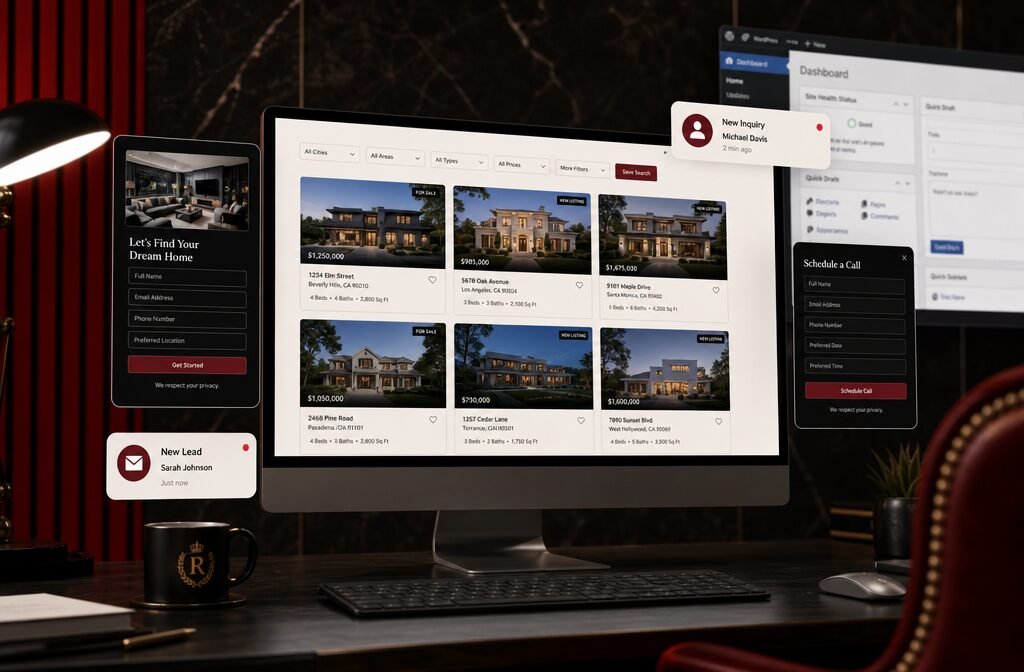
Quick Answer: The best IDX for WordPress in 2026 depends on your budget, MLS, and lead generation goals — but IDX Broker, ShowcaseIDX, and iHomefinder consistently top the list for agents who want a real estate website that actually converts visitors into clients. Installing the right IDX WordPress plugin connects your site to live MLS data, automates property search, and captures buyer leads around the clock — without you manually updating a single listing.
Key Takeaways
- IDX (Internet Data Exchange) lets your WordPress site display live MLS listings — it's non-negotiable for any serious real estate website in 2026.
- IDX Broker is the most widely used IDX WordPress plugin for agents who want deep customization and solid MLS coverage.
- ShowcaseIDX is the top pick for agents focused on lead generation and SEO-friendly property pages.
- iHomefinder works exceptionally well for teams and brokerages that need scalable, multi-agent setups.
- Realtyna and WPL Pro are the best options if you want to own your data and avoid monthly SaaS fees long-term.
- Free IDX options exist but come with serious limitations — they're fine for testing, not for building a lead machine.
- Most IDX plugins are manageable for non-tech-savvy agents, especially with guided setup and WordPress page builders.
- AI-powered IDX tools are entering the market in 2026, bringing smarter lead capture, behavioral property matching, and automated follow-up triggers.
- Your IDX plugin must be compatible with your specific local MLS — always verify before purchasing.
- A good IDX setup paired with a strong CRM is the foundation of a self-sustaining lead generation system.
Best IDX for WordPress: Turn Your Site Into a Lead Machine — The Full Breakdown
The best IDX for WordPress in 2026 is not a one-size-fits-all answer, but the goal is always the same: turn passive website traffic into active buyer and seller leads. An IDX plugin pulls live MLS listing data directly into your WordPress real estate website, giving visitors a reason to stay, search, and register — which is exactly how your site starts working for you instead of just sitting there looking pretty.
Here's the honest breakdown of the top IDX WordPress plugins agents are using right now:
🏆 IDX Broker
Best for: Agents and brokers who want maximum MLS coverage and customization.
IDX Broker is the most widely deployed IDX WordPress plugin in the country. It connects to over 600 MLS boards across the U.S. and Canada, which means most agents can get up and running without compatibility headaches. The WordPress plugin integrates cleanly with most themes, and the lead capture tools — saved searches, listing alerts, and registration walls — are genuinely impeccable.
Pricing: Starts around $55/month for individual agents; team and office plans go higher.
Standout features:
- Customizable search widgets and map-based search
- Lead management dashboard built in
- Mortgage calculator and market reports
- Omnibar search (works like Google for listings)
Choose IDX Broker if: You want broad MLS compatibility, a proven track record, and don't mind a monthly subscription for a polished product.
ShowcaseIDX
Best for: Agents who prioritize SEO and organic lead generation.
ShowcaseIDX is the fresh pick for agents building their real estate website on organic search traffic. Every listing gets its own SEO-indexed page, which means Google can crawl and rank your property pages — a feature that many IDX solutions quietly skip. The AI property search and behavioral tracking tools are also a step ahead of the competition in 2026.
Pricing: Starts around $59.95/month.
Standout features:
- SEO-indexed listing pages (huge for organic traffic)
- AI-powered property recommendations
- Neighborhood and school data built in
- Clean, modern search UI that buyers actually enjoy using
Choose ShowcaseIDX if: You're serious about ranking in Google and want your IDX to feed your long-term SEO strategy, not fight it.
iHomefinder (Optima Express)
Best for: Teams, brokerages, and agents who need multi-agent functionality.
iHomefinder's Optima Express WordPress plugin is the go-to for brokerages that need to manage multiple agent profiles under one roof. The lead routing, agent assignment, and team dashboard features are built for scale. It's also one of the cleaner integrations for WordPress real estate websites that use IDX alongside other tools like email marketing platforms.
Pricing: Starts around $50/month; team plans vary.
Standout features:
- Multi-agent and team roster pages
- Lead routing and agent assignment
- Market reports and CMAs
- Strong email drip integration
Choose iHomefinder if: You run a team or brokerage and need IDX that scales with your headcount.
Realtyna (WPL Pro)
Best for: Agents who want to own their data and avoid long-term SaaS fees.
Realtyna takes a different approach. Instead of a cloud-based MLS feed, WPL Pro stores listing data directly on your WordPress server. That means you own the data, your site loads faster, and you're not locked into a recurring subscription at the same rate forever. The tradeoff is a higher upfront cost and a slightly steeper setup process.
Pricing: One-time license starting around $299 + MLS add-ons.
Standout features:
- Data stored on your own server (full ownership)
- Highly customizable property search templates
- RESO Web API MLS integration
- No per-lead or per-search fees
Choose Realtyna if: You're playing the long game and want to reduce monthly overhead while maintaining full control of your real estate website.
dsIDXpress
Best for: Budget-conscious agents who want a lightweight IDX solution.
dsIDXpress is a leaner option that works well for solo agents with smaller websites. It's not loaded with bells and whistles, but it gets the job done for basic MLS feed integration on WordPress. The SEO-friendly URLs are a nice touch at this price point.
Pricing: Starts around $40/month.
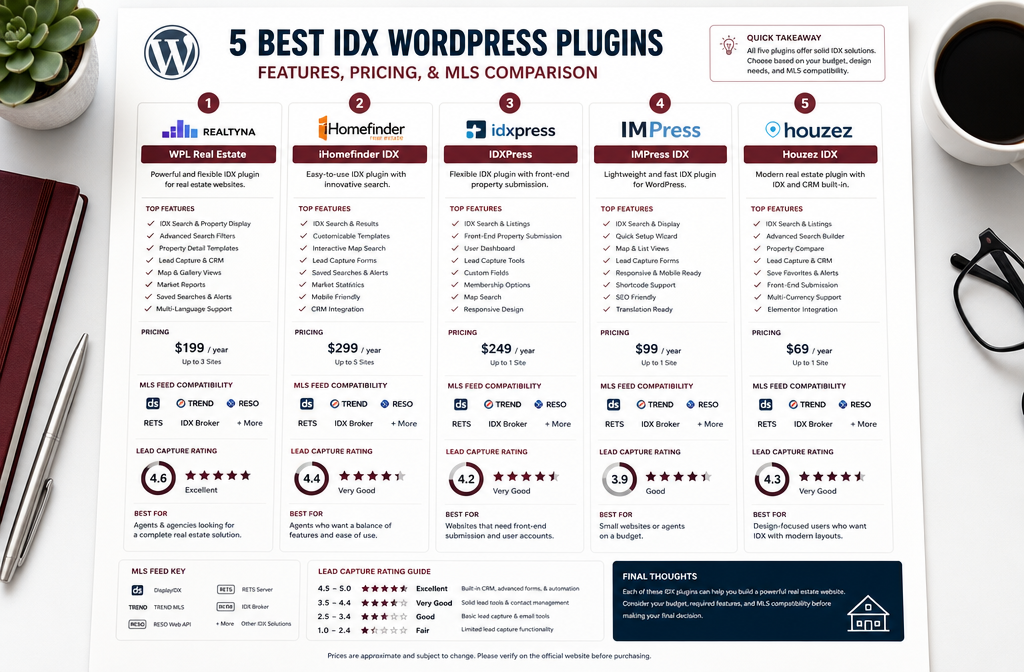
Quick Comparison Table
| Plugin | Best For | Starting Price | MLS Coverage | Lead Tools | SEO-Friendly |
|---|---|---|---|---|---|
| IDX Broker | Broad compatibility | ~$55/mo | 600+ MLS | ✅ Strong | ✅ Good |
| ShowcaseIDX | SEO + lead gen | ~$59.95/mo | Strong U.S. | ✅ AI-powered | ✅ Excellent |
| iHomefinder | Teams/brokerages | ~$50/mo | Strong U.S. | ✅ Multi-agent | ✅ Good |
| Realtyna/WPL Pro | Data ownership | ~$299 one-time | RESO API | ✅ Customizable | ✅ Good |
| dsIDXpress | Budget solo agents | ~$40/mo | Moderate | ⚠️ Basic | ✅ Good |
What Is an IDX and Why Do Real Estate Agents Need It?
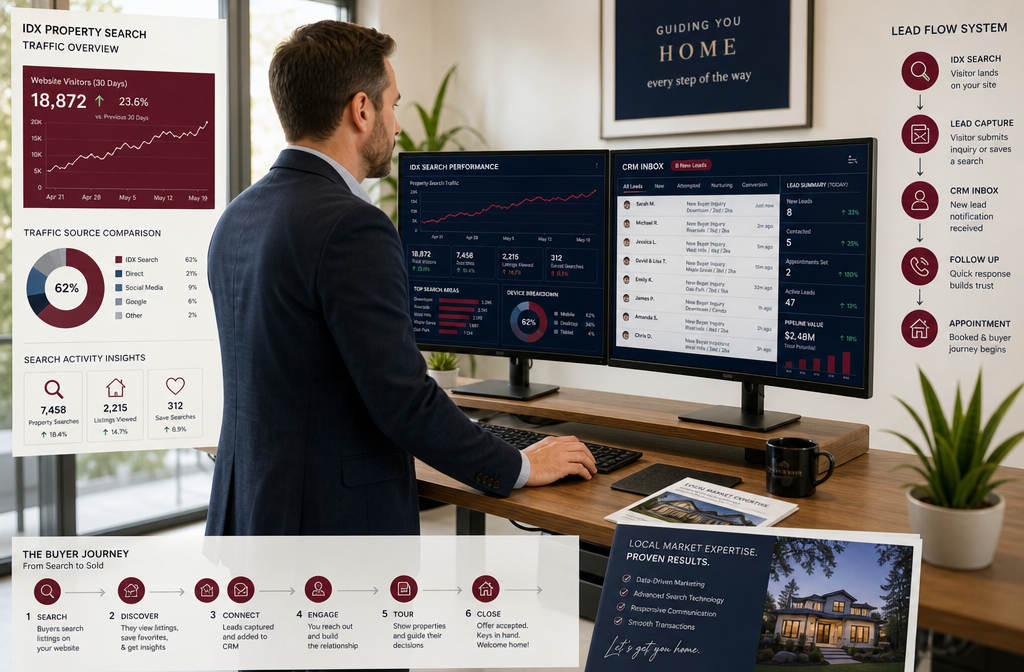
IDX stands for Internet Data Exchange — it's the system that allows real estate agents to display MLS listings on their own websites. Without IDX, your real estate website is essentially a digital business card. With it, your site becomes a property search portal that keeps buyers coming back.
Every time a visitor searches for homes on your site, saves a listing, or registers for alerts, that's a lead in your pipeline. The MLS feed WordPress connection is what makes this possible. Agents who skip IDX are essentially sending potential clients straight to Zillow, Realtor.com, or a competitor's site — which, no offense, is not the move.
Why it matters in 2026:
- Buyers start their home search online before ever calling an agent (NAR research consistently puts this figure above 95%)
- An IDX-powered site keeps that search activity on YOUR domain
- Lead capture tools built into IDX plugins collect contact info in exchange for saved searches and listing alerts
- AI MLS integration tools in 2026 are now matching buyers to properties based on behavioral data, not just filter inputs
If you're serious about real estate lead generation, IDX is not optional. It's the infrastructure.
How Do IDX Plugins Compare to Manual Property Listing Methods?
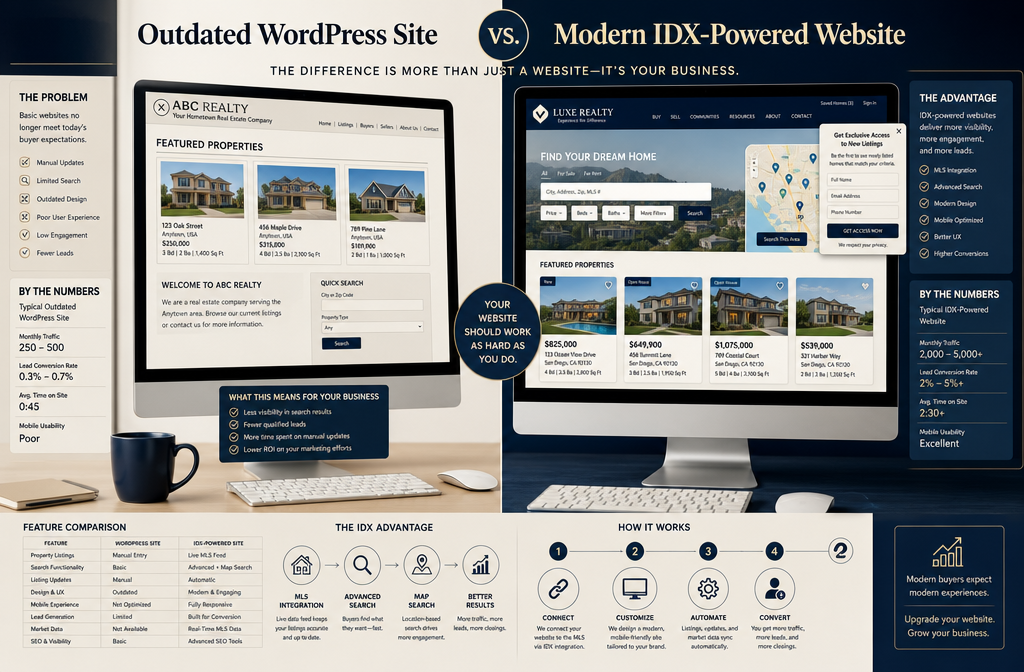
Manual listing methods — where you upload each property individually to your WordPress site — are not scalable and not competitive. IDX plugins win on every practical metric that matters to a working agent.
Here's the honest comparison:
| Factor | IDX Plugin | Manual Listings |
|---|---|---|
| Data freshness | Real-time MLS feed | Only as fresh as your last update |
| Time investment | Near-zero after setup | Hours per week |
| Listing volume | Entire MLS inventory | Only what you enter |
| Lead capture | Built-in, automated | Manual or separate tool |
| SEO value | Scales with MLS inventory | Limited to your entries |
| Cost | Monthly subscription | Free but time-expensive |
Manual listings make sense for one specific use case: showcasing your own active listings with custom marketing copy and branded photos. For everything else — buyer search, neighborhood exploration, market data — IDX is the only practical answer.
Agents who are still manually entering listings in 2026 are, respectfully, leaving time and leads on the table. Let it cook with an automated IDX setup and watch the difference.
What Features Should You Look for in an IDX Plugin?
The best IDX plugin for your real estate website is the one that matches how your business actually works. Not every agent needs every feature — but these are the ones worth paying attention to.
Non-negotiable features:
- MLS compatibility — your specific local MLS must be supported
- Lead capture tools — registration walls, saved search prompts, listing alert sign-ups
- Mobile-responsive search — buyers search on phones; your IDX must look good there
- Map-based search — draw-a-search and neighborhood maps are now expected by buyers
- WordPress theme compatibility — the plugin should integrate with your existing design
Strong-to-have features:
- SEO-indexed listing pages (ShowcaseIDX does this best)
- CRM integration or built-in lead management
- Mortgage calculators and affordability tools
- Market reports and sold data
- AI property matching and behavioral tracking (2026 standard for premium tools)
Skip if you don't need it:
- Multi-agent rosters (solo agents don't need this)
- Advanced team lead routing (overkill for individual agents)
- White-label options (relevant for brokerages, not solo agents)
The best IDX for WordPress is the one that fits your workflow, not the one with the longest feature list.
Which IDX Plugin Works Best for Realtors with Small Websites?
For agents with smaller WordPress sites — maybe a few pages, a basic theme, and modest traffic — ShowcaseIDX and dsIDXpress are the most practical starting points. Both install cleanly on lean WordPress setups without requiring a developer.
Recommended for small real estate websites:
- ShowcaseIDX — clean UI, fast setup, SEO-friendly from day one
- dsIDXpress — lower cost, lightweight, good for solo agents just getting started
- IDX Broker — slightly more setup involved but worth it if you plan to grow
The key thing for smaller sites is making sure the IDX plugin doesn't slow your page load speed. A heavy IDX integration on a shared hosting plan is a real problem. If your site is on basic shared hosting, consider upgrading to managed WordPress hosting before adding IDX — your lead conversion rates depend on fast load times.
How Much Do WordPress IDX Plugins Cost?
IDX WordPress plugin pricing in 2026 ranges from free (with serious limitations) to $100+/month for enterprise-level setups. Here's the realistic cost picture:
Budget tier ($0–$45/month):
- Free IDX options (limited MLS coverage, basic features, often branded)
- dsIDXpress (~$40/month)
- Good for: New agents testing the waters
Mid-tier ($45–$75/month):
- IDX Broker (~$55/month)
- iHomefinder Optima Express (~$50/month)
- ShowcaseIDX (~$59.95/month)
- Good for: Active agents who need real lead generation tools
Premium/One-time ($75+/month or $299+ one-time):
- Realtyna WPL Pro (~$299+ one-time license)
- IDX Broker office/team plans
- iHomefinder team plans
- Good for: Brokerages, teams, or agents who want to own their setup
Hidden costs to budget for:
- MLS board fees (separate from the plugin — your MLS may charge $25–$100+/month for IDX data access)
- WordPress hosting upgrades for performance
- Theme or page builder compatibility work (sometimes needed)
- Developer setup fees if you're not DIY-inclined
The total real cost of IDX for a real estate website is typically $75–$200/month when you factor in MLS fees. That's still a fraction of what most agents spend on paid leads — and unlike paid leads, your IDX works 24/7.
Can You Integrate IDX with Your Existing WordPress Site Easily?
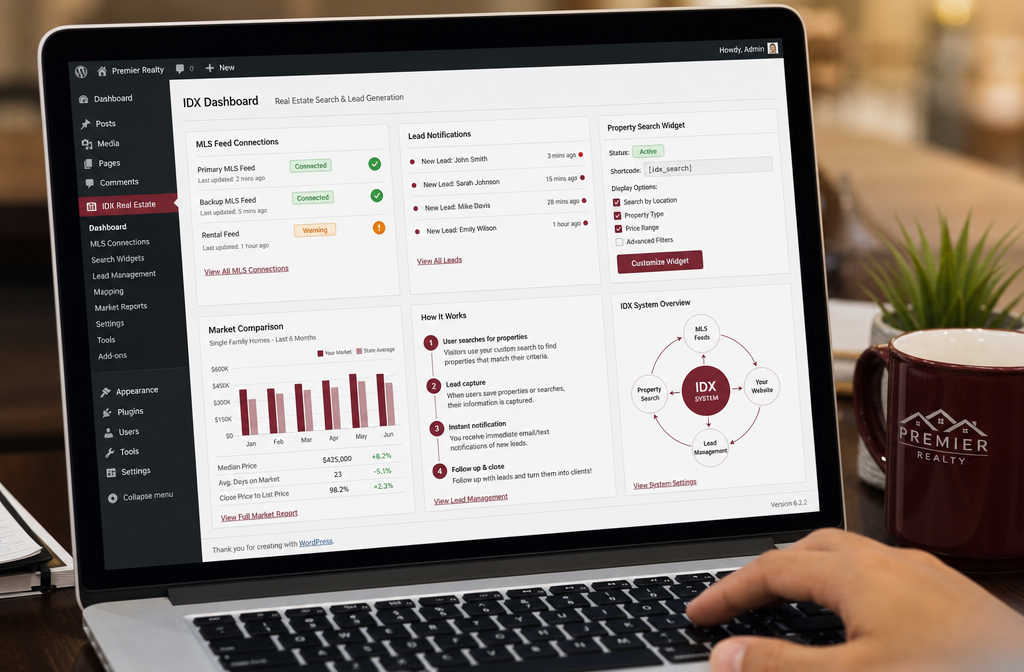
Yes — most IDX WordPress plugins are designed to integrate with existing WordPress sites without requiring a rebuild. The process is straightforward for most agents, even those who aren't tech-savvy.
Typical integration steps:
- Purchase your IDX plugin subscription (IDX Broker, ShowcaseIDX, etc.)
- Apply for MLS IDX access through your local board (if not already approved)
- Install the plugin from WordPress.org or via the plugin ZIP file
- Enter your IDX account credentials/API key in the plugin settings
- Wait for MLS data sync (usually 24–48 hours for initial feed)
- Add search widgets, listing pages, and lead capture forms to your site using shortcodes or page builder blocks
- Test on mobile and desktop before going live
Compatibility notes:
- Most IDX plugins work with Elementor, Divi, Beaver Builder, and Gutenberg
- Some themes conflict with IDX styling — a child theme or CSS override usually fixes this
- Older WordPress themes (pre-2020) may need updates before IDX integrates cleanly
The setup is manageable for most agents in an afternoon. If you hit a wall, most IDX providers offer onboarding support — IDX Broker and ShowcaseIDX both have solid customer service reputations.
Which IDX Plugin Generates the Most Leads?
ShowcaseIDX consistently earns the strongest reputation for lead generation among the major IDX WordPress plugins. The combination of SEO-indexed listing pages, AI property recommendations, and behavioral lead capture creates a system where buyers essentially self-qualify before you ever contact them.
What makes an IDX plugin a lead machine:
- Registration prompts — requiring sign-up to save searches or view full listing details
- Listing alerts — automated emails when new properties match a buyer's criteria (keeps your name in their inbox)
- Saved search tracking — you see exactly what buyers are looking at before you call them
- AI lead capture — tools like ShowcaseIDX's behavioral matching flag high-intent buyers automatically
- Market report opt-ins — home value and market trend reports are extraordinary lead magnets for sellers
IDX Broker also performs well here, especially with its Omnibar search and lead scoring features. The honest truth is that the plugin itself is only part of the equation — how you follow up on IDX leads determines whether your site is actually a lead machine or just a nice-looking property search tool.
Pair your IDX with a solid real estate CRM and an email marketing system and you've got a full pipeline system running on autopilot.
Is IDX Worth It for New Real Estate Agents?
Yes — IDX is worth it for new agents, but the timeline matters. You won't see immediate lead flow just because you installed a plugin. Let it cook before you see results. IDX is a long-game tool that compounds over time as your site builds traffic and your MLS listings accumulate indexed pages.
For new agents, here's the honest picture:
✅ IDX is worth it if:
- You're building a WordPress real estate website you plan to keep long-term
- You're investing in SEO and content to drive organic traffic
- You have a CRM ready to handle leads when they start coming in
- You're committed to consistent follow-up
⚠️ IDX alone won't save you if:
- Your site has zero traffic (no visitors = no leads)
- You have no follow-up system
- You're expecting instant results in month one
New agents who are also running lead generation strategies alongside their IDX setup tend to see the best results. IDX is the infrastructure; you still need to drive people to your site.
The good news: ShowcaseIDX's SEO-indexed listing pages mean that even a new site can start ranking for neighborhood and property search terms within a few months — which is genuinely fresh compared to the old approach of just hoping buyers find you.
Which IDX Works Best with Your Local MLS?
MLS compatibility is the single most important factor when choosing an IDX WordPress plugin — and it's the one most agents forget to check first.
How to verify MLS compatibility:
- Go to the IDX provider's website and look for their MLS coverage map or list
- Search for your specific MLS board by name or state
- Contact the provider directly if your MLS isn't listed — some have pending integrations
- Check with your MLS board to confirm they allow IDX data sharing with your chosen provider
MLS coverage by provider (general):
- IDX Broker — 600+ MLS boards, the broadest coverage in the market
- ShowcaseIDX — strong U.S. coverage, especially major metro markets
- iHomefinder — solid nationwide coverage with strong RESO API support
- Realtyna — uses RESO Web API, compatible with most modern MLS boards
- dsIDXpress — more limited coverage; verify your MLS before purchasing
So based rule: If your MLS isn't supported, no amount of great features matters. Verify compatibility first, then evaluate features.
Some smaller or regional MLS boards have unique data agreements that limit which IDX providers can access their feed. Your local board's compliance department can tell you exactly which providers are approved.
Are There Free IDX Options for WordPress?
Free IDX options exist, but they come with real limitations that most active agents will outgrow quickly. The most commonly cited free option is a basic IDX feed provided directly by some MLS boards — but these are typically unbranded, visually basic, and lack lead capture tools.
Free IDX options and their trade-offs:
| Option | What You Get | What's Missing |
|---|---|---|
| MLS board-provided IDX | Basic search widget | No branding, no lead tools, limited customization |
| Free plugin tiers | Limited listings or features | Usually capped or watermarked |
| Trial periods | Full features temporarily | Reverts to paid after trial |
The honest assessment: free IDX is better than no IDX, but it's not a lead machine. If budget is the constraint, start with a free trial from ShowcaseIDX or IDX Broker, get your MLS connection live, and upgrade once you close your first deal from a web lead.
Agents who are serious about gatekeeping their leads from Zillow and Realtor.com need a paid IDX solution with real lead capture tools. The $50–$60/month investment pays for itself with one transaction.
How Complicated Is IDX Setup for Someone Not Tech-Savvy?
IDX setup is manageable for most non-technical agents — especially with the current generation of plugins that include guided onboarding. On a scale of 1–10 for technical difficulty, most IDX WordPress plugins sit around a 4–5 for initial setup.
What's easy:
- Installing the plugin (same as any WordPress plugin)
- Connecting your account via API key
- Adding a search widget to a page using shortcodes
What takes more effort:
- Styling the search results to match your theme
- Setting up lead capture forms and registration prompts
- Configuring listing alert email sequences
- Troubleshooting MLS feed delays
Resources that help:
- IDX Broker has a dedicated WordPress setup guide and live chat support
- ShowcaseIDX offers onboarding calls for new subscribers
- Realtyna has an extensive documentation library and community forum
- YouTube tutorials for each major plugin are widely available
If you're using a page builder like Elementor or Divi, the visual drag-and-drop interface makes placing IDX widgets significantly easier. Most agents with basic WordPress familiarity can complete a functional IDX setup in 2–4 hours.
For agents who want zero technical headache, some IDX providers also offer fully managed WordPress real estate website setups — you pay a bit more, but someone else handles the configuration.
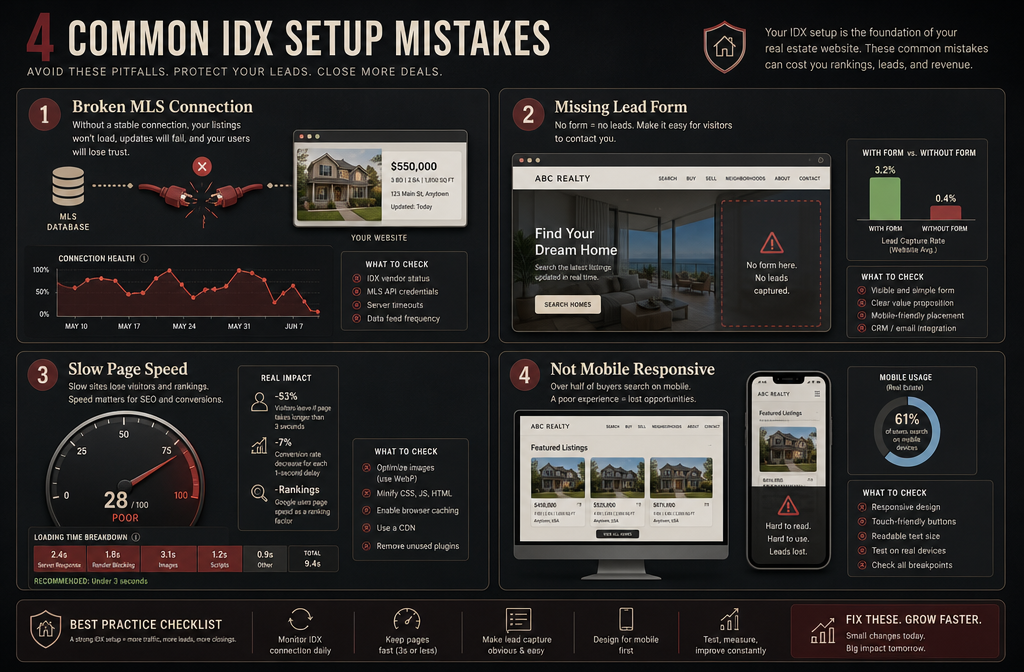
What Are Common Mistakes When Setting Up IDX for Real Estate?
The most common IDX setup mistakes cost agents leads before they even realize the system isn't working properly. Here are the ones worth avoiding:
Mistake 1: Not verifying MLS approval before purchasing
Your MLS board must approve your IDX data access. Some agents buy a plugin, install it, and then wait weeks for MLS approval they haven't applied for yet. Apply to your MLS first.
Mistake 2: Skipping lead capture configuration
An IDX search with no registration prompt is just a free search tool for anonymous visitors. Set up saved search registration, listing alert sign-ups, and contact forms from day one.
Mistake 3: Ignoring mobile optimization
A significant portion of property searches happen on mobile devices. If your IDX search widget looks broken on a phone, you're losing leads. Test on multiple devices before going live.
Mistake 4: No follow-up system connected
IDX leads without a CRM are just names in a database. Connect your IDX to a real estate CRM so every new registration triggers an immediate follow-up sequence.
Mistake 5: Choosing the wrong hosting plan
IDX plugins pull live MLS data, which adds server load. Shared hosting plans often can't handle this well, resulting in slow search results and frustrated visitors. Managed WordPress hosting is worth the upgrade.
Mistake 6: Forgetting about SEO settings
Most IDX plugins have SEO configuration options — meta titles, descriptions, canonical tags for listing pages. Leaving these at default settings is a missed opportunity, especially if you're using ShowcaseIDX for its SEO-indexed pages.
Mistake 7: Not updating the plugin regularly
IDX plugins require regular updates to maintain MLS feed connections and WordPress compatibility. An outdated plugin can break your entire property search overnight.
Can IDX Plugins Work with Different Real Estate Website Designs?
Yes — the major IDX WordPress plugins are built to work across a wide range of real estate website designs and themes. Most use shortcodes, Gutenberg blocks, or widget areas that drop into any WordPress layout.
Theme compatibility notes:
- Elementor — all major IDX plugins have Elementor-compatible widgets or shortcode blocks
- Divi — works well with IDX Broker and ShowcaseIDX; some CSS tweaking may be needed
- GeneratePress / Astra — lightweight themes that pair cleanly with IDX without performance issues
- Real estate-specific themes (AgentPress, Real Homes, Houzez) — often pre-built with IDX integration in mind
- Custom themes — may require developer help to style IDX search results to match
AI-powered IDX in 2026:
The newest generation of IDX tools is bringing AI property search and AI lead capture directly into WordPress. ShowcaseIDX's behavioral matching and IDX Broker's AI-powered recommendations are early versions of what's becoming the new standard. These tools analyze how visitors interact with listings and surface properties — and lead capture prompts — at the right moment in the search journey.
For agents building or refreshing their agent website builder setup in 2026, choosing an IDX plugin with AI MLS integration capabilities is a forward-thinking move that pays off as the tools mature.
FAQ: Best IDX for WordPress
Q: What does IDX stand for in real estate?
IDX stands for Internet Data Exchange — the system that allows real estate agents to display MLS listings on their own websites under a data sharing agreement with their MLS board.
Q: Do I need MLS approval to use an IDX plugin?
Yes. You must be an active MLS member and receive board approval to display IDX data. Most boards approve requests within a few days to a few weeks.
Q: Can I use IDX Broker with any WordPress theme?
IDX Broker works with most WordPress themes. Some custom or older themes may require minor CSS adjustments to style the search results consistently with your site design.
Q: Is ShowcaseIDX better than IDX Broker for SEO?
ShowcaseIDX has a clear SEO advantage because it creates individually indexed listing pages that Google can crawl and rank. IDX Broker's listing pages are less consistently indexed. For agents focused on organic search traffic, ShowcaseIDX is the stronger choice.
Q: How long does it take to get IDX up and running on WordPress?
From plugin installation to a live, functional property search, most agents complete setup in 2–4 hours. MLS data sync after initial connection typically takes 24–48 hours.
Q: Can IDX plugins slow down my WordPress site?
Yes, if your hosting plan isn't adequate. IDX plugins pull live MLS data, which increases server load. Managed WordPress hosting or a VPS plan significantly reduces this issue.
Q: What's the difference between Realtyna WPL Pro and cloud-based IDX solutions?
Realtyna WPL Pro stores MLS data on your own server, giving you data ownership and potentially faster load times. Cloud-based solutions like IDX Broker and ShowcaseIDX host the data on their servers and serve it to your site. WPL Pro has higher upfront cost but lower long-term monthly fees.
Q: Do IDX plugins work for commercial real estate websites?
Most IDX plugins are designed for residential MLS data. Commercial real estate listings often require separate data feeds or platforms. Check with your commercial MLS or data provider for compatible options.
Q: Can I use IDX on a WordPress.com site?
No. IDX plugins require a self-hosted WordPress.org installation. WordPress.com does not allow third-party plugin installation on most plans.
Q: What is AI-powered IDX and is it available in 2026?
AI-powered IDX uses machine learning to match buyers with properties based on their search behavior, not just their filter inputs. ShowcaseIDX and IDX Broker both have AI-assisted features available in 2026, with more providers adding similar capabilities throughout the year.
Q: Is iHomefinder good for a single agent or just teams?
iHomefinder works well for single agents, but its multi-agent features make it especially valuable for teams and brokerages. Solo agents may find IDX Broker or ShowcaseIDX a better value-to-feature fit.
Q: How do I choose between IDX Broker and ShowcaseIDX?
Choose IDX Broker if MLS compatibility and broad coverage are your top priorities. Choose ShowcaseIDX if organic search traffic and AI lead capture are your focus. Both are impeccable products — the right choice depends on your business model.
Conclusion: Your Real Estate Website Deserves Better Than a Digital Business Card
The best IDX for WordPress is the one you actually set up, configure properly, and connect to a real follow-up system. Whether you go with IDX Broker for its extraordinary MLS coverage, ShowcaseIDX for its fresh SEO-first approach, iHomefinder for team scalability, or Realtyna for data ownership — the move is to stop gatekeeping leads from yourself and build a real estate website that works while you're out closing deals.
Your actionable next steps:
- Verify your MLS board's IDX policy — confirm which providers are approved before spending a dollar
- Pick one plugin from this list that matches your budget and business model — don't overthink it
- Upgrade your hosting if you're on shared hosting — your IDX performance depends on it
- Configure lead capture from day one — registration prompts, listing alerts, and saved searches
- Connect your IDX to a CRM — check out our CRM comparison for real estate agents to find the right fit
- Build content around your IDX — neighborhood guides, market reports, and buyer resources drive traffic to your property search pages
- Track your leads and refine — use your IDX's analytics to see what buyers are searching and adjust your marketing accordingly
Your website has the potential to be your best-performing lead source in 2026. The IDX plugin is the engine. Now go build the machine.
For more on building a complete lead generation system, explore our guides on real estate lead generation software, real estate marketing automation, and the best AI tools for real estate agents that are changing how top producers run their businesses right now.
Tags: best idx for wordpress, idx wordpress plugin, idx broker, showcaseidx, ihomefinder, realtyna, mls feed wordpress, real estate website wordpress, idx lead generation, wordpress real estate plugin, idx integration, real estate agent tools 2026