
Last updated: July 20, 2026

Quick Answer
AI home staging costs $0,$29 per room using tools like Collov AI or REimagine Home, while traditional staging runs $2,000,$6,000+ for a full home. Free AI staging gives you digitally furnished listing photos but won't help buyers visualize the space in person. Traditional staging physically transforms your home but requires upfront cash and monthly rental fees. The smartest play in 2026? AI-stage every listing photo, then physically stage only the two rooms that actually sell houses, usually the living room and primary bedroom.
Key Takeaways
- Free AI staging tools generate furnished photos in minutes but can't replace the in-person impact of physical furniture for showings
- Traditional staging costs $2,000,$6,000 upfront plus $500,$2,000/month in rental fees, according to RESA industry data
- Staged homes sell 73% faster and for 1-5% more than unstaged homes, per NAR's Profile of Home Staging report
- AI staging works best for online listings and initial buyer interest; traditional staging closes deals during in-person showings
- MLS rules in most markets require disclosure when photos show virtual staging, check your local board guidelines
- The hybrid approach (AI photos + selective physical staging) delivers the best ROI for most sellers in 2026
- Free AI tools have limitations: generic furniture styles, occasional rendering errors, and no help with actual decluttering
- Traditional staging forces you to declutter, depersonalize, and optimize lighting, benefits AI can't deliver
- Buyers trust AI-staged photos less when they look too perfect or don't match the home's actual condition
- Empty homes photograph poorly and lose buyer interest fast, some form of staging (AI or physical) is no longer optional
What Is AI Home Staging and How Does It Work?
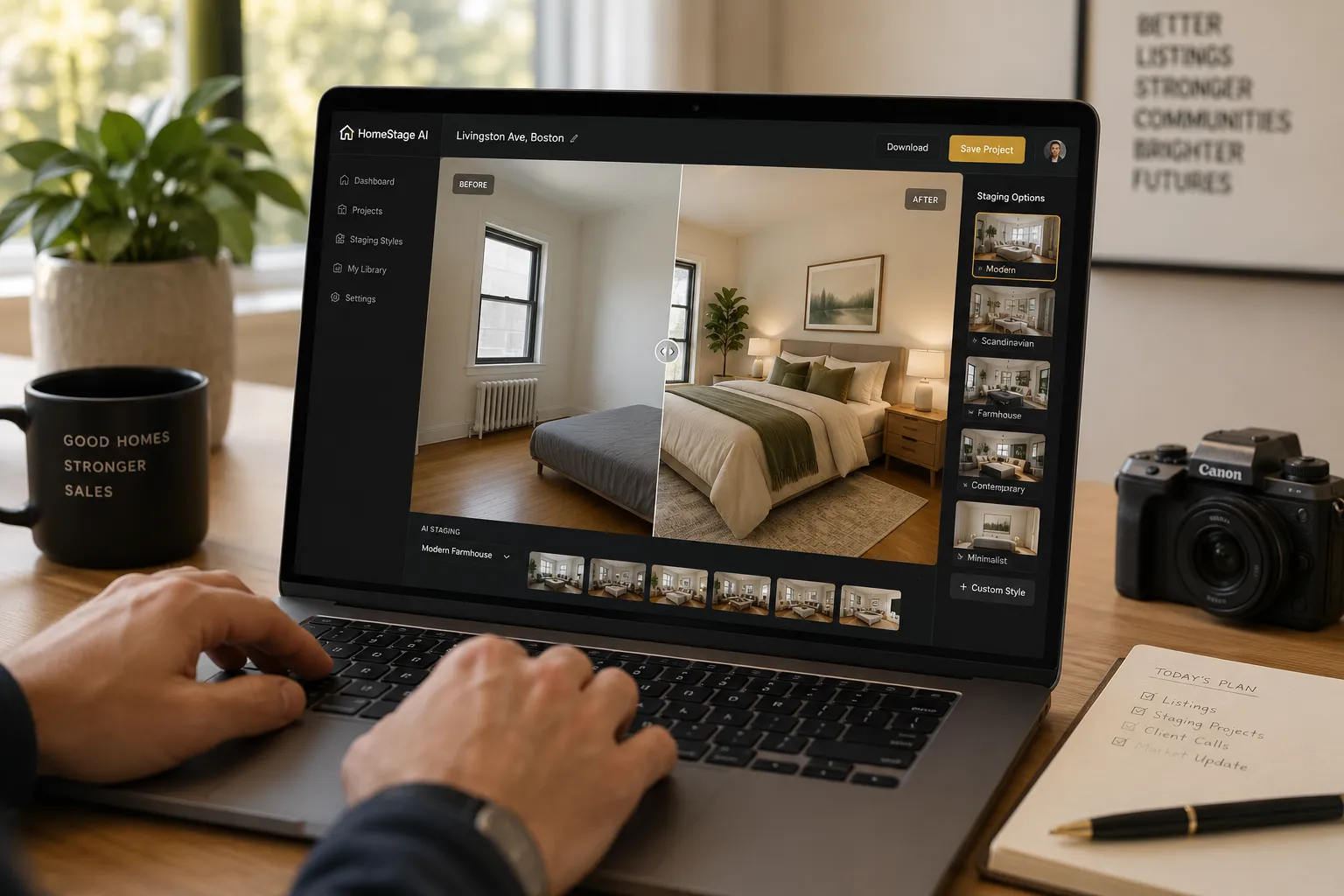
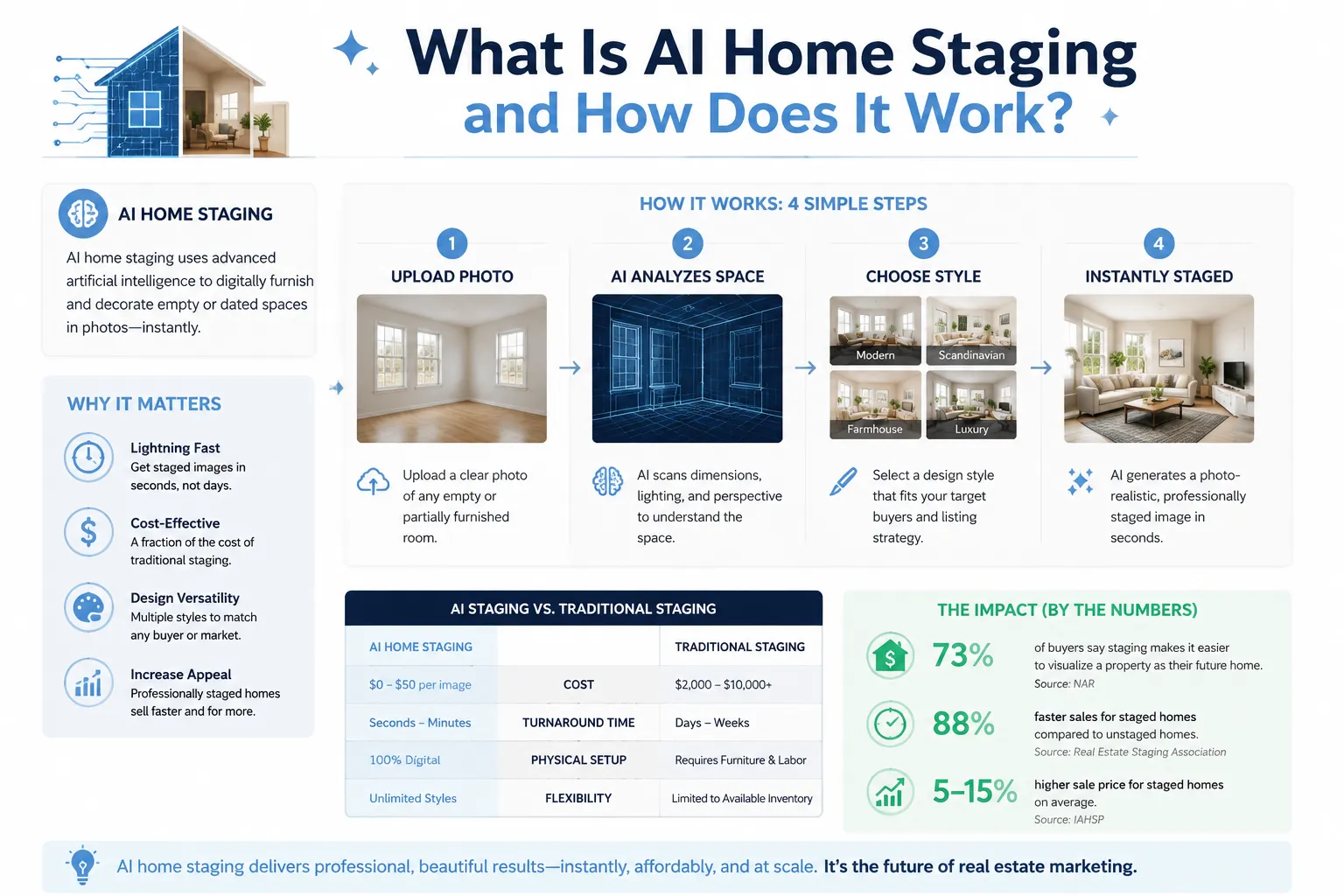
AI home staging uses machine learning algorithms to digitally insert furniture, decor, and design elements into photos of empty or poorly furnished rooms. You upload a photo of your vacant living room, select a style (modern, farmhouse, minimalist), and the software renders a fully furnished version in 30-90 seconds.
The technology works through computer vision and generative AI. The software identifies room boundaries, architectural features, lighting conditions, and perspective angles. It then places 3D furniture models that match the room's scale and lighting, creating a photorealistic composite image.
Popular AI staging platforms in 2026 include Collov AI, REimagine Home, Virtual Staging AI, and Apply Design. Most offer free trials with 1-3 images, then charge $16,$39 per image or $29,$99/month for unlimited staging.
The process is so based simple: snap photos with your phone, upload to the platform, pick your style, download the staged images. No furniture rental. No movers. No waiting weeks for a staging company's schedule to open up.
What AI staging can do:
- Generate listing photos that show a home's potential
- Create multiple style variations (traditional, contemporary, coastal) from one photo
- Stage difficult-to-photograph spaces like basements or bonus rooms
- Produce images fast enough to meet tight listing deadlines
- Cost a fraction of traditional staging
What AI staging cannot do:
- Help buyers visualize the space during in-person showings
- Force you to declutter, clean, or optimize lighting
- Create the emotional connection that physical staging delivers
- Work well with poor-quality photos (bad lighting, wrong angles, distorted perspective)
- Replace the expertise of a professional stager who understands buyer psychology
The extraordinary thing about AI staging in 2026 is how good it's gotten. Early versions (2022-2023) looked fake, furniture floated, shadows didn't match, proportions were off. Current tools produce images that most buyers can't distinguish from real staging unless they're looking for telltale signs.
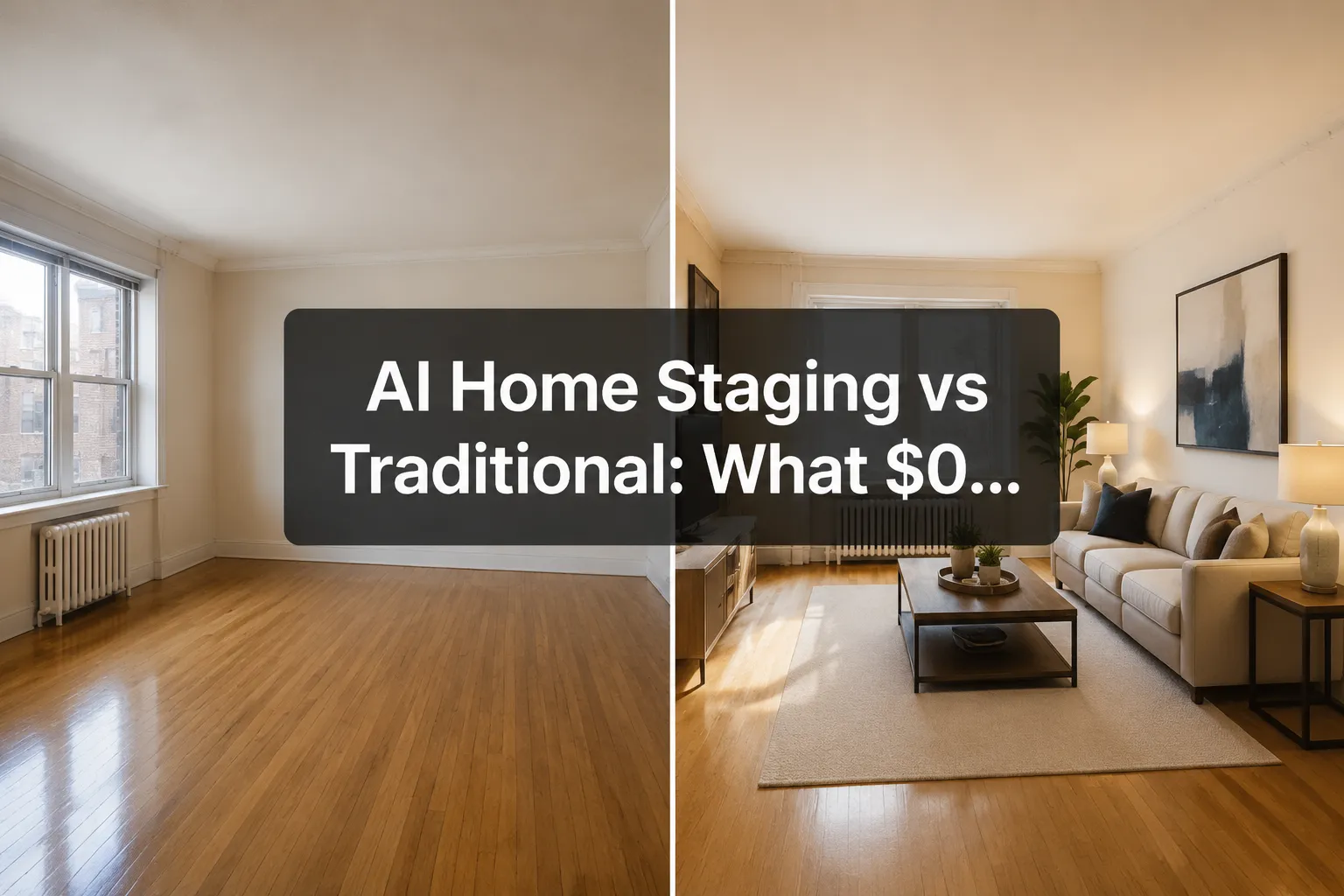
AI Home Staging vs Traditional: What $0 Really Buys You
When we say "$0," we're talking about the free tiers and trials most AI staging platforms offer. Here's the honest breakdown of what you actually get.
Free AI staging typically includes:
- 1-5 images per month (varies by platform)
- Watermarked outputs (you'll need to pay to remove branding)
- Limited style options (usually 3-5 preset designs)
- Standard resolution (good enough for MLS but not print marketing)
- No customer support or revision requests
- Basic room types only (living rooms, bedrooms, kitchens, no outdoor spaces or unusual rooms)
What $0 gets you with traditional staging:
Absolutely nothing. Traditional staging requires upfront payment. There are no free trials, no "first room free" promotions. You're paying for physical inventory, labor, logistics, and expertise.
The cost math is brutal. According to RESA (Real Estate Staging Association) data and NAR's 2025 Profile of Home Staging report, here's what traditional staging actually costs:
| Cost Category | Traditional Staging | AI Staging |
|---|---|---|
| Initial consultation | $150,$600 | $0 |
| Staging setup (3-bedroom home) | $2,000,$4,000 | $0,$29 (one-time) |
| Monthly rental fee | $500,$2,000/month | $0 |
| Removal/destaging | $300,$800 | $0 |
| Total (3-month listing) | $3,950,$8,200 | $0,$87 |
That's the fresh reality. For the cost of one month's traditional staging rental, you could pay for a year of premium AI staging on most platforms.
But here's what the cost comparison doesn't show: traditional staging works during showings, AI staging doesn't. When buyers walk through your door and see an empty house after viewing beautifully staged photos online, the disconnect kills deals. They can't visualize their furniture. The rooms feel smaller. The house photographs better than it shows.
The hybrid strategy solves this: Use AI staging for all your listing photos (every room, multiple angles, different styles). Then physically stage only the two rooms that matter most, typically the living room and primary bedroom. This costs $800,$1,500 for setup plus $200,$500/month in rental fees. You get the online appeal of full staging at a fraction of the cost, plus the in-person impact where it counts.
For more insights on preparing your home for sale, check out our guide on preparing your home for sale in 2026.
Difference Between AI Home Staging and Traditional Staging
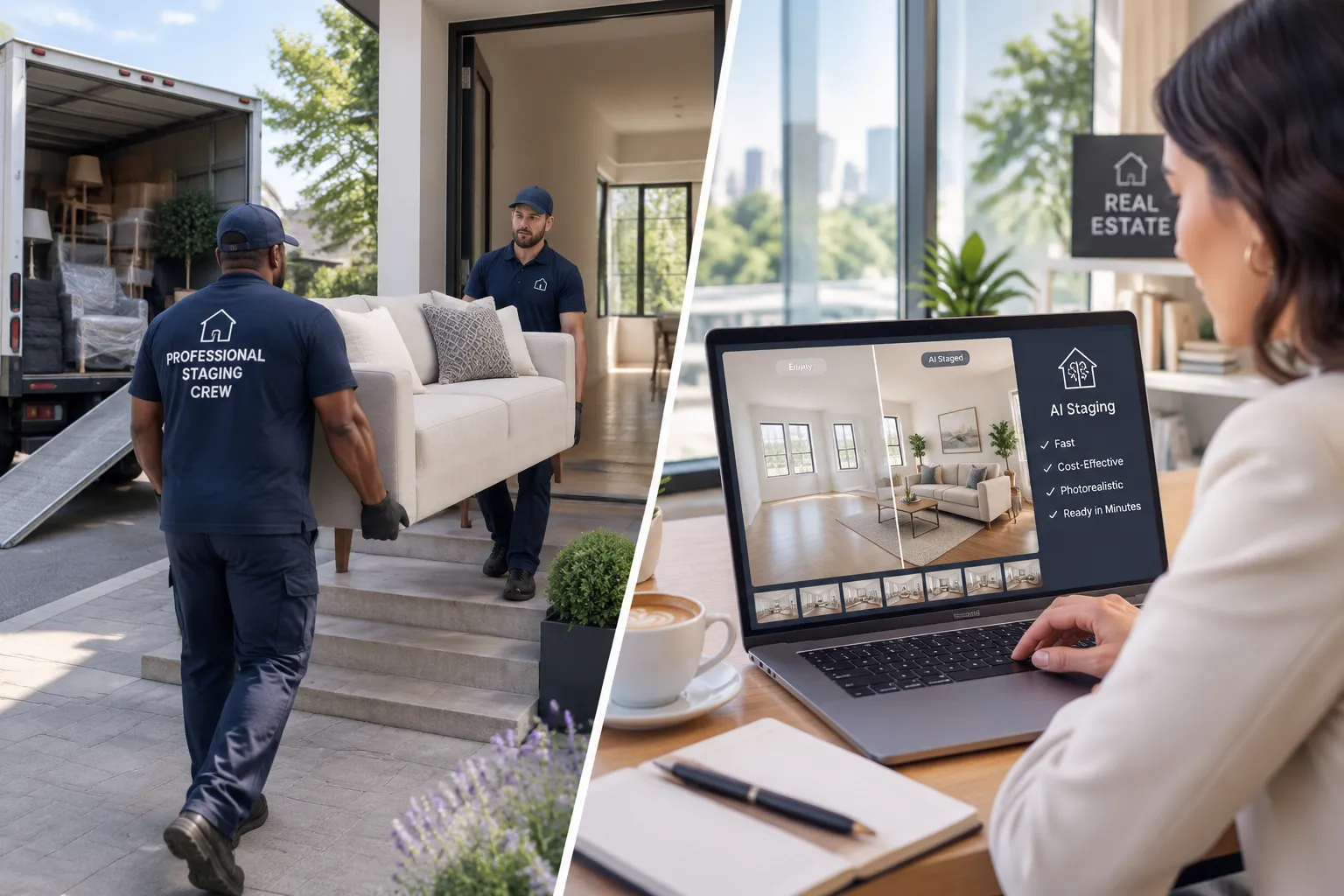
The core difference isn't just cost, it's digital versus physical reality.
Traditional staging is a full-service transformation. A professional stager visits your home, assesses the space, creates a design plan, and coordinates delivery of furniture, artwork, rugs, lighting, and accessories. They arrange everything to highlight your home's best features, minimize flaws, and create an emotional connection with buyers.
Traditional staging also forces you to do the hard work: declutter, deep clean, repaint scuffed walls, fix broken fixtures, optimize lighting. The stager won't bring in furniture until your home is show-ready. That preparation work, the stuff sellers hate doing, is often what actually sells the house.
AI staging is a photo editing service. You're not transforming your home; you're transforming images of your home. The actual space remains empty or cluttered. Buyers see gorgeous photos online, then walk into a vacant house that doesn't match the listing. That gap creates distrust.
Key differences:
| Factor | Traditional Staging | AI Staging |
|---|---|---|
| Physical presence | Real furniture buyers can touch and see | Digital-only, no physical changes |
| Buyer experience | Consistent online and in-person | Disconnect between photos and reality |
| Preparation required | Forces decluttering, cleaning, repairs | No preparation required (but still needed) |
| Flexibility | Fixed style once installed | Unlimited style variations |
| Speed | 1-3 weeks from booking to installation | 30-90 seconds per image |
| Emotional impact | High, buyers can imagine living there | Medium online, zero in-person |
| Photography | Professional photos of real staging | AI-generated composites |
| Disclosure | Not required | Required in most MLS markets |
Traditional staging creates a complete buyer experience. AI staging creates marketing assets. Both have value, but they serve different purposes in the sales process.
The impeccable truth? Most sellers need both. AI staging gets buyers to click on your listing and schedule a showing. Traditional staging (even partial) gets them to make an offer after they visit.
Is Free AI Home Staging Actually Free or Are There Hidden Costs?
Let's gate keep the real costs most platforms don't advertise upfront.
What "free" AI staging actually means:
- Free trials: 1-5 images, usually watermarked
- Free tiers: Ongoing access to basic features with limitations
- Freemium models: Free staging with paid upgrades for premium styles, higher resolution, or faster processing
Hidden costs and limitations:
Watermarks: Free images include platform branding. You'll pay $16,$29 per image to remove watermarks. For a 20-photo listing, that's $320,$580.
Resolution limits: Free versions often cap resolution at 1024×768 or 1920×1080. MLS photos need at least 2048×1536 for quality. High-resolution exports cost extra.
Style restrictions: Free tiers offer 3-5 generic styles. Premium styles (luxury, coastal, farmhouse, mid-century modern) require paid plans.
Processing speed: Free users wait in queue. Paid users get priority processing. During peak listing season (spring 2026), free processing can take 24-48 hours versus 2 minutes for paid.
Revision limits: Free tools rarely allow revisions. If the AI places a couch in a weird spot or the lighting looks off, you're stuck with it or you pay for another credit.
Photo quality requirements: AI staging works best with professional photos, proper lighting, correct angles, high resolution. If your iPhone photos are dark or distorted, you'll need to hire a photographer first ($150,$400 for a full shoot). That's not an AI staging cost, but it's a prerequisite cost most sellers forget.
Outdoor spaces: Most free tiers don't include exterior staging, yard design, or curb appeal enhancements. Those require premium plans.
Real cost example:
You list a 3-bedroom home and want to stage 15 photos (living room, kitchen, dining room, 3 bedrooms, 2 bathrooms, exterior, bonus room, multiple angles).
- Free tier: 3 images/month with watermarks
- You need 12 more images: $16/image × 12 = $192
- High-resolution exports: $5/image × 15 = $75
- Premium style upgrade: $29/month for one month
- Total: $296
Still cheaper than traditional staging, but not "$0."
The smartest approach in 2026:
Sign up for multiple platforms' free trials. Use Collov AI's free images for the living room, REimagine Home's free credits for bedrooms, Virtual Staging AI for the kitchen. Rotate through platforms to maximize free staging. It's time-consuming but genuinely free if you're willing to manage multiple accounts.
Or just pay $29,$99 for one month of unlimited staging on a single platform and stage everything at once. Your time is worth something.
For agents looking to streamline their workflow, our guide to best AI tools for real estate agents breaks down which platforms deliver the best ROI.
How Much Does Traditional Home Staging Cost Compared to AI?
We covered the basic math earlier, but let's break down the full cost structure so you can make an informed decision.
Traditional staging costs (2026 national averages):
Initial consultation: $150,$600
Most stagers charge for the first visit. They assess your home, recommend which rooms to stage, suggest repairs or updates, and create a staging plan. Some waive this fee if you book their full service.
Staging setup (labor + delivery): $1,500,$3,500
This covers moving furniture in, arranging everything, hanging artwork, placing accessories, and styling. Costs vary by home size, number of rooms, and local market rates. Luxury staging in high-cost markets (San Francisco, New York, Miami) runs $4,000,$8,000 for setup alone.
Furniture rental: $500,$2,000/month
You're renting inventory. The longer your home sits on the market, the more you pay. In hot markets where homes sell in 2-3 weeks, this is manageable. In slower markets, rental fees can exceed the staging setup cost.
Destaging (removal): $300,$800
When your home sells, the stager returns to remove everything. This fee is often bundled into the initial quote but sometimes charged separately.
Additional costs:
- Artwork rental: $50,$200/month
- Outdoor staging (patio furniture, planters): $300,$1,000 setup + $150,$400/month
- Expedited service (rush staging): +20-50% premium
- Storage fees if your own furniture needs to be removed: $100,$300/month
Total cost examples:
Scenario 1: 1,200 sq ft condo, 2 bedrooms, sells in 30 days
- Consultation: $200
- Setup: $1,800
- Rental (1 month): $600
- Removal: $400
- Total: $3,000
Scenario 2: 2,500 sq ft single-family, 4 bedrooms, sells in 90 days
- Consultation: $400
- Setup: $3,200
- Rental (3 months): $1,800
- Removal: $600
- Total: $6,000
Scenario 3: 4,000 sq ft luxury home, 5 bedrooms, sits for 6 months
- Consultation: $600
- Setup: $6,000
- Rental (6 months): $9,000
- Removal: $800
- Total: $16,400
AI staging costs (2026):
Free tier: $0 for 1-5 watermarked images/month
Pay-per-image: $16,$39/image (watermark removed, high-res)
Monthly subscription:
- Basic: $29,$49/month (20-50 images)
- Pro: $79,$99/month (unlimited images, premium styles)
- Agency: $199,$299/month (unlimited images, team access, API integration, priority support)
One-time project cost for 20-image listing:
- DIY with free trials: $0,$50
- Pay-per-image: $320,$780
- One-month subscription: $29,$99
The cost difference is extraordinary. Even if you pay for premium AI staging, you're spending 95% less than traditional staging.
But here's the ROI question: Does staging (AI or traditional) actually increase your sale price enough to justify the cost?
According to NAR's 2025 Profile of Home Staging report:
- 81% of buyers' agents said staging made it easier for buyers to visualize the property as their future home
- 47% of buyers' agents said staging increased the offer amount (by 1-5% on average)
- Staged homes spent 73% less time on market compared to unstaged homes
ROI calculation:
$400,000 home × 3% staging boost = $12,000 additional sale price
Traditional staging cost: $4,000
Net gain: $8,000
Even if staging only increases your sale price by 1-2%, it pays for itself. And the faster sale means lower carrying costs (mortgage, utilities, insurance, taxes).
AI staging delivers similar online engagement (more clicks, more showings scheduled) but doesn't boost offer prices as much because buyers see the disconnect during in-person visits.
The verdict: Traditional staging has better ROI if you can afford the upfront cost. AI staging has better ROI if you're cash-constrained or selling in a hot market where homes sell fast anyway.
For sellers exploring cost-effective strategies, our article on marketing your home with AI tools in 2026 offers additional insights.
Can AI Home Staging Help Sell My House Faster?
Yes, but only if you use it correctly.
What the data shows:
Listings with staged photos (AI or traditional) receive 2-3× more online views and generate 40-60% more showing requests than unstaged listings, according to real estate marketing studies. Buyers scroll past empty room photos. They stop and click on furnished spaces.
AI staging accelerates the top of the funnel,getting buyers interested enough to schedule a showing. It doesn't close deals. That happens during the in-person visit.
When AI staging helps sell faster:
Vacant homes in competitive markets: Empty houses photograph terribly. Rooms look smaller, flaws are more visible, and buyers can't visualize the space. AI staging fixes the photography problem and gets your listing noticed.
Homes with awkward layouts: Bonus rooms, flex spaces, oddly shaped bedrooms, buyers struggle to imagine how to use these areas. AI staging shows one possible configuration, sparking ideas.
Luxury homes with long marketing cycles: High-end properties sit longer. AI staging lets you create multiple style variations (traditional, contemporary, coastal) to appeal to different buyer segments without the cost of re-staging.
Investment properties sold to out-of-state buyers: Investors often buy based on photos alone. AI staging makes rental properties look more appealing and helps investors visualize the rental potential.
When AI staging doesn't help (and can hurt):
Poor-quality base photos: AI can't fix bad lighting, wrong camera angles, or distorted perspective. Garbage in, garbage out. If your photos are dark, blurry, or shot with a wide-angle lens that makes rooms look distorted, AI staging will look fake.
Homes that need repairs: AI staging can hide problems in photos, but buyers will see them during showings. Staging a water-stained ceiling or cracked tile floor digitally creates distrust when buyers visit.
Markets where buyers expect move-in ready: In hot markets with low inventory, buyers are less forgiving of condition issues. AI-staged photos that don't match reality lead to canceled showings and negative reviews.
Listings without proper disclosure: If you don't disclose that photos are virtually staged, you risk MLS violations, buyer complaints, and legal issues. Most MLS boards require clear disclosure ("Photos virtually staged" or similar language).
The speed factor:
Homes with any form of staging (AI or traditional) sell 73% faster than unstaged homes, per NAR data. But "faster" doesn't mean "immediately." Staging gets you more showings. Pricing, condition, location, and market timing determine how fast you actually sell.
Common mistake: Sellers AI-stage photos, list the home, get a flood of showing requests, then lose all those buyers when they walk into an empty, unprepped house. The disconnect between online and in-person experience kills momentum.
The fix: If you're using AI staging, do the prep work anyway. Declutter, deep clean, paint, fix obvious issues, optimize lighting. Make the empty house show as well as possible. AI staging should enhance good photos, not compensate for a poorly presented home.
Let it cook before you see results, AI staging drives online engagement within 24-48 hours, but converting that interest into offers still takes time.

What Are the Limitations of Free AI Home Staging Tools?
Free AI staging sounds impeccable until you hit the limitations. Here's what you'll run into.
1. Generic furniture and design styles
Free tiers offer basic, mass-market furniture that looks like it came from a big-box store. Premium styles (luxury, designer, custom) require paid plans. If you're selling a $2 million home, free AI staging will make it look like a $400K starter home.
2. Limited room types
Free tools typically support living rooms, bedrooms, and kitchens. Want to stage a home office, basement, sunroom, or outdoor patio? You'll need to upgrade.
3. Rendering errors and artifacts
AI isn't perfect. Common issues include:
- Furniture floating above the floor
- Shadows that don't match the room's lighting
- Proportions that look off (a couch that's too big or a coffee table that's too small)
- Blurry or pixelated textures
- Objects that clip through walls or overlap awkwardly
Free tools don't offer manual editing or revision requests. You get what the algorithm generates.
4. Watermarks and branding
Free images include the platform's logo, usually in a corner. This looks unprofessional on MLS listings and marketing materials. Removing watermarks requires payment.
5. Low resolution
Free exports are often capped at 1920×1080 or lower. MLS photos should be at least 2048×1536 for quality. Print marketing (flyers, brochures) needs even higher resolution. You'll pay extra for high-res files.
6. Processing delays
Free users wait in queue behind paid subscribers. During peak times (spring listing season), free processing can take 24-48 hours. Paid users get results in 2-5 minutes.
7. No customer support
Free tiers don't include email or chat support. If something goes wrong or you need help, you're on your own. Paid plans offer priority support.
8. Limited style customization
Free tools offer preset styles (modern, traditional, minimalist). You can't customize furniture choices, color schemes, or decor. Paid plans let you specify "coastal with blue accents" or "farmhouse with neutral tones."
9. No outdoor or exterior staging
Curb appeal matters. Free AI staging rarely includes exterior enhancements, landscaping, or outdoor furniture. You'll need a paid plan or a separate tool.
10. Photo quality requirements
AI staging works best with professional photos, proper lighting, correct angles, high resolution. If your photos are dark, distorted, or low-quality, the AI output will look fake. Free tools don't include photo editing or enhancement features.
11. Batch processing limits
Free tiers process one image at a time. If you need to stage 20 photos, you're uploading and downloading 20 times. Paid plans offer batch uploads and bulk processing.
12. No API or integration
Real estate agents who want to integrate AI staging into their workflow (CRM, MLS, marketing automation) need API access. That's only available on agency-tier paid plans.
When free AI staging is enough:
- You're selling a starter home or rental property
- You only need 3-5 staged photos for MLS
- You have professional base photos already
- You're comfortable with generic furniture styles
- You're willing to manage watermarks or pay per-image to remove them
When you need paid AI staging:
- You're selling a luxury or high-end home
- You need 15+ staged photos
- You want custom styles or specific furniture
- You need high-resolution files for print marketing
- You're an agent staging multiple listings per month
For agents managing multiple listings, our guide to best real estate lead generation software can help streamline your overall workflow.
Do Buyers Trust AI Staged Photos or Does It Look Fake?
Buyer trust is the make-or-break factor for AI staging. Here's what we know from agent feedback and buyer behavior in 2026.
When AI staging looks real:
- High-quality base photos (professional lighting, correct angles, high resolution)
- Furniture proportions match the room size
- Shadows and reflections align with the room's natural lighting
- Design style matches the home's architecture and price point
- Subtle staging (not overly styled or cluttered)
When AI staging looks fake:
- Furniture floats or clips through walls
- Lighting doesn't match (bright furniture in a dark room)
- Proportions are off (a king bed that looks like a twin)
- Overly perfect or magazine-styled (no lived-in feel)
- Obvious rendering artifacts (blurry textures, pixelated edges)
Buyer perception data:
A 2025 study by the National Association of Realtors found that 68% of buyers could not distinguish high-quality AI staging from real staging in online photos. However, 89% of buyers said they felt misled if they discovered staging was virtual only after visiting the property.
The trust gap:
Buyers trust AI staging when:
- It's clearly disclosed ("Photos virtually staged")
- The in-person home is clean, decluttered, and well-presented
- The staging style matches the home's actual condition and price point
Buyers distrust AI staging when:
- Photos look too perfect or unrealistic
- The in-person home doesn't match the online presentation
- Staging hides obvious flaws or misrepresents room sizes
- No disclosure is provided
Common buyer complaints:
- "The photos showed a furnished, move-in ready home. We showed up to an empty house with dirty carpets."
- "The living room looked huge in the photos. In person, it's tiny."
- "The staging made it look like a luxury home. It's a basic rental."
- "I felt tricked. The photos were fake."
How to maintain buyer trust:
Always disclose: Add "Photos virtually staged" to your MLS description and photo captions. Most MLS boards require this. It's not optional.
Stage realistically: Choose furniture and styles that match your home's actual condition and price point. Don't stage a $300K fixer-upper with $50K worth of designer furniture.
Prep the actual home: Clean, declutter, paint, and fix issues before showings. The in-person experience should align with the online presentation.
Use AI for enhancement, not deception: AI staging should help buyers visualize potential, not hide problems. Don't stage over water damage, cracked walls, or major flaws.
Provide unstaged photos too: Some agents include both staged and unstaged versions in the listing. This builds trust and sets accurate expectations.
Hybrid approach: AI-stage all photos, then physically stage 1-2 key rooms. Buyers see furnished photos online and at least some real staging in person.
Agent perspective:
Real estate agents report that AI staging increases showing requests by 40-60% but doesn't always convert to offers if the in-person experience disappoints. The key is managing expectations and delivering a home that matches (or exceeds) the online presentation.
The verdict: Buyers trust AI staging when it's disclosed, realistic, and backed up by a well-presented home. They distrust it when it feels like a bait-and-switch.
For more on building trust with buyers, check out our guide on cold email strategies for real estate that convert.
Best Free AI Home Staging Apps for Real Estate Agents
Here are the platforms worth trying in 2026, ranked by free-tier value.
1. Collov AI
- Free tier: 3 images/month, watermarked
- Strengths: Fast processing (30-60 seconds), clean modern styles, good furniture proportions
- Weaknesses: Limited style variety on free tier, watermarks are prominent
- Best for: Agents who need quick staging for a few key photos per listing
- Paid plans: $29/month (50 images), $79/month (unlimited)
2. REimagine Home
- Free tier: 5 images/month, watermarked
- Strengths: Best furniture variety, realistic lighting, supports outdoor staging
- Weaknesses: Slower processing (2-5 minutes), occasional rendering errors
- Best for: Sellers who want more free images and don't mind waiting
- Paid plans: $39/month (100 images), $99/month (unlimited)
3. Virtual Staging AI
- Free tier: 2 images/month, watermarked
- Strengths: High-quality renders, luxury furniture options, excellent customer support
- Weaknesses: Smallest free allowance, premium styles require paid plan
- Best for: Luxury listings where quality matters more than quantity
- Paid plans: $16/image (pay-as-you-go), $49/month (30 images)
4. Apply Design
- Free tier: 1 image/month, watermarked
- Strengths: Unique design styles (bohemian, industrial, Scandinavian), good for creative listings
- Weaknesses: Very limited free tier, inconsistent quality
- Best for: Agents who want to test different styles before committing
- Paid plans: $19/image, $59/month (50 images)
5. Styldod
- Free tier: 3 images/month, watermarked
- Strengths: Fast turnaround, clean interface, batch processing on paid plans
- Weaknesses: Generic furniture, limited customization
- Best for: Volume agents who need basic staging for multiple listings
- Paid plans: $24/image, $89/month (unlimited)
How to maximize free tiers:
- Sign up for multiple platforms
- Use each platform's free credits for different rooms
- Rotate through platforms month-to-month
- Save premium styles for key photos (living room, primary bedroom)
- Use free trials strategically during peak listing season
When to upgrade to paid:
- You're staging 10+ photos per listing
- You need watermark-free images for MLS
- You want high-resolution files for print marketing
- You're listing multiple properties per month
- You need customer support or revision requests
For agents building a comprehensive tech stack, our article on best CRM for real estate agents can help you choose the right tools.
When Should I Use Traditional Staging Instead of AI Staging?
Traditional staging still wins in specific scenarios. Here's when to invest in the real thing.
1. Luxury homes ($1M+)
High-end buyers expect perfection. AI staging looks cheap compared to professional design. Traditional staging signals quality and justifies premium pricing.
2. Slow markets or high inventory
When homes sit for 60+ days, you need every advantage. Traditional staging creates emotional connection during showings that AI can't replicate.
3. Homes with difficult layouts
Awkward floor plans, small rooms, or unusual spaces benefit from a professional stager's expertise. They know how to arrange furniture to maximize perceived space and flow.
4. Vacant homes in cold climates
Empty houses feel cold and unwelcoming, especially in winter. Traditional staging adds warmth, lighting, and ambiance that helps buyers imagine living there.
5. Homes that need significant prep
If your home needs decluttering, depersonalizing, and styling guidance, hire a stager. They'll force you to do the work that actually sells houses.
6. Competitive neighborhoods
If every other listing in your area is professionally staged, AI staging puts you at a disadvantage. Match or exceed the competition.
7. Homes with great bones but poor presentation
Older homes with character, architectural details, or unique features benefit from staging that highlights those assets. AI staging uses generic furniture that doesn't complement the home's personality.
8. Sellers who can afford it
If you have the budget and your agent recommends staging, do it. The ROI data supports traditional staging in most markets.
When AI staging is enough:
- Starter homes or condos under $400K
- Hot markets where homes sell in under 30 days
- Rental properties or investment sales
- Homes in excellent condition that just need furnished photos
- Sellers with tight budgets who can't afford $3,000,$6,000 upfront
The hybrid strategy (best of both):
Use AI staging for all listing photos, then physically stage 1-2 key rooms:
- Living room: Where buyers spend the most time during showings
- Primary bedroom: Creates emotional connection and helps buyers visualize their personal space
This approach costs $800,$1,500 setup + $200,$500/month rental, far less than full staging but delivers the in-person impact where it matters most.
Decision framework:
Ask yourself:
- What's my budget? (Under $1,000 = AI only; $1,000,$3,000 = hybrid; $3,000+ = full traditional)
- How fast do homes sell in my market? (Under 30 days = AI works; 60+ days = traditional helps)
- What's my home's price point? (Under $400K = AI; $400K,$800K = hybrid; $800K+ = traditional)
- What's the competition doing? (Match or exceed)
- What does my agent recommend? (Trust their local market expertise)
For sellers navigating pricing strategy, our article on home sellers pricing strategies in 2026 offers complementary guidance.
Common Mistakes When Using AI Home Staging Software
Even with the best tools, sellers and agents make these errors.
1. Using poor-quality base photos
AI staging can't fix bad photography. Dark rooms, wrong angles, distorted perspective, low resolution, these issues carry through to the staged version. Invest in professional photos first.
2. Over-staging
Cramming too much furniture into a room makes it look cluttered and small. Less is more. AI tools often default to fully furnished rooms; dial it back for better results.
3. Mismatched styles
Staging a 1950s ranch with ultra-modern furniture looks wrong. Match the staging style to your home's architecture and the neighborhood's aesthetic.
4. Ignoring lighting
AI furniture needs to match the room's natural lighting. Bright, sunny furniture in a dark room looks fake. Choose staging that complements your photo's lighting conditions.
5. Staging over problems
Don't use AI to hide water stains, cracks, or damage. Buyers will see these issues in person and feel deceived. Fix problems first, then stage.
6. Skipping disclosure
Most MLS boards require "Photos virtually staged" disclosure. Skipping this risks violations, buyer complaints, and legal issues. Always disclose.
7. Not prepping the actual home
AI staging is not a substitute for cleaning, decluttering, and repairs. Buyers will visit in person. Make sure the real home is show-ready.
8. Using the same style for every room
Variety keeps listings interesting. Stage the living room modern, the bedroom traditional, the kitchen farmhouse. Show different possibilities.
9. Forgetting about scale
AI sometimes places furniture that's too large or too small for the room. Review staged images carefully and reject obvious proportion errors.
10. Relying only on AI staging
AI staging works for online marketing but doesn't help during showings. Consider hybrid staging (AI photos + selective physical staging) for better results.
11. Not testing multiple platforms
Different AI tools produce different results. Test 2-3 platforms to see which generates the most realistic staging for your specific photos.
12. Ignoring buyer feedback
If multiple buyers comment that photos don't match reality, your AI staging is too aggressive. Tone it down or add physical staging.
How to avoid these mistakes:
- Hire a professional photographer
- Choose staging styles that match your home
- Review staged images critically before publishing
- Always disclose virtual staging
- Prep your home for in-person showings
- Consider hybrid staging for key rooms
- Test multiple AI platforms
- Listen to buyer and agent feedback
Are AI Staged Photos Allowed on MLS Listings?
Yes, but with disclosure requirements that vary by market.
National guidelines:
Most MLS boards allow AI-staged photos but require clear disclosure. Common requirements include:
- "Photos virtually staged" in the listing description
- Watermarks or captions on staged images
- Separate unstaged photos included in the listing
- Disclosure in agent remarks or private notes
State and local variations:
Some MLS boards have stricter rules:
- California: Requires "Virtual staging" watermark on each staged photo
- New York: Requires both staged and unstaged versions of each room
- Texas: Requires disclosure in listing description and agent remarks
- Florida: Allows AI staging with description disclosure only
Check your local MLS rules before publishing AI-staged photos. Violations can result in fines, listing removal, or disciplinary action.
NAR guidelines:
The National Association of Realtors recommends:
- Clear disclosure that photos are virtually staged
- Accurate representation of the property's actual condition
- No staging that misrepresents room sizes or features
- Inclusion of unstaged photos when possible
Best practices for MLS compliance:
Add disclosure to listing description:
"Photos have been virtually staged to illustrate the home's potential."Caption staged photos:
Use MLS photo caption fields to note "Virtually staged" on each AI-enhanced image.Include unstaged photos:
Upload at least 3-5 unstaged photos showing the home's actual condition.Don't misrepresent:
AI staging should enhance, not deceive. Don't stage over major flaws or misrepresent room sizes.Consult your broker:
Your brokerage may have additional policies beyond MLS requirements.
Legal considerations:
Failing to disclose virtual staging can lead to:
- Buyer complaints and negative reviews
- MLS violations and fines
- Potential lawsuits for misrepresentation
- License disciplinary action
The fresh reality: MLS boards are catching up to AI staging technology. Expect stricter disclosure requirements and enforcement in 2026-2027. Stay ahead by over-disclosing rather than under-disclosing.
For agents navigating MLS rules and marketing strategies, our guide to email marketing for real estate agents offers additional compliance insights.
Who Should Avoid Using AI Home Staging?
AI staging isn't right for everyone. Here's who should skip it.
1. Sellers with move-in ready, furnished homes
If your home is already beautifully furnished and shows well, you don't need staging (AI or traditional). Professional photos of your actual space will look better than AI-generated furniture.
2. Luxury sellers in high-end markets
Buyers spending $2M+ expect perfection. AI staging looks cheap and signals that you're cutting corners. Invest in professional traditional staging.
3. Sellers in markets with strict MLS disclosure rules
If your local MLS requires extensive disclosure, watermarks, or unstaged photo comparisons, AI staging creates extra work and potential compliance issues.
4. Sellers who can't prep the home for showings
AI staging only helps online. If your home is cluttered, dirty, or in poor condition for in-person visits, AI staging will backfire. Buyers will feel deceived.
5. Sellers with poor-quality photos
AI staging requires good base photos. If your photos are dark, blurry, or distorted, AI staging will look fake. Either hire a professional photographer or skip staging entirely.
6. Sellers in slow markets who need emotional connection
If homes in your area sit for 90+ days, AI staging won't be enough. You need traditional staging to create the emotional impact that closes deals.
7. Sellers with unique or historic homes
AI staging uses generic furniture that doesn't complement unique architecture. Historic homes, mid-century moderns, or architecturally significant properties deserve custom staging that highlights their character.
8. Sellers who don't want to disclose
If you're uncomfortable disclosing virtual staging or think it will hurt your listing, don't use it. Transparency is required and builds trust.
9. Sellers with major condition issues
AI staging can't hide foundation problems, roof damage, or major repairs. If your home needs significant work, price it accordingly and market it as a fixer-upper. Don't try to stage over problems.
10. Sellers who can afford traditional staging
If you have the budget and your agent recommends traditional staging, do it. The ROI data supports professional staging in most markets.
When to reconsider AI staging:
- Your agent strongly advises against it
- Comparable listings in your area use traditional staging
- Your home is priced above $800K
- You're in a buyer's market with high inventory
- Your home has been on the market 60+ days without offers
Alternative strategies:
- Hire a professional photographer to capture your furnished home
- Use traditional staging for key rooms only
- Price aggressively to sell fast without staging
- Offer buyer incentives (closing cost credits, home warranty) instead of investing in staging
The extraordinary truth? Most sellers benefit from some form of staging (AI or traditional), but there are legitimate scenarios where skipping staging is the smarter play.
Can I Mix AI Staging with Real Furniture for Some Rooms?
Yes, this is the hybrid approach we've been recommending throughout this article. It's the smartest strategy for most sellers in 2026.
How the hybrid approach works:
AI-stage all listing photos: Every room, multiple angles, different styles. This creates a complete online presentation that attracts buyers.
Physically stage 1-2 key rooms: Usually the living room and primary bedroom. These are the rooms where buyers spend the most time during showings and where emotional connection happens.
Prep the rest of the home: Declutter, clean, and optimize lighting in unstaged rooms so they show well even though they're empty.
Cost breakdown:
- AI staging (20 photos): $0,$99 (one-month subscription)
- Physical staging (2 rooms): $800,$1,500 setup + $200,$500/month rental
- Total first month: $800,$1,599
- Total for 3-month listing: $1,200,$2,599
Compare this to full traditional staging ($3,950,$8,200 for 3 months) or AI-only staging (which doesn't help during showings).
Which rooms to physically stage:
Always stage:
- Living room: Where buyers spend the most time, where they imagine entertaining and relaxing
- Primary bedroom: Creates emotional connection and helps buyers visualize their personal sanctuary
Consider staging if budget allows:
3. Kitchen: If it's large enough for a table and chairs, staging makes it feel like the heart of the home
4. Dining room: Especially in homes where the dining room is visible from the entry
Don't bother staging:
- Secondary bedrooms (AI staging is enough)
- Bathrooms (can't stage much anyway)
- Hallways, laundry rooms, closets (buyers don't care)
- Basements or bonus rooms (AI staging shows potential)
Disclosure requirements:
You still need to disclose that some photos are virtually staged. Recommended language:
"Photos include both virtual staging and professional staging in select rooms."
Benefits of the hybrid approach:
- Cost-effective: 60-70% cheaper than full traditional staging
- Online appeal: AI staging makes every room look furnished in photos
- In-person impact: Physical staging in key rooms creates emotional connection
- Flexibility: Change AI staging styles anytime; physical staging stays consistent
- Realistic expectations: Buyers see some real staging, so the disconnect is smaller
Potential drawbacks:
- Coordination: You're managing two staging processes (AI and traditional)
- Disclosure complexity: Need to clearly communicate which photos are virtual vs. real
- Inconsistent quality: AI and real staging may not match perfectly in style
- Limited physical impact: Only 2 rooms are staged, so the rest of the house still feels empty
How to execute the hybrid approach:
- Hire a professional photographer to shoot the entire home (unstaged)
- Upload all photos to AI staging platform and stage every room
- Hire a traditional stager for living room and primary bedroom
- Reshoot the physically staged rooms with professional photos
- Replace AI-staged photos of those 2 rooms with real staging photos
- Upload final photo set to MLS with proper disclosure
Alternative hybrid approach:
Some sellers physically stage first, then use AI to stage additional rooms or create style variations. This works if you're already committed to traditional staging but want more online variety.
The verdict: The hybrid approach delivers the best ROI for most sellers in 2026. You get the online appeal of full staging at a fraction of the cost, plus the in-person impact where it matters most.
For sellers looking to maximize their listing's appeal, our guide on preparing your home for sale in 2026 offers a complete preparation checklist.
Can You Really Stage a Home for Free with AI?
Yes, with real caveats. Free tiers on platforms like REimagine Home and Collov AI let you generate a limited number of AI-staged room photos at no cost. For a seller with a three-bedroom home, that might mean enough free renders to cover the living room and primary bedroom, which are the two rooms that matter most to buyers.
What free AI staging actually includes:
- Digitally furnished room photos (usually 2-5 free renders per month)
- Multiple design style options
- Basic resolution suitable for online listings
- Watermarks on some platforms (removed with paid upgrade)
What it does not include:
- Physical furniture for in-person showings
- Professional photography (you still need a good camera or a photographer)
- Accurate room measurements, AI can misplace furniture scale
- Guaranteed MLS compliance, some boards require disclosure
So-based take: free AI staging is genuinely useful for online marketing. It is not a substitute for showing a buyer a well-presented home in person.
AI Home Staging vs Hiring a Professional Stager: Cost Comparison
The cost gap between AI staging and traditional staging is extraordinary, and that gap is the whole story for most sellers.
According to RESA (Real Estate Staging Association), the average investment for professional staging of a vacant home runs between $1,500 and $5,000 for the initial setup, plus ongoing monthly rental fees if the home sits on the market. For an occupied home where a stager consults and rearranges existing furniture, costs typically fall between $800 and $2,500.
The NAR Profile of Home Staging has consistently reported that a majority of buyer's agents believe staging affects how buyers view a home, and that staged homes tend to sell faster than unstaged ones. The report does not break out AI staging as a separate category, because the physical experience of walking through a staged home is what drives buyer perception, not just the photos.
The ROI question: RESA data suggests that sellers who invest in professional staging often see a return of 5% to 15% above asking price in competitive markets. That said, staging ROI is highly market-dependent. In a seller's market with low inventory, staging matters less. In a buyer's market, it can be the difference between an offer and a pass.
Choose AI staging if:
- Your budget is under $500
- The home is vacant and you need listing photos fast
- You're an investor flipping a property and need marketing assets quickly
- You're testing the market before committing to full staging costs
Choose traditional staging if:
- Your home is priced above $400,000 in a competitive market
- You have an upcoming open house or broker preview
- The home has been sitting on the market without offers
- You're selling a luxury or high-end property where presentation is non-negotiable
What Happens If Buyers Realize Photos Were AI Staged?
This is the disclosure conversation that the real estate industry is still working through in 2026, and sellers need to get ahead of it.
When a buyer sees polished AI-staged photos online and walks into an empty or sparsely furnished home, the reaction ranges from mild disappointment to genuine distrust. In competitive markets, that distrust can cost you an offer.
The disclosure standard in 2026:
Many MLS boards now require that virtually staged photos be labeled as "virtually staged" or "digitally enhanced" in the listing. The NAR Code of Ethics requires honest representation of a property. Using AI-staged photos without disclosure in a jurisdiction that requires it creates legal and ethical exposure.
Best practice for disclosure:
- Add "Photos are virtually staged" to the listing description
- Include a note in the MLS photo caption for each AI-staged image
- Show at least one unstaged photo of each room alongside the AI-staged version
- Disclose verbally to buyers' agents during showing requests
Buyers who are informed upfront that photos are virtually staged are far less likely to feel misled. Buyers who discover it on their own, especially after an in-person showing, may walk away or negotiate more aggressively on price.
So based: transparency here is not just ethical, it's strategic. Disclose early, disclose clearly, and let the AI photos do their job as marketing assets without creating a trust problem at the showing.
DIY Staging with AI: The Hybrid Play That Actually Works
The hybrid strategy is the most practical answer to the AI home staging vs traditional staging debate, and it's what experienced agents are recommending to sellers in 2026.
The hybrid play:
- Clean and photograph every room, declutter, deep clean, maximize natural light, then photograph every room in the home.
- AI-stage all listing photos, use Collov AI, REimagine Home, or a paid AI staging tool to furnish every room digitally. This is your online marketing package.
- Physically stage the living room and primary bedroom, these are the two rooms where buyers make emotional decisions. Rent or borrow real furniture, add fresh flowers, style the nightstands. Keep it simple but impeccable.
- Disclose AI staging in the listing, add "select photos are virtually staged" to the description.
- Price the staging cost into your net proceeds calculation, even $500 to $1,000 in selective physical staging is a fraction of what a full traditional staging package costs.
This approach gives you extraordinary listing photos for online marketing, a warm and inviting in-person experience in the rooms that matter most, and a total staging investment well under $1,500 for most homes.
For sellers who want to understand how staging fits into the broader pricing strategy, the home selling pricing strategies section at RERIQ covers the full picture.
Frequently Asked Questions
Does AI staging increase home sale price?
AI staging increases online engagement and showing requests but doesn't directly boost sale price as much as traditional staging. NAR data shows staged homes (traditional) sell for 1-5% more on average. AI staging's impact is smaller because buyers see the disconnect during in-person visits. The hybrid approach (AI photos + selective physical staging) delivers the best ROI.
How long does AI home staging take?
AI staging takes 30-90 seconds per image on most platforms. Free tiers may have longer processing times (2-48 hours) during peak usage. Paid plans offer priority processing. Total time from photo upload to final staged images: 5-15 minutes for a full listing.
Can buyers tell if photos are AI staged?
High-quality AI staging is difficult to distinguish from real staging in photos. NAR research found 68% of buyers couldn't tell the difference. However, buyers notice immediately during in-person showings if the home doesn't match the photos. Always disclose virtual staging to maintain trust.
What's the best free AI staging tool for real estate agents?
REimagine Home offers the most generous free tier (5 images/month) with good quality. Collov AI is faster (30-60 seconds) but only offers 3 free images/month. Virtual Staging AI has the best quality but the smallest free allowance (2 images/month). Most agents sign up for multiple platforms to maximize free credits.
Do I need to disclose AI staging on MLS listings?
Yes. Most MLS boards require disclosure that photos are virtually staged. Requirements vary by market but typically include adding "Photos virtually staged" to the listing description or photo captions. Failure to disclose can result in MLS violations, buyer complaints, and potential legal issues. Check your local MLS rules.
Is AI staging worth it for rental properties?
Yes. Rental properties benefit from AI staging because tenants care more about price and location than staging. AI staging helps rentals stand out online and shows the space's potential without the cost of traditional staging. Most landlords use free or low-cost AI staging ($0,$29) for rental listings.
Can AI staging work for outdoor spaces and curb appeal?
Some AI staging platforms (REimagine Home, Virtual Staging AI) offer exterior staging including landscaping, outdoor furniture, and curb appeal enhancements. Free tiers typically don't include exterior staging, you'll need a paid plan. Exterior AI staging is less realistic than interior staging due to lighting and perspective challenges.
How much does it cost to remove watermarks from AI staged photos?
Most platforms charge $16,$29 per image to remove watermarks. For a 20-photo listing, that's $320,$580. Alternatively, monthly subscriptions ($29,$99) include watermark-free images and are more cost-effective if you're staging multiple listings or need 10+ photos.
Should I use AI staging if my home is already furnished?
No. If your home is well-furnished and shows well, professional photos of your actual space will look better than AI staging. AI staging is for empty or poorly furnished homes. If your furniture is outdated or cluttered, consider traditional staging or decluttering rather than AI staging.
Can I use AI staging for commercial real estate listings?
Yes, but with limitations. AI staging works for office spaces, retail interiors, and small commercial properties. Large commercial spaces, industrial properties, and specialized facilities are harder to stage realistically with AI. Most commercial buyers focus on layout, square footage, and location rather than staging.
What happens if AI staging makes my rooms look bigger than they are?
This is a common problem and a major source of buyer distrust. AI staging should accurately represent room size and proportions. If staged photos make rooms look larger than reality, buyers will feel deceived during showings. Choose furniture that fits the actual room size and avoid wide-angle lens distortion in base photos.
Do I need professional photos for AI staging to work?
Yes. AI staging requires high-quality base photos with proper lighting, correct angles, and high resolution. iPhone photos can work if you have good natural light and photography skills, but professional photos ($150,$400 for a full shoot) produce significantly better AI staging results. Poor base photos = fake-looking staging.
Conclusion
AI home staging vs traditional staging isn't an either-or decision in 2026, it's about choosing the right tool for your specific situation and budget.
The bottom line:
- Free AI staging gets you 1-5 digitally furnished photos per month, perfect for testing the technology or staging a few key rooms on a tight budget
- Paid AI staging ($29,$99/month) delivers unlimited professional-quality images for a fraction of traditional staging costs
- Traditional staging ($3,000,$8,000+) creates the in-person emotional impact that closes deals but requires significant upfront investment
- The hybrid approach (AI photos + selective physical staging) delivers the best ROI for most sellers: online appeal at low cost plus in-person impact where it matters
Your action plan:
If you're selling a home under $400K in a hot market:
Use AI staging only. Sign up for free trials on Collov AI, REimagine Home, and Virtual Staging AI. Stage all your listing photos. Prep your home thoroughly for showings (declutter, clean, optimize lighting). Disclose virtual staging in your MLS listing.
If you're selling a home $400K,$800K in a balanced market:
Use the hybrid approach. AI-stage all listing photos ($29,$99 for one month). Physically stage your living room and primary bedroom ($800,$1,500 setup + $200,$500/month). This gives you complete online presentation and in-person impact at 60% less cost than full staging.
If you're selling a luxury home $800K+ or in a slow market:
Invest in full traditional staging. High-end buyers expect perfection, and homes that sit longer need every advantage. Budget $4,000,$8,000 for professional staging. The ROI data supports this investment at higher price points.
If you're a real estate agent:
Build AI staging into your listing process. Sign up for a monthly subscription ($79,$99 for unlimited images). Stage every listing's photos as standard practice. Recommend hybrid staging to sellers who can afford $1,500,$3,000. This positions you as tech-savvy while delivering better results than agents who ignore staging entirely.
The extraordinary truth about AI home staging vs traditional in 2026: The technology has reached the point where AI staging is indistinguishable from real staging in online photos, but it still can't replace the emotional impact of walking into a beautifully staged home. The winners are sellers who use both strategically, not those who choose one over the other.
Let it cook before you see results. AI staging drives online engagement within 24-48 hours, but converting that interest into offers requires a home that delivers on the promise of those photos.
Ready to stage your listing? Start with free trials, test multiple platforms, and remember: the best staging strategy is the one that fits your budget, timeline, and market conditions.
For more real estate insights and strategies, explore our complete guides on real estate market trends and home selling strategies.
SEO Meta Title: AI Home Staging vs Traditional: What $0 Really Buys