

Last updated: May 24, 2026

Quick Answer: The best commercial real estate CRM software in 2026 depends on your deal volume, team size, and whether you need deep property-specific features or just solid pipeline management. Top national brokerages lean on platforms like Apto, Buildout, ClientLook, and REthink CRM — all built specifically for commercial deals. Salesforce Real Estate Cloud and HubSpot for real estate round out the enterprise options for larger firms that need serious customization.
Key Takeaways
- Commercial-specific CRMs like Apto, ClientLook, and REthink CRM outperform generic tools for tracking complex multi-tenant deals, lease comps, and property records.
- Salesforce Real Estate Cloud and HubSpot CRM for real estate are the go-to choices for large brokerages that need deep customization and API integrations.
- Pipedrive for real estate is a strong budget-friendly option for smaller commercial teams that want visual pipeline management without the steep learning curve.
- AI deal tracking and agentic AI commercial real estate features are now standard expectations — not premium add-ons — in 2026.
- Cost ranges from roughly $49/month per user for entry-level tools to $300+/month per user for enterprise platforms with full property data integration.
- Picking the wrong CRM is one of the most expensive mistakes commercial brokers make — not because of the software cost, but because of the lost deals during a botched migration.
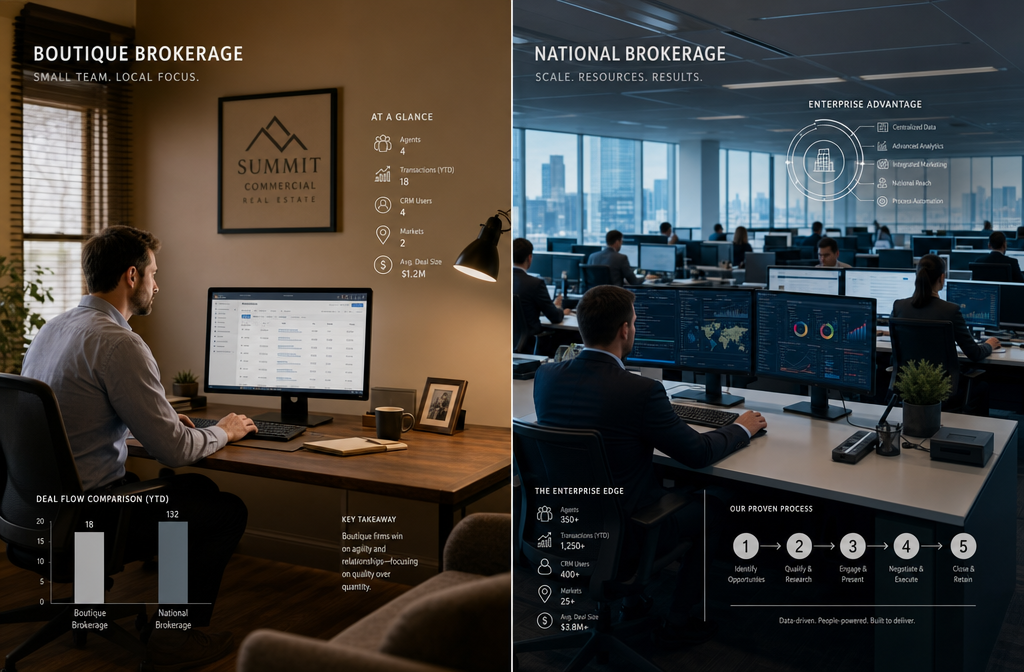
- Small boutique firms and solo commercial brokers have different needs than national brokerage teams — the "best" CRM is not one-size-fits-all.
- Integration with CoStar, LoopNet, and commercial listing platforms is a non-negotiable feature for serious commercial brokers in 2026.
- Training and adoption are the #1 reasons CRM implementations fail — the software is rarely the problem.
- The best CRM for real estate agents in the residential world doesn't always translate to commercial — the deal complexity is a different animal entirely.

Best Commercial Real Estate CRM: What Top Brokers Use and Why It Matters
The best commercial real estate CRM is purpose-built software that tracks properties, contacts, deals, and lease comps in one place — not a repurposed residential tool or a generic sales platform with a real estate skin slapped on it. Top brokers in 2026 are choosing platforms that handle the actual complexity of commercial transactions: multi-party deals, long sales cycles, tenant and landlord relationships, and property-specific data that residential CRMs simply weren't designed to manage.
Here's the straight truth: most commercial brokers are still running deals out of spreadsheets, email threads, and memory. That's not gatekeeping — that's just the reality of an industry that moves slowly on tech adoption. But the brokers closing the most volume? They've got a CRM for commercial real estate that's doing heavy lifting behind the scenes while they focus on relationships.
The Commercial vs. Residential CRM Divide
A residential CRM tracks buyers, sellers, and a relatively linear transaction. A commercial real estate CRM has to track:
- Multiple properties tied to a single deal
- Tenants, landlords, investors, lenders, and attorneys — all in one contact ecosystem
- Lease comps and sale comps linked to specific buildings
- Long deal timelines that can stretch 12–36 months
- Commission splits across multiple brokers and co-brokers
- Pipeline stages that don't look anything like a residential transaction
That's why the commercial real estate broker software category exists separately — and why choosing the wrong tool costs brokers real money.
What Makes a Good CRM for Commercial Real Estate Agents?
A good CRM for commercial real estate agents does three things well: it organizes property and contact data together, it tracks where every deal is in the pipeline, and it integrates with the tools brokers already use daily. Everything else is a bonus.
The features that separate a great commercial real estate CRM from a mediocre one:
- Property-to-contact linking — the ability to associate multiple contacts (tenant, owner, lender) with a single property record
- Deal pipeline customization — commercial deals have unique stages that generic CRMs can't replicate out of the box
- Comp tracking — lease and sale comps stored inside the CRM, not in a separate spreadsheet
- CoStar and LoopNet integration — pulling live listing data without manual entry
- Activity logging — automatic tracking of calls, emails, and meetings tied to specific properties or contacts
- AI deal tracking — in 2026, the top platforms use agentic AI commercial real estate features to flag stale deals, suggest follow-ups, and score leads automatically
- Mobile access — brokers aren't always at a desk; field-ready mobile apps are non-negotiable
Decision rule: If a CRM can't link a property record to multiple contacts and track deal-specific notes at the property level, it's not built for commercial real estate. Walk away.
What Are the Top Commercial Real Estate CRMs Used by National Brokerages?
The top three commercial real estate CRMs used by national brokerages in 2026 are Apto, Buildout, and Salesforce Real Estate Cloud. Each serves a different segment of the market, and the choice usually comes down to team size, budget, and how deep the property data integration needs to go.
Apto
Apto is built specifically for commercial real estate brokers and runs natively on Salesforce — which means it gets the customization power of enterprise CRM without requiring brokers to build everything from scratch. It's strong on comp tracking, deal management, and contact-to-property relationships.
- Best for: Mid-size to large commercial brokerage teams
- Standout feature: Comp management and prospecting lists built for CRE workflows
- Limitation: Salesforce-based pricing means costs add up fast for smaller teams
Buildout
Buildout is more of a full commercial real estate platform than a pure CRM — it covers marketing, deal management, and pipeline tracking with a strong emphasis on creating professional offering memorandums and property marketing packages.
- Best for: Teams that need CRM + marketing collateral in one platform
- Standout feature: Automated OM generation and property marketing
- Limitation: Less flexible for pure relationship/contact management than dedicated CRM tools
ClientLook (now ClientLook by Lightning Step)
ClientLook is one of the few CRMs designed exclusively for commercial real estate from day one. It's clean, focused, and doesn't try to be everything. For brokers who want a dedicated commercial real estate CRM without enterprise complexity, it's a strong contender.
- Best for: Solo brokers and small commercial teams
- Standout feature: Simplicity — built for CRE, not adapted for it
- Limitation: Fewer third-party integrations than Salesforce-based options
REthink CRM
REthink CRM is another Salesforce-native platform built specifically for commercial real estate. It competes directly with Apto and offers strong deal tracking, contact management, and reporting.
- Best for: Teams already in the Salesforce ecosystem
- Standout feature: Robust reporting and pipeline visibility
- Limitation: Implementation and setup require dedicated time and often a consultant
Salesforce Real Estate Cloud
Salesforce Real Estate Cloud is the enterprise-grade option for large commercial brokerages that need maximum customization, deep API integrations, and the ability to build custom workflows. It's powerful, but it requires real investment in setup and ongoing administration.
- Best for: Large national brokerages with dedicated tech teams
- Standout feature: Unlimited customization and integration capability
- Limitation: High cost and steep learning curve without proper implementation support
Why Do Top Brokers Choose Certain CRM Software Over Others?
Top brokers choose CRM software based on how well it mirrors the way they actually work — not based on feature lists or sales demos. The platforms that win in commercial real estate are the ones that reduce friction in the daily workflow, not add to it.
The real reasons top brokers stay loyal to specific platforms:
- It was already working when they found it. The best CRM is the one a broker actually uses consistently. Extraordinary tools that sit unused are worthless.
- Their team adopted it. A CRM only works if the whole team is in it. Platforms with clean UX and solid onboarding win on adoption.
- It integrates with their existing stack. CoStar, LoopNet, DocuSign, email, and calendar integration matter more than any individual CRM feature.
- AI commercial real estate features are now baked in. In 2026, brokers expect AI deal tracking, automated follow-up suggestions, and lead scoring as standard — not premium add-ons.
- It scales with them. Brokers who've been burned by migrating CRMs mid-growth choose platforms they can grow into.
"The CRM that wins isn't always the most feature-rich one. It's the one the team actually opens every morning." — Sentiment shared consistently across commercial brokerage teams with 15+ years of field experience.
For brokers also running lead generation alongside their CRM, check out our breakdown of the best real estate lead generation software in 2026 — because your CRM is only as good as the leads going into it.

How Much Does a Commercial Real Estate CRM Cost?
Commercial real estate CRM software ranges from about $49/month per user on the low end to $300+ per user per month for enterprise platforms with full property data integration. Most mid-tier commercial-specific CRMs land between $89 and $150 per user per month.
Here's a practical pricing breakdown for 2026:
| CRM Platform | Pricing Range (Per User/Month) | Best Fit |
|---|---|---|
| ClientLook | ~$89–$119 | Solo brokers, small teams |
| Pipedrive for real estate | ~$49–$99 | Small commercial teams, budget-conscious |
| REthink CRM | ~$99–$149 | Mid-size Salesforce-based teams |
| Apto | ~$129–$199 | Mid-size to large commercial teams |
| Buildout | Custom pricing | Teams needing CRM + marketing |
| HubSpot CRM for real estate | Free–$150+ | Teams wanting scalable, flexible options |
| Salesforce Real Estate Cloud | $150–$300+ | Enterprise-level large brokerages |
What to watch for beyond the base price:
- Implementation and onboarding fees (can run $1,000–$10,000+ for enterprise platforms)
- Data migration costs if moving from another CRM
- Add-on costs for CoStar or LoopNet API integrations
- Annual vs. monthly billing discounts (usually 15–20% savings annually)
Decision rule: If your team has fewer than 5 brokers, start with ClientLook or Pipedrive for real estate before committing to a Salesforce-based platform. Let it cook before you see results — CRM ROI typically takes 90–180 days to show up in deal velocity.
Which CRM Integrates Best with Commercial Property Listing Platforms?
Apto and REthink CRM integrate most deeply with commercial property listing platforms because they're built on Salesforce, which has the API infrastructure to connect with CoStar, LoopNet, and other data providers. For brokers who rely heavily on comp data and live listing information, this integration is a deal-breaker feature.
Key integrations to look for in a commercial real estate CRM:
- CoStar — market data, comps, and property records
- LoopNet — commercial listing syndication
- DocuSign / Adobe Sign — electronic signatures for LOIs and leases
- Google Workspace / Microsoft 365 — email and calendar sync
- Zoom / Teams — meeting logging and activity tracking
- Accounting software — QuickBooks or similar for commission tracking
HubSpot for real estate doesn't have native CRE-specific integrations out of the box, but its open API and large marketplace of third-party connectors make it adaptable. It's fresh in terms of flexibility, but requires more setup work than purpose-built CRE platforms.
For brokers managing investment properties alongside commercial deals, our best accounting software for real estate investors guide covers the financial tracking side of the equation.
Which CRM Is Best for Small vs. Large Commercial Real Estate Firms?
Small commercial firms (1–5 brokers) get the most value from ClientLook or Pipedrive for real estate — both are affordable, easy to implement, and don't require a dedicated tech administrator. Large commercial firms (20+ brokers) need the customization and scalability of Salesforce Real Estate Cloud, Apto, or REthink CRM.
Small Boutique Firms and Solo Brokers
- Best picks: ClientLook, Pipedrive for real estate, HubSpot CRM for real estate (free tier to start)
- Why: Lower cost, faster setup, less administrative overhead
- Trade-off: Fewer CRE-specific features, less deep property data integration
- Pro tip: HubSpot's free CRM tier is legitimately useful for a solo commercial broker who needs contact management and basic pipeline tracking without spending anything
Mid-Size Commercial Teams (5–20 Brokers)
- Best picks: Apto, REthink CRM, Buildout
- Why: Built for CRE workflows, scalable team features, better reporting
- Trade-off: Higher cost per user, longer implementation timeline
- Pro tip: Budget for at least 60 days of onboarding and training before expecting full team adoption
Large National Brokerages (20+ Brokers)
- Best picks: Salesforce Real Estate Cloud, Apto (enterprise tier), Buildout
- Why: Maximum customization, enterprise security, deep integrations, advanced AI deal tracking
- Trade-off: Significant upfront investment in implementation and ongoing admin
- Pro tip: Hire or designate a CRM administrator before go-live — this is the single biggest predictor of enterprise CRM success

How Do Commercial Real Estate CRMs Help Track Leads and Deals?
A commercial real estate CRM tracks leads and deals by organizing every contact, property, and interaction into a structured pipeline that shows exactly where each opportunity stands — and what action needs to happen next. The best platforms use AI deal tracking to flag deals that have gone cold, automate follow-up reminders, and score leads based on engagement signals.
Here's how the deal tracking workflow typically looks inside a commercial real estate CRM:
- Lead capture — A new contact (tenant prospect, investor, property owner) enters the CRM via manual entry, web form, or integration with a listing platform
- Property association — The contact is linked to one or more properties in the database
- Pipeline stage assignment — The deal is placed in the appropriate stage (prospecting, qualifying, LOI, due diligence, closing)
- Activity logging — Calls, emails, site tours, and meetings are logged automatically or manually
- Follow-up automation — The CRM triggers reminders or automated emails based on deal stage and time elapsed
- AI scoring (2026 standard) — Agentic AI commercial real estate features analyze deal activity and surface which opportunities need attention
- Reporting — Brokers and team leads see pipeline value, deal velocity, and conversion rates in real time
For brokers generating leads through multiple channels, our guide on top ways to generate commercial real estate leads pairs well with any CRM implementation — because the system only works if leads are flowing in consistently.
Can I Use a Residential Real Estate CRM for Commercial Properties?
Technically yes, but it's a bad idea for any broker doing serious commercial volume. Residential CRMs like kvCORE or Follow Up Boss are built around buyer and seller transactions — they don't have property-to-contact linking, comp tracking, or multi-party deal management that commercial transactions require.
Where residential CRMs fall short for commercial:
- No native property record management (beyond basic address fields)
- Pipeline stages are designed for 30–60 day residential transactions, not 12–36 month commercial deals
- No lease comp or sale comp storage
- Contact relationships don't reflect the complexity of commercial deals (tenant + landlord + lender + attorney + co-broker)
- Reporting doesn't account for commercial deal structures like net leases, cap rates, or NOI
When it might be acceptable: A commercial broker doing only a handful of deals per year, or one who primarily does investment sales that resemble residential transactions in complexity, might get by with a general CRM. But anyone doing office, retail, industrial, or multi-tenant deals regularly needs a purpose-built crm for commercial real estate.
If you're also comparing residential CRM options for a mixed practice, our kvCORE vs Follow Up Boss breakdown is worth reading — but know that neither of those platforms was built with commercial deal complexity in mind.
What Are the Most Common Mistakes When Picking a CRM for Commercial Real Estate?
The most common mistake is choosing a CRM based on price or brand recognition instead of fit for commercial workflows. The second most common mistake is underestimating the training and adoption investment required to make any CRM actually work.
The full list of mistakes brokers make:
- Choosing a residential CRM for commercial deals — covered above, but worth repeating
- Buying the most expensive platform without assessing needs — Salesforce Real Estate Cloud is extraordinary for large teams; it's overkill for a 3-person boutique firm
- Skipping the free trial or demo — every major platform offers a trial; not using it is so based on optimism and so bad in practice
- Ignoring integration requirements — if the CRM doesn't connect with CoStar or your email platform, it creates more work, not less
- No designated CRM champion on the team — someone has to own the implementation; without that person, adoption dies within 90 days
- Migrating all data at once without cleaning it first — importing 10 years of messy spreadsheet data into a new CRM just creates a messy CRM
- Expecting immediate ROI — let it cook before you see results; CRM value compounds over time as data accumulates and workflows mature
- Not training the whole team — one power user and four reluctant adopters is not a CRM implementation; it's a very expensive personal organizer
What Training Is Needed to Implement a Commercial Real Estate CRM?
Most commercial real estate CRM implementations require 2–4 weeks of structured onboarding for the team, plus ongoing reinforcement for 60–90 days before the system becomes second nature. Skipping training is the #1 reason CRM implementations fail — not the software itself.
A practical training roadmap:
- Week 1: Admin setup — custom fields, pipeline stages, user permissions, integrations
- Week 2: Data migration — import existing contacts, properties, and deals; clean data before importing
- Week 3: Team training — hands-on sessions covering daily workflows, deal entry, contact management, and activity logging
- Week 4: Live use with support — team runs real deals through the system with a designated CRM champion available for questions
- Days 30–90: Reinforcement — weekly check-ins, reporting reviews, and workflow refinements based on real usage
Most platforms offer onboarding support, video libraries, and live training sessions. Apto and Salesforce Real Estate Cloud both have extensive training ecosystems. ClientLook is known for being easier to self-train on.
For brokers who want to get sharper on the tech side of their business overall, our guide to the best AI tools for real estate agents covers the broader toolkit that pairs with a solid CRM.
How Do Commercial Real Estate CRMs Handle Complex Multi-Tenant Property Deals?
Commercial real estate CRMs handle multi-tenant deals by allowing brokers to link multiple tenant records, lease records, and contact relationships to a single property — and track each tenant's lease status, expiration dates, and renewal probability independently within the same deal record.
This is where purpose-built platforms like Apto, REthink CRM, and ClientLook genuinely separate themselves from generic CRM tools. Here's what multi-tenant deal management looks like inside a strong commercial real estate CRM:
- Property record holds the building's key data (address, SF, ownership, zoning)
- Multiple tenant records are linked to the property, each with their own lease terms, expiration dates, and contact history
- Lease comp data is stored at the property level and accessible for future deals in the same submarket
- Ownership contact is tracked separately from tenant contacts, with relationship mapping showing the full deal ecosystem
- Pipeline stages can be set independently for each tenant space within the same building
- Renewal tracking flags upcoming lease expirations so brokers can proactively reach out before a tenant goes to market
This level of deal complexity is exactly why the question "can I use a residential CRM for commercial properties?" has such a clear answer: not if you're doing real commercial volume.
Is a Commercial Real Estate CRM Worth the Investment?
Yes — for any commercial broker doing consistent deal volume, a purpose-built commercial real estate CRM pays for itself through faster deal cycles, fewer dropped leads, and better client relationships. The ROI isn't always immediate, but brokers who commit to the system consistently report meaningful improvements in deal velocity and pipeline visibility within 6 months.
The math on CRM ROI for commercial brokers:
- Average commercial real estate commission: $25,000–$100,000+ per deal
- Average CRM cost: $100–$200/month per user ($1,200–$2,400/year)
- If a CRM helps a broker close even one additional deal per year that would have otherwise slipped through the cracks, the ROI is 10x–40x the annual software cost
The real question isn't whether a commercial real estate CRM is worth it — it's whether the broker is willing to invest the time to implement it properly. The software is the easy part.
For brokers thinking about their full tech stack investment, our best real estate marketing automation platform guide covers how CRM fits into a broader automated business system.
AI and the Future of Commercial Real Estate CRM in 2026
Agentic AI commercial real estate features are no longer a novelty — they're becoming the baseline expectation for any serious CRM for commercial real estate. In 2026, the platforms leading the market are integrating AI in ways that go beyond simple automation.
Here's what AI commercial real estate 2026 looks like inside top CRM platforms:
- AI deal tracking — algorithms analyze deal activity patterns and flag opportunities at risk of going cold before the broker notices
- AI CMA commercial — some platforms now generate commercial market analysis reports using AI, pulling comp data and market trends automatically
- Lead scoring — AI ranks inbound leads based on engagement signals, property match, and historical conversion data
- Agentic follow-up — the CRM autonomously drafts and schedules follow-up emails based on deal stage and contact behavior
- Predictive pipeline reporting — AI forecasts deal close probability and projected commission based on historical pipeline data
The stat circulating in commercial real estate tech circles is that 89% AI CRM adoption among top brokers is becoming the new normal — meaning the brokers not using AI-enhanced CRM tools are already playing catch-up. That's not gatekeeping; that's just where the market is heading.
For a broader look at how AI is reshaping the agent's toolkit, our top 13 real estate AI tools for agents covers the full landscape beyond CRM.

FAQ: Best Commercial Real Estate CRM
Q: What is the best CRM for commercial real estate in 2026?
A: Apto, ClientLook, and REthink CRM are the top purpose-built options for commercial real estate. Salesforce Real Estate Cloud leads for large enterprise teams. The best choice depends on team size, budget, and integration needs.
Q: Is HubSpot good for commercial real estate?
A: HubSpot CRM for real estate is a solid starting point, especially for smaller teams or brokers who want a free entry-level option. It's not purpose-built for CRE, but its flexibility and open API make it adaptable. Expect to customize it significantly for commercial workflows.
Q: Can I use Pipedrive for commercial real estate?
A: Yes. Pipedrive for real estate works well for small commercial teams that want visual pipeline management at a lower price point. It lacks CRE-specific features like comp tracking and property-to-contact linking, but it's a clean, functional option for deal tracking.
Q: What's the difference between Apto and ClientLook?
A: Apto is Salesforce-native and better suited for mid-size to large commercial teams that need deep customization and comp management. ClientLook is simpler, purpose-built for CRE, and better for solo brokers or small teams who want a focused tool without enterprise complexity.
Q: How long does it take to implement a commercial real estate CRM?
A: Most teams are fully operational in 4–6 weeks. Data migration, team training, and workflow setup are the biggest time investments. Enterprise platforms like Salesforce Real Estate Cloud can take 3–6 months for full implementation.
Q: Do commercial real estate CRMs integrate with CoStar?
A: Apto and REthink CRM offer the strongest CoStar integration options through the Salesforce API ecosystem. ClientLook has more limited integration options. Always verify current integration availability directly with the vendor before purchasing.
Q: What features should I prioritize in a CRM for commercial real estate?
A: Property-to-contact linking, deal pipeline customization, comp tracking, CoStar/LoopNet integration, activity logging, and AI deal tracking are the non-negotiables. Mobile access and team reporting are close behind.
Q: Is Salesforce too complex for a small commercial brokerage?
A: For most small commercial teams (under 5 brokers), yes — Salesforce Real Estate Cloud is more platform than needed and requires significant setup investment. ClientLook or Pipedrive for real estate are better fits at that scale.
Q: What is agentic AI in commercial real estate CRM?
A: Agentic AI in commercial real estate CRM refers to AI features that take autonomous actions — like drafting follow-up emails, flagging stale deals, or scoring leads — without requiring the broker to manually trigger each action. It's the next step beyond simple automation.
Q: How much should a commercial real estate team budget for CRM software?
A: Budget $89–$199 per user per month for a purpose-built commercial real estate CRM, plus onboarding costs. Small teams can start lower with Pipedrive or HubSpot. Enterprise teams should budget for implementation support on top of licensing fees.
Conclusion: Stop Gatekeeping Yourself From the Right Tool
The best commercial real estate CRM isn't the one with the longest feature list or the biggest brand name — it's the one your team will actually use, that fits your deal complexity, and that grows with your business. For most commercial brokers in 2026, that means choosing between purpose-built platforms like Apto, ClientLook, REthink CRM, or Buildout, with Salesforce Real Estate Cloud reserved for teams that have the budget and infrastructure to support it.
Here's the actionable path forward:
- Assess your deal complexity first. Multi-tenant, multi-party commercial deals need a purpose-built CRM. Simple deal flow can start with HubSpot or Pipedrive for real estate.
- Run a free trial before committing. Every major platform offers one. Use it with real deals, not demo data.
- Budget for training, not just licensing. The software cost is the easy part. Adoption is where implementations succeed or fail.
- Designate a CRM champion on your team. One person who owns the system, trains others, and holds the team accountable to using it.
- Expect a 90–180 day ramp. Let it cook before you see results — CRM ROI is a long game, and the brokers who stick with it are the ones who win.
The commercial real estate brokers closing the most volume in 2026 aren't the ones with the most leads — they're the ones with the best systems. A impeccable CRM is the foundation of that system. Time to build yours.
Have questions about real estate tools, tech, or market trends? Reach us at news@realestaterankiq.com or explore more at realestaterankiq.com.
Tags: commercial real estate CRM, best CRM for commercial real estate, Apto CRM, ClientLook, REthink CRM, Salesforce real estate, HubSpot for real estate, Pipedrive for real estate, commercial real estate broker software, AI deal tracking, CRM for real estate investors, Buildout CRM