





Quick Answer
Apps for home renovations have evolved from simple inspiration galleries into comprehensive project management ecosystems that handle budgeting, 3D visualization, contractor coordination, and real-time progress tracking. The best renovation apps in 2026—including Houzz Pro, Home Design 3D, MagicPlan, and Lowe’s Vision—combine augmented reality (AR) visualization with integrated cost tracking and professional directories, helping homeowners save an average of 30-40% on project planning time while reducing costly design mistakes. Whether you’re a first-time investor tackling a fix-and-flip or a homeowner planning a kitchen refresh, the right app transforms chaotic renovation chaos into organized, profitable execution.
Key Takeaways
✅ Modern renovation apps integrate five critical functions: 3D visualization, budget tracking, contractor directories, project timelines, and AR previews—eliminating the need for multiple disconnected tools.
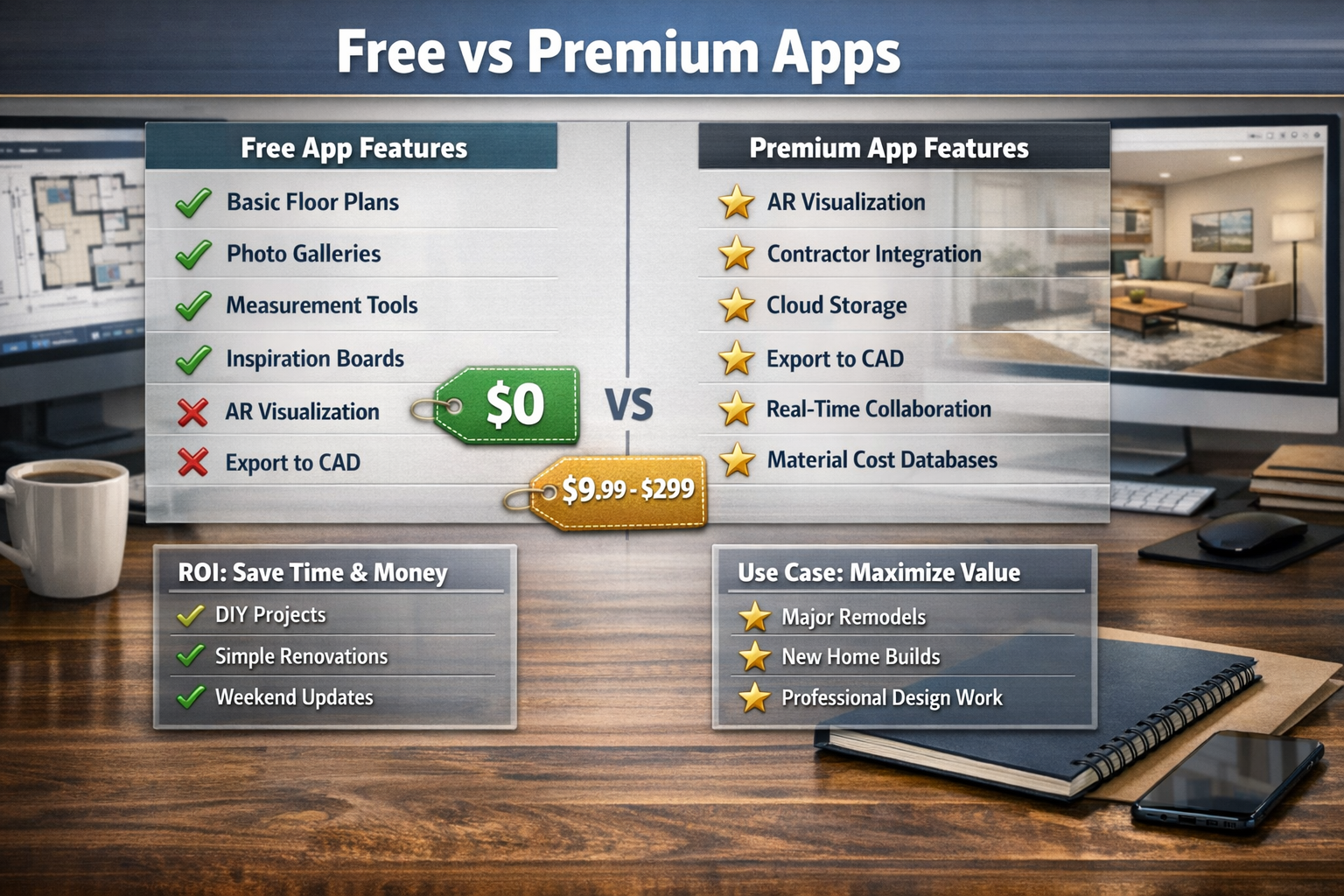
✅ Free apps like Houzz and MagicPlan handle 80% of basic renovation needs (inspiration, measurements, simple floor plans), while premium options ($9.99-$299) add professional features like CAD export and real-time collaboration.
✅ AR visualization technology in apps like Lowe’s Vision and IKEA Place reduces purchase regret by 60% by letting you preview paint colors, furniture, and fixtures in your actual space before buying.
✅ Budget tracking features prevent the typical 20-30% cost overrun on renovations by sending real-time alerts when expenses approach limits and automatically categorizing purchases.
✅ Contractor integration through platforms like Houzz Pro and BuilderTrend streamlines communication, reduces project delays by 25%, and provides verified professional reviews from actual completed projects.
✅ Cloud synchronization across devices means your entire renovation plan—photos, measurements, budgets, timelines—stays accessible whether you’re at the hardware store, meeting contractors, or reviewing options at home.
✅ AI-powered design suggestions in 2026 apps analyze your space dimensions, style preferences, and budget constraints to recommend optimized layouts and material selections that maximize ROI.
✅ Photo documentation features create timestamped before-during-after galleries that protect you in contractor disputes and boost resale value by showing quality work progression.
✅ Material cost databases built into apps like Home Depot’s Project Color and Lowe’s Vision provide real-time pricing for lumber, fixtures, and finishes, eliminating guesswork from budget planning.
✅ Export capabilities let you share professional-looking proposals with contractors, lenders, or partners—turning your phone into a portable design studio that commands respect in negotiations.
Why Traditional Renovation Planning Wastes Your Time and Money
Here’s what nobody tells you about home renovations: the planning phase determines 80% of your final outcome, but most people spend 80% of their energy on execution. We’ve watched countless investors and homeowners dive into demolition with nothing but Pinterest screenshots and a contractor’s verbal estimate, then act shocked when costs balloon 40% above budget and the finished kitchen looks nothing like the inspiration photo.
The Best apps for home renovations ,That Will Transform Your Home Renovation Experience
Traditional renovation planning creates three expensive problems. First, disconnected information silos—your measurements live in a notebook, your budget exists in a spreadsheet, your inspiration photos scatter across Instagram saves, and your contractor communications hide in text threads. When decision time arrives, you can’t see the full picture, so you make choices that contradict earlier decisions or blow past budget constraints.
Second, visualization failure. That “perfect” paint color looks extraordinary in the store sample but turns your living room into a dungeon because you didn’t account for natural lighting. The sofa you ordered based on measurements scribbled on a napkin blocks the walkway. These mistakes cost real money—returns, restocking fees, wasted materials, and contractor time spent fixing preventable errors.
Third, communication breakdowns with contractors. When you describe your vision verbally or with hand-drawn sketches, contractors interpret your words through their own lens. What you call “modern farmhouse” might mean shiplap and barn doors to you but industrial concrete to them. By the time you see the work in progress, you’ve already paid for materials and labor that don’t match your vision.
Apps for home renovations solve these problems by centralizing every renovation element into one synchronized platform. Instead of juggling five tools poorly, you master one tool that handles everything—and the results speak for themselves. Homeowners using comprehensive renovation apps report 30-40% faster planning phases, 25% fewer mid-project changes (the budget killers), and significantly higher satisfaction with final outcomes.
The difference between winging your renovation and using purpose-built apps mirrors the gap between driving cross-country with gas station maps versus using GPS with real-time traffic updates. Both might eventually get you there, but one wastes substantially less time, money, and sanity. For first-time investors working with limited capital, that efficiency difference determines whether your fix-and-flip generates profit or becomes a cautionary tale.
Real Estate Rank IQ has guided hundreds of investors through their first renovation projects, and the pattern stays consistent: those who invest two weeks learning proper renovation apps save 10-20 times that investment in prevented mistakes. Let it cook before you see results—the upfront learning curve pays extraordinary dividends when you’re standing in your transformed space, on budget, and ahead of schedule.
Apps for Home Renovations: The Complete 2026 Toolkit
The renovation app landscape in 2026 breaks into five functional categories, and the smartest approach combines tools from multiple categories rather than expecting one app to handle everything perfectly. Think of it like assembling a real estate investment team—you wouldn’t hire one person to be your agent, inspector, lender, and contractor. Similarly, your digital renovation toolkit should pair specialized apps that excel at specific functions.
Visualization and Design Apps
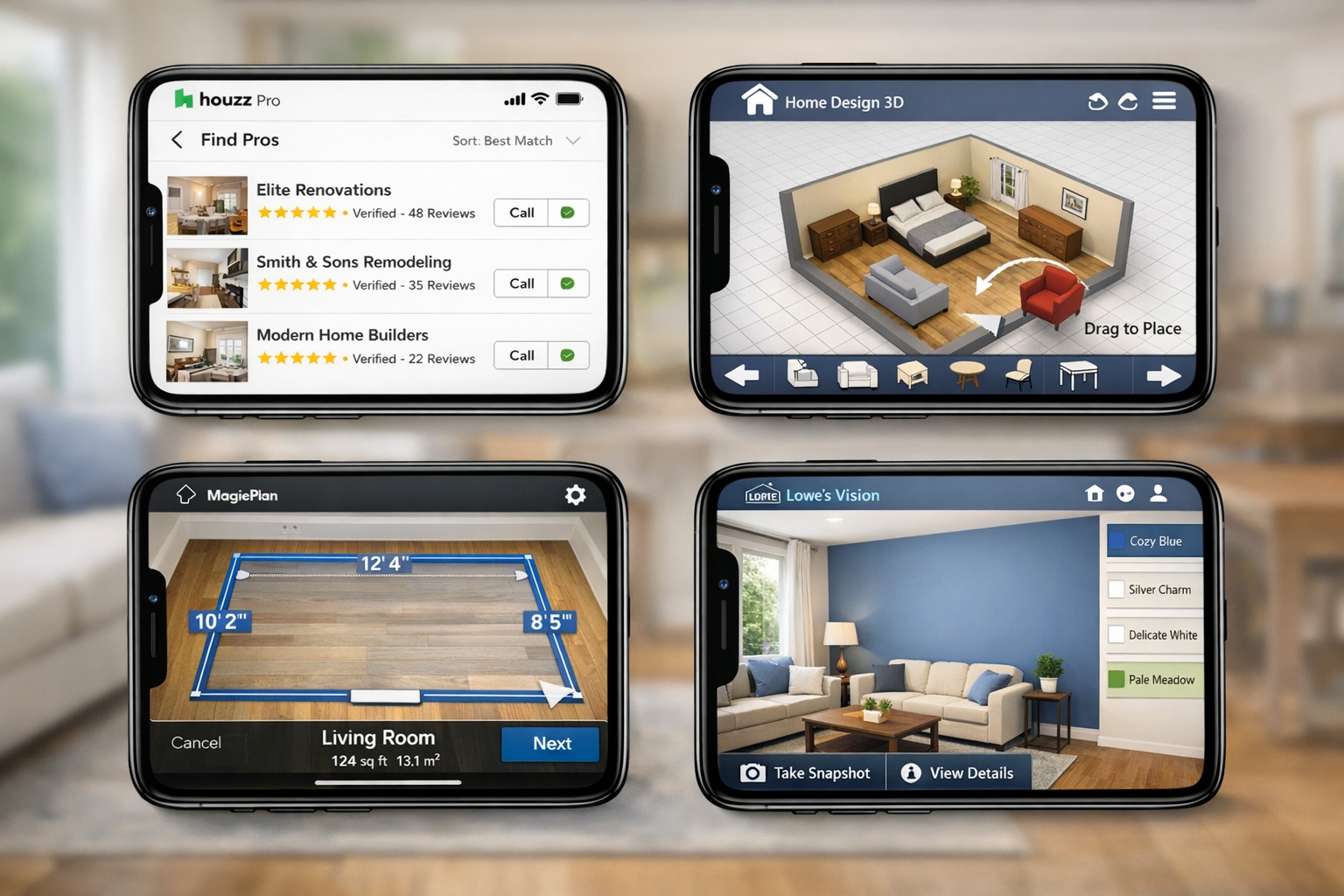
Houzz remains the 800-pound gorilla of renovation inspiration and planning. With over 20 million high-resolution photos organized by room type, style, and budget range, Houzz functions as your visual research library. But here’s where it gets impeccable: the app’s AI-powered visual search lets you photograph any design element you love—a neighbor’s front door, a restaurant’s lighting fixture, a hotel lobby’s tile pattern—and instantly finds similar products available for purchase, complete with pricing and retailer links.
The Houzz Pro upgrade ($65/month in 2026) adds project management features that integrate with contractor scheduling systems, 3D room visualization tools, and a verified professional directory with actual project portfolios and client reviews. For investors managing multiple renovation projects simultaneously, the cloud-based project folders keep each property’s plans, budgets, and communications separate and organized.
Home Design 3D ($9.99 one-time purchase) delivers professional-grade floor plan creation and 3D visualization without the learning curve of traditional CAD software. You can draw walls, add doors and windows, place furniture, and then walk through your designed space in first-person view mode. The app’s real power emerges when you’re evaluating layout options—should you knock down that wall between the kitchen and dining room? Build both versions in Home Design 3D, walk through each, and make the decision with confidence before you touch a sledgehammer.
The 2026 version includes material texture libraries (hardwood, tile, carpet, paint finishes) that render with realistic lighting, so you can preview how that trendy dark green paint will actually look in your north-facing bedroom at 3 PM versus 8 AM. This feature alone prevents thousands of dollars in paint regret.
Lowe’s Vision and Home Depot’s Project Color bring augmented reality to renovation planning. Point your phone camera at any wall, and these apps overlay paint colors, wallpaper patterns, or tile designs in real-time, adjusting for lighting conditions and surface textures. The technology has matured significantly—2026 versions account for ambient lighting, surface reflectivity, and even how colors shift between natural and artificial light sources.
For first-time investors, these AR apps answer the question that keeps you awake at night: “Will this actually look good, or am I about to make an expensive mistake?” The answer appears on your screen before you buy a single gallon of paint.
Measurement and Floor Plan Apps
MagicPlan (freemium model, premium features $9.99/month) revolutionized renovation measurement by using your phone’s camera and sensors to create accurate floor plans. Walk around a room, tap corners and doorways, and the app generates a scaled floor plan with dimensions accurate to within 1-2 inches—sufficient for planning purposes and material estimates.
The premium version adds furniture placement, cost estimation tools, and export options to PDF, CAD, or 3D formats that contractors can import directly into their professional software. For investors evaluating potential fix-and-flip properties, MagicPlan lets you create floor plans during the initial walkthrough, then share those plans with contractors for preliminary estimates before you even make an offer.
RoomScan Pro ($4.99) takes a different approach: instead of using the camera, you touch your phone against walls in sequence, and the app uses motion sensors to map the room. This method works in poorly lit spaces or cluttered rooms where camera-based apps struggle. The resulting floor plans export to scale, making them useful for ordering materials or planning furniture layouts.
Budget and Project Management Apps
Houzz Pro (mentioned earlier) and BuilderTrend ($99-$499/month depending on project volume) represent the professional tier of renovation project management. These platforms integrate budgeting, scheduling, contractor communication, change order tracking, and payment processing into unified dashboards.
For investors managing renovation projects remotely or juggling multiple properties, these apps provide the control and visibility that prevent projects from spiraling. You can see in real-time when material deliveries arrive, when subcontractors complete phases, and how actual costs compare to budgeted amounts—all from your phone while you’re evaluating your next acquisition.
Renovation Cost Estimator (free with ads, $2.99 ad-free) provides quick ballpark estimates for common renovation projects based on your zip code, property size, and material quality preferences. While not precise enough for contractor bids, these estimates help investors evaluate whether a potential flip’s numbers work before investing in detailed contractor quotes.
The app’s 2026 database includes regional labor cost variations, material price trends, and permit fee estimates—the hidden costs that destroy fix-and-flip margins when you forget to account for them.
Contractor Connection and Review Apps
Houzz Pro, Angi (formerly Angie’s List), and Thumbtack function as contractor marketplaces where you can browse professional profiles, review portfolios of completed work, read verified client reviews, and request quotes. The key differentiator in 2026: verified project photos and video walkthroughs that prove contractors actually completed the work they’re claiming credit for.
Smart investors use these apps to build contractor networks in their target markets before they need them. When you close on a property, you’re not scrambling to find a plumber or electrician—you’ve already vetted three options, reviewed their work, and negotiated preliminary pricing.
BuildZoom (free) aggregates contractor licensing data, permit history, and legal records to help you avoid contractors with problematic track records. The app flags red flags like frequent permit violations, unresolved complaints, or patterns of abandoned projects—the warning signs that separate professional contractors from the nightmares you read about on Reddit.
Specialty and Niche Apps
iHandy Carpenter (free) turns your phone into a toolkit with level, ruler, protractor, and plumb bob functions. While not revolutionary, these tools prove surprisingly useful during property walkthroughs when you’re evaluating whether floors are level or walls are plumb—indicators of foundation issues that affect renovation budgets.
Paint My Place ($2.99) specializes in exterior paint visualization, letting you preview how different color combinations will look on your home’s facade, trim, and accents. For investors focused on curb appeal improvements that maximize ROI, this app prevents the costly mistake of choosing exterior colors that clash with the neighborhood aesthetic or reduce perceived value.
IKEA Place and Wayfair View use AR to place furniture and decor items in your space at accurate scale. While primarily shopping tools, they’re valuable for staging decisions—helping you determine optimal furniture sizes and arrangements before you buy or rent staging furniture.
The extraordinary thing about 2026’s renovation app ecosystem: most of these tools cost less combined than a single hour of professional design consultation, yet they provide 80% of the value for DIY-minded investors and homeowners willing to invest the learning time.
For comprehensive guidance on maximizing renovation ROI, our broker-written guides break down which improvements pay you back and which waste money—essential reading before you start any renovation project.
How to Choose the Right Apps for Your Renovation Project
Not every renovation needs every app, and trying to master ten different platforms simultaneously guarantees frustration and abandoned tools. Your app selection should match your project complexity, technical comfort level, and whether you’re managing contractors or doing the work yourself.
For Simple Cosmetic Updates (Paint, Fixtures, Decor)
Minimum viable toolkit: Lowe’s Vision or Home Depot Project Color (AR visualization) + Houzz (inspiration and product sourcing) + your phone’s native camera (documentation).
This combination handles 90% of simple refresh projects. Use AR apps to preview paint colors and visualize fixture changes, browse Houzz for design inspiration and product recommendations, and document your progress with timestamped photos. Total cost: $0. Time investment: 2-3 hours to learn the basics.
When to upgrade: If you’re coordinating multiple rooms or making decisions that affect resale value, add MagicPlan ($9.99/month) for accurate measurements and floor plans you can share with contractors or stagers.
For Mid-Range Renovations (Kitchen, Bathroom, Flooring)
Recommended toolkit: Home Design 3D ($9.99 one-time) + MagicPlan (premium $9.99/month) + Houzz Pro ($65/month) + Renovation Cost Estimator (free).
This combination lets you design layouts in 3D, create accurate floor plans, manage contractor communications, track budgets, and estimate costs before committing. The upfront investment ($85 first month, $75 ongoing) pays for itself if it prevents a single major mistake or helps you negotiate better contractor pricing.
Pro move: Use Home Design 3D to create multiple layout options, then share those 3D walkthroughs with contractors during the bidding process. Contractors who can see exactly what you want provide more accurate quotes and fewer mid-project “clarifications” that inflate costs.
For Major Renovations or Multi-Property Investors
Professional toolkit: BuilderTrend or Houzz Pro (project management) + Home Design 3D (visualization) + MagicPlan (measurement) + BuildZoom (contractor vetting) + your choice of AR visualization apps.
At this level, you’re running a business, not a hobby project. The monthly cost ($100-$500 depending on project volume) becomes a rounding error compared to the money you save through better organization, faster decision-making, and reduced contractor disputes.
Critical feature: Cloud synchronization across devices. When you’re managing multiple properties, you need access to all project information from your phone, tablet, and computer without manual file transfers or version control headaches.
The “Too Many Apps” Warning
Here’s where people go wrong: they download twelve renovation apps, spend three hours setting up accounts and learning interfaces, feel overwhelmed, and abandon everything to go back to their chaotic notebook-and-spreadsheet system.
Better approach: Start with one visualization app (Houzz or Home Design 3D) and one measurement app (MagicPlan free version). Master those two tools on a small project—even just redesigning a single room. Once those apps feel natural, add budgeting and contractor management tools for your next larger project.
The goal isn’t to use every available app; it’s to use the right apps well enough that they actually improve your renovation experience rather than adding complexity. Think of it like learning real estate investing—you don’t start by simultaneously wholesaling, flipping, and building a rental portfolio. You master one strategy, then expand.
Free vs. Paid: The Real Cost-Benefit Analysis
Free versions of most apps provide sufficient functionality for homeowners doing one renovation every few years. The limitations—watermarked exports, restricted project counts, basic features only—don’t matter when you’re planning your kitchen remodel and won’t touch another renovation for five years.
Upgrade to paid versions when:
- You’re managing multiple projects simultaneously (investors, contractors, designers)
- You need professional-quality exports to share with contractors, lenders, or partners
- Time savings justify the cost (your hourly rate × hours saved > subscription cost)
- You’re making decisions involving $10,000+ where better visualization prevents costly mistakes
For first-time investors, we recommend starting with free versions, then upgrading individual apps as you identify specific limitations that cost you time or money. This approach prevents paying for features you don’t use while ensuring you have professional tools when they matter.
Our guide to hiring contractors explains how to vet professionals and avoid red flags—essential reading before you start requesting quotes through contractor marketplace apps.
Step-by-Step: Using Apps to Plan Your First Renovation
Theory means nothing without execution, so let’s walk through a realistic scenario: you’re a first-time investor who just closed on a dated 1990s ranch house that needs a kitchen refresh, bathroom update, and fresh paint throughout. Your budget is $25,000, your timeline is 60 days, and you’re coordinating contractors while working a full-time job. Here’s how apps transform this project from overwhelming to manageable.
Phase 1: Documentation and Measurement (Days 1-3)
Tools: MagicPlan (free version) + your phone’s camera
Walk through the property and use MagicPlan to create floor plans of the kitchen and bathroom. The app generates dimensioned layouts in 10-15 minutes per room—faster and more accurate than measuring with a tape measure and sketching on graph paper.
Take comprehensive photos of every surface, fixture, and problem area. Organize these photos in your phone’s albums by room, or use Houzz’s project folders to keep everything centralized. These photos serve three purposes: baseline documentation for insurance, reference images when shopping for materials, and evidence if contractor disputes arise.
Pro tip: Take photos of the inside of cabinets, under sinks, and in attics/crawl spaces. These areas reveal hidden problems (water damage, outdated wiring, pest issues) that affect your renovation budget and timeline.
Phase 2: Design and Visualization (Days 4-10)
Tools: Houzz (inspiration) + Home Design 3D (layout planning) + Lowe’s Vision (color/material preview)
Browse Houzz for kitchen and bathroom designs that match your target buyer demographic and budget. Save 20-30 inspiration photos to project folders, then identify common elements—cabinet styles, color palettes, fixture types—that appear repeatedly. These patterns reveal design trends that appeal to your market.
Import your MagicPlan floor plans into Home Design 3D and start designing layouts. For the kitchen, try 3-4 different cabinet configurations and appliance placements. Walk through each version in 3D view to identify traffic flow problems, wasted space, or awkward proportions that aren’t obvious in 2D floor plans.
Use Lowe’s Vision to preview paint colors in each room at different times of day. The app’s AR technology shows how colors shift between morning and evening light—critical information that prevents the “this looked different in the store” regret.
Decision checkpoint: By day 10, you should have finalized layouts, selected paint colors, and identified specific products (cabinets, countertops, fixtures, flooring) with model numbers and pricing. This specificity transforms contractor conversations from vague discussions into precise quotes.
Phase 3: Budgeting and Material Sourcing (Days 11-15)
Tools: Renovation Cost Estimator (free) + Houzz (product sourcing) + spreadsheet or Houzz Pro budget tracker
Use Renovation Cost Estimator to generate ballpark costs for your kitchen and bathroom projects based on your zip code and material quality preferences. These estimates aren’t contractor bids, but they tell you whether your $25,000 budget is realistic or fantasy.
Browse Houzz’s product marketplace to find actual prices for the cabinets, countertops, fixtures, and flooring you selected during the design phase. Add these prices to your budget spreadsheet along with estimated labor costs from the Cost Estimator app.
Reality check: If your preliminary budget exceeds $25,000, this is when you make adjustments—downgrade countertop materials, choose stock cabinets instead of semi-custom, or reduce the project scope. Making these decisions now, before contractors are involved, costs you nothing. Making them mid-project costs you contractor time, restocking fees, and schedule delays.
Phase 4: Contractor Selection (Days 16-25)
Tools: Houzz Pro or Angi (contractor marketplace) + BuildZoom (background checks)
Request quotes from 3-5 contractors for each trade (general contractor, plumber, electrician). Share your Home Design 3D layouts, MagicPlan floor plans, and Houzz inspiration photos so contractors see exactly what you want.
Use BuildZoom to verify each contractor’s license status, permit history, and complaint record. This 15-minute background check per contractor prevents the nightmare scenario of hiring someone with a pattern of abandoned projects or permit violations.
Interview questions to ask (informed by your app research):
- “I’m planning [specific cabinet model] with [specific countertop]. Do you foresee any installation challenges?”
- “My 3D layout shows [specific configuration]. Based on your experience, will this work with the existing plumbing/electrical?”
- “I’m targeting [specific timeline]. What factors could delay this schedule?”
Contractors respect clients who’ve done their homework. Your app-generated plans and specific product selections signal that you’re organized and informed—the type of client contractors want to work with, which often translates to better pricing and priority scheduling.
Phase 5: Project Management and Execution (Days 26-60)
Tools: Houzz Pro or BuilderTrend (project management) + your phone’s camera (progress documentation)
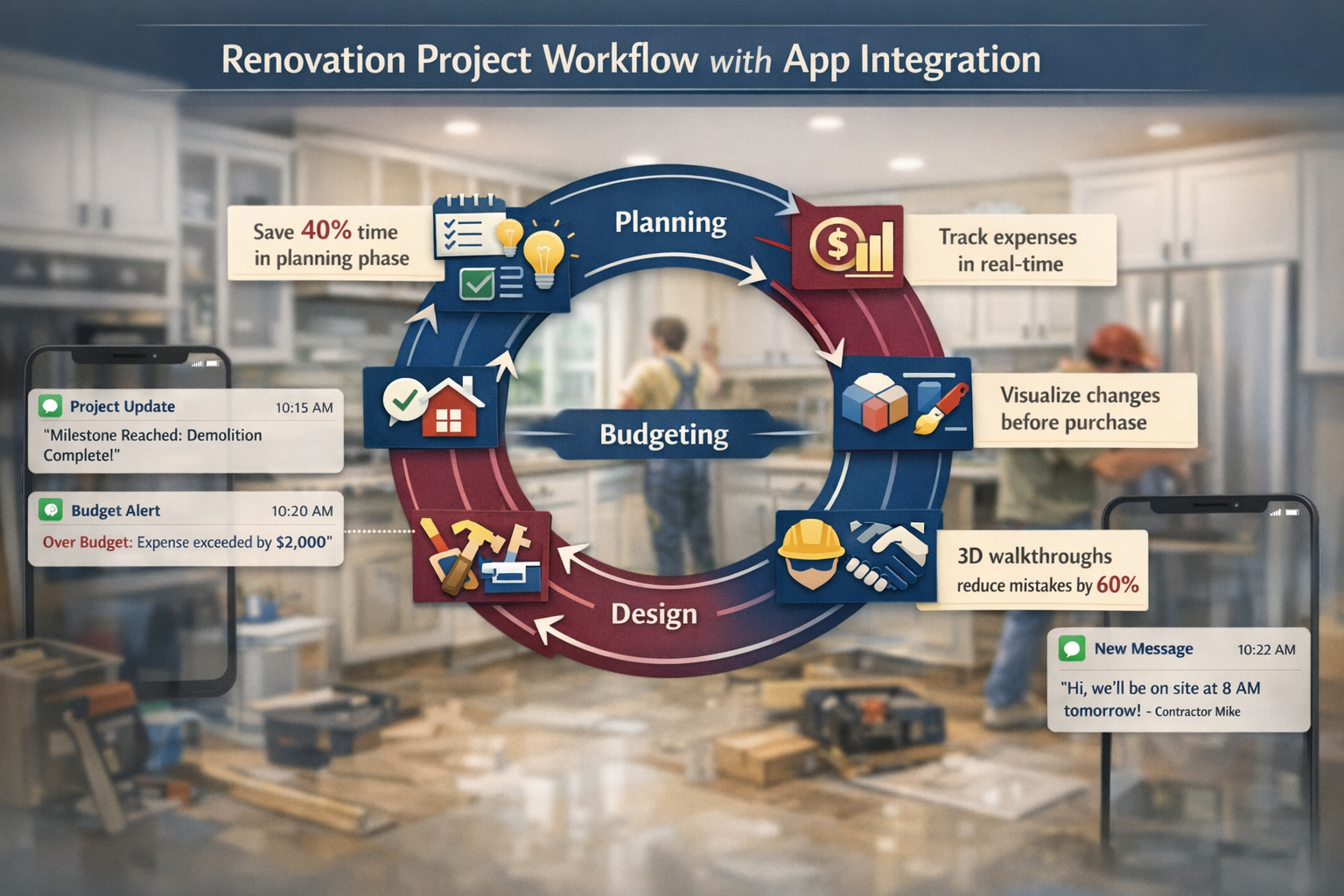
Create a project timeline in your project management app with milestones for each phase: demolition, rough plumbing/electrical, drywall, cabinet installation, countertop installation, fixture installation, painting, final walkthrough.
Set up automatic notifications for milestone completions and budget threshold alerts. When spending approaches 80% of any budget category, the app alerts you before you’re over budget and scrambling to cut costs elsewhere.
Document progress with daily or every-other-day photos. These timestamped images protect you if disputes arise (“the contractor claims they installed premium fixtures, but my photos show they used builder-grade”) and create a valuable before-during-after portfolio for future marketing or resale.
Communication protocol: Use your project management app’s messaging feature for all contractor communications. This creates a searchable, timestamped record of every decision, change order, and agreement—eliminating the “he said, she said” disputes that plague renovation projects.
Phase 6: Final Walkthrough and Documentation (Days 61-65)
Tools: Your phone’s camera + project management app’s punch list feature
Create a punch list of incomplete items or quality issues using your app’s checklist feature. Walk through with contractors, photograph each item, and set deadlines for completion.
Take final “after” photos from the same angles as your initial “before” photos. This before-after documentation proves the transformation and provides marketing materials if you’re flipping the property or want to showcase your work to future contractors.
Lessons learned: Most project management apps include notes sections where you can record what worked, what didn’t, and what you’d do differently next time. These notes become invaluable when you start your next renovation project—your personal playbook that improves with each project.
This systematic, app-enabled approach transforms renovation from a chaotic, stressful experience into a managed process with clear phases, documented decisions, and measurable progress. The apps don’t do the work for you, but they eliminate the organizational chaos that causes most renovation disasters.
For investors focused on maximizing ROI through strategic improvements, our broker-backed analysis ranks which renovations pay you back and which waste money—essential reading before you finalize your project scope.
Common Mistakes When Using Renovation Apps (And How to Avoid Them)
Even the best apps can’t prevent bad decisions if you use them incorrectly. We’ve seen investors and homeowners make the same mistakes repeatedly, so let’s address them directly.
Mistake #1: Treating AR Visualization as Perfect Reality
The problem: AR apps like Lowe’s Vision and IKEA Place provide impressive visualizations, but they’re approximations, not photorealistic predictions. Lighting conditions, surface textures, and color rendering vary between your phone’s screen and reality.
The fix: Use AR visualization for directional decisions (“this color family works better than that one”) rather than absolute certainty (“this is exactly how it will look”). Order physical samples of your top 2-3 choices and view them in your actual space at different times of day before making final decisions.
Real example: An investor used an AR app to select a “warm gray” paint color that looked perfect on screen. In the actual north-facing rooms, the color read as cold blue-gray, requiring a complete repaint that cost $2,800 and delayed the flip by two weeks. Physical samples would have revealed this issue for $15.
Mistake #2: Over-Designing Without Considering Execution Reality
The problem: Home Design 3D and similar apps let you create elaborate designs that look stunning in 3D but prove impractical or expensive to build. That curved breakfast bar looks extraordinary on screen but requires custom cabinetry that triples your budget.
The fix: Share your 3D designs with contractors before you fall in love with them. Contractors can identify expensive custom work, code violations, or structural impossibilities that aren’t obvious to non-professionals. This reality check costs you nothing if done during the design phase but costs thousands if discovered mid-construction.
Mistake #3: Ignoring the “Garbage In, Garbage Out” Principle
The problem: Budget tracking and cost estimation apps only work if you input accurate, complete information. Forgetting to include permit fees, disposal costs, or contingency buffers produces budgets that look great on screen but explode in reality.
The fix: Use the Renovation Cost Estimator app’s detailed category breakdowns as a checklist to ensure you’re accounting for every cost category. Add a 15-20% contingency buffer for unexpected issues—because there are always unexpected issues in renovation projects.
Industry data: Renovation projects without contingency buffers exceed their initial budgets by an average of 30-40%. Projects with 15-20% contingency buffers stay within 5-10% of total budget, according to contractor surveys from 2024-2025.
Mistake #4: App Hoarding Without Mastery
The problem: Downloading twelve apps, setting up accounts, and then using none of them effectively because you’re overwhelmed by options and interfaces.
The fix: Start with two apps maximum—one for visualization, one for measurement. Use them on a small project until they feel natural. Only then add project management or budgeting apps. This staged approach builds competence rather than creating tool overload.
Mistake #5: Skipping the Documentation Phase
The problem: Jumping straight to design and planning without thoroughly documenting existing conditions. When problems emerge mid-project, you have no baseline evidence of what existed before contractors started work.
The fix: Spend your first day taking comprehensive photos and videos of every surface, fixture, and space. Use your phone’s timestamp feature or a project management app’s photo documentation tool to create a dated record. This evidence protects you in disputes and insurance claims.
Mistake #6: Trusting App-Generated Estimates as Contractor Bids
The problem: Treating Renovation Cost Estimator outputs as actual project costs rather than ballpark ranges for feasibility analysis.
The fix: Use app-generated estimates to determine whether a project fits your budget before investing time in detailed planning. Once you’ve decided to proceed, get actual contractor bids based on your specific plans, materials, and local labor rates. The app estimates and contractor bids should be within 20-30% of each other; larger discrepancies suggest you’ve missed cost categories or chosen unrealistic material expectations.
Mistake #7: Forgetting That Apps Don’t Replace Professional Expertise
The problem: Believing that apps make architects, designers, and contractors unnecessary. Apps are tools that enhance your capabilities, not replacements for professional knowledge.
The fix: Use apps to educate yourself, communicate clearly with professionals, and manage projects effectively. But recognize when you need expert input—structural changes, electrical/plumbing work, code compliance, and complex design challenges benefit from professional consultation. The money you spend on a few hours of professional advice often saves multiples of that cost by preventing expensive mistakes.
When to hire professionals despite having great apps:
- Structural modifications (removing walls, adding windows/doors)
- Electrical or plumbing system upgrades
- Projects requiring permits and inspections
- Design decisions that significantly affect resale value
- Situations where your app-generated plans receive wildly different contractor bids (suggests you’re missing something important)
The most successful renovation projects combine app-enabled organization and visualization with professional expertise at critical decision points. Apps make you a more informed, effective client—not a replacement for the professionals who actually do the work.
For guidance on preparing your home for sale after renovations, our 60-day checklist covers everything from final touches to marketing strategies that maximize your return.
The Future of Renovation Apps: What’s Coming in 2026-2027
The renovation app space continues evolving rapidly, and understanding emerging trends helps you choose tools that won’t become obsolete or require platform switches mid-project.
AI-Powered Design Assistance
The next generation of renovation apps integrates artificial intelligence that analyzes your space dimensions, style preferences, budget constraints, and local market trends to recommend optimized designs. Instead of browsing thousands of inspiration photos, you’ll describe your goals (“modern farmhouse kitchen under $15,000 that appeals to young families”) and receive 3-5 AI-generated designs tailored to your specific parameters.
Early implementations: Houzz’s 2026 beta features include AI design assistants that suggest furniture arrangements, color palettes, and material selections based on your room dimensions and stated preferences. The technology isn’t perfect yet—it sometimes suggests impractical layouts or overlooks budget constraints—but it’s improving rapidly.
What this means for you: AI design assistance will compress the inspiration and planning phase from weeks to days, but human judgment remains critical for evaluating whether AI suggestions actually work for your specific situation.
Enhanced AR with Material Texture Accuracy
Current AR visualization apps struggle with material texture rendering—that tile looks smooth on screen but has a rough, textured surface in reality. The 2026-2027 generation of AR apps will incorporate material texture databases that render surfaces with accurate reflectivity, texture depth, and lighting interaction.
Why this matters: Texture affects perceived quality and style. Glossy versus matte finishes, smooth versus textured surfaces, and reflective versus light-absorbing materials create dramatically different aesthetics that current AR apps don’t capture accurately.
Integrated Contractor Bidding and Payment
Apps like BuilderTrend and Houzz Pro are moving toward fully integrated contractor marketplaces where you can request bids, compare proposals, sign contracts, and process payments without leaving the app. This integration creates transparency (all communications and agreements documented) and simplifies project management.
The catch: These integrated platforms typically charge contractors 3-5% transaction fees, which contractors may pass through to clients in the form of higher bids. The convenience and documentation benefits often justify this cost, but it’s worth understanding the economics.
Real-Time Material Pricing and Availability
Lumber prices fluctuated wildly in 2021-2023, catching many investors off guard with mid-project cost increases. Future renovation apps will integrate with supplier inventory and pricing systems to provide real-time material costs and availability, letting you lock in pricing before starting projects or adjust material selections when prices spike.
Early example: Home Depot’s 2026 app updates include real-time inventory checks and price tracking for project materials, with alerts when items go on sale or face supply constraints.
Virtual Reality (VR) Walkthroughs
While AR overlays digital elements onto your real space, VR creates fully immersive environments where you can walk through your renovated space before construction begins. Professional design firms have used VR for years, but consumer-grade VR capabilities are coming to mainstream renovation apps.
Hardware requirement: VR walkthroughs require VR headsets (Meta Quest, Apple Vision Pro), which remain expensive ($300-$3,500) and aren’t yet mainstream. But as prices drop and capabilities improve, VR will become the gold standard for visualizing major renovations before committing to construction.
Sustainability and Energy Efficiency Calculators
Growing buyer interest in energy efficiency and sustainability is pushing renovation apps to include carbon footprint calculators, energy savings estimates, and sustainable material alternatives. These features help investors make renovation decisions that appeal to environmentally conscious buyers while potentially qualifying for tax credits or rebates.
Practical application: Future versions of apps like Home Design 3D will estimate annual energy costs for different insulation, window, and HVAC choices, letting you calculate payback periods for efficiency upgrades and make data-driven decisions about which improvements justify their costs.
The renovation app space is so based right now—the technology is finally catching up to what users have wanted for years. But don’t wait for perfect tools before starting your project. Today’s apps already provide extraordinary value, and you can always upgrade to new features as they become available.
For investors interested in sustainable design trends that boost resale value, our 2026 analysis covers which energy-efficient features buyers actually pay premiums for versus which are just marketing hype.
Frequently Asked Questions
Do I really need apps for home renovations, or can I just use Pinterest and a notebook?
You can absolutely complete renovations with traditional tools, but apps provide three advantages that justify the learning curve: (1) centralized organization that prevents information silos and forgotten decisions, (2) AR visualization that reduces costly purchase mistakes, and (3) integrated budgeting that prevents the 20-30% cost overruns typical of poorly tracked projects. For simple cosmetic updates, Pinterest and notebooks work fine. For projects involving $10,000+ or multiple rooms, apps save more money than they cost.
Which apps for home renovations work best for complete beginners?
Start with Houzz (free) for inspiration and product sourcing, plus MagicPlan (free version) for creating floor plans and taking measurements. These two apps handle 80% of basic renovation planning with minimal learning curve. Once you’re comfortable with those, add Lowe’s Vision or Home Depot Project Color (both free) for AR paint and material visualization. This three-app starter toolkit costs $0 and provides professional-grade planning capabilities.
Are paid renovation apps worth the cost for a single project?
For most homeowners doing one renovation, free app versions provide sufficient functionality. Upgrade to paid versions only if you encounter specific limitations that cost you time or money—for example, if you need to export professional-quality plans to share with contractors, or if you’re managing multiple rooms simultaneously and need advanced project management features. The exception: if you’re making decisions involving $10,000+ where better visualization prevents mistakes, a $10-$65 app subscription is cheap insurance.
Can renovation apps replace hiring an interior designer or architect?
Apps make you a more informed, capable client, but they don’t replace professional expertise for complex projects. Use apps for inspiration, visualization, and project management, but consult professionals for structural modifications, code compliance, complex design challenges, or situations where your renovation significantly affects resale value. The most successful projects combine app-enabled organization with professional guidance at critical decision points.
How accurate are AR visualization apps compared to reality?
AR apps in 2026 provide 80-85% accuracy for color and material visualization, but they struggle with texture rendering, lighting subtleties, and how colors shift throughout the day. Use AR for directional decisions (“this color family works better than that one”), then order physical samples of your top 2-3 choices to view in your actual space before making final decisions. This two-step approach combines digital convenience with real-world verification.
Which apps work best for managing contractors and preventing disputes?
Houzz Pro ($65/month) and BuilderTrend ($99-$499/month) provide the most comprehensive contractor management features, including messaging systems that create timestamped communication records, change order tracking, payment processing, and milestone scheduling. For smaller projects, even free apps like Houzz or Google Drive can work if you’re disciplined about documenting all communications, decisions, and agreements in writing with photos and timestamps.
Do renovation apps work offline, or do I need internet access?
Most renovation apps require internet connectivity for full functionality, but many cache data for offline use. MagicPlan, Home Design 3D, and similar apps let you create floor plans and designs offline, then sync to the cloud when connectivity returns. AR visualization apps require internet for product databases and rendering. For property walkthroughs in areas with poor cell service, download relevant app data beforehand or use apps with robust offline capabilities.
Can I use renovation apps to get accurate contractor bids?
Apps help you create detailed plans and specifications that lead to more accurate contractor bids, but the apps themselves don’t generate bids. Use apps like Renovation Cost Estimator for ballpark feasibility analysis, then share your app-generated plans (floor plans, 3D designs, material specifications) with contractors to get actual bids. The more detailed and specific your app-generated plans, the more accurate contractor bids become.
Are there renovation apps specifically for rental property investors?
While no apps target rental investors exclusively, BuilderTrend and Houzz Pro work well for investors managing multiple properties because they support multiple simultaneous projects with separate budgets, timelines, and contractor teams. For rental-specific features like ROI calculations and rent-optimized design choices, you’ll need to supplement renovation apps with rental analysis tools or spreadsheets.
How do I prevent renovation apps from becoming just another unused subscription?
Start with free versions and upgrade only when you hit specific limitations that cost you time or money. Use apps on a small project first (even just redesigning one room) to build familiarity before tackling larger renovations. Set specific goals for each app (“I will use MagicPlan to create floor plans for all three bedrooms by Friday”) rather than vague intentions to “use apps more.” Apps become valuable when they solve specific problems, not when you collect them hoping they’ll magically improve your projects.
Can renovation apps help me avoid common mistakes that waste money?
Yes, in three ways: (1) AR visualization prevents purchase regret by letting you preview colors and materials before buying, (2) budget tracking apps alert you when spending approaches limits before you’re over budget, and (3) project management apps document all decisions and communications, preventing costly misunderstandings with contractors. The apps don’t prevent bad decisions, but they provide information and organization that help you make better decisions.
Do professional contractors actually respect clients who use renovation apps?
Quality contractors appreciate clients who use apps because it signals organization, clear communication, and realistic expectations—the traits that make projects run smoothly. Contractors get frustrated with clients who have vague ideas, change their minds constantly, and can’t articulate what they want. App-generated plans, 3D visualizations, and specific product selections demonstrate that you’ve done your homework, which contractors respect and often reward with better pricing and priority scheduling.
Conclusion: Your Renovation Success Starts With the Right Digital Toolkit
The difference between renovation projects that finish on time, on budget, and exactly as envisioned versus those that spiral into costly disasters often comes down to one factor: organization. Apps for home renovations don’t swing hammers or install cabinets, but they provide the centralized planning, visualization, and project management that transforms chaotic renovation chaos into systematic execution.
For first-time investors working with limited capital, the stakes are even higher. A single major mistake—choosing the wrong layout, selecting materials that don’t appeal to your target market, or losing track of expenses until you’re 40% over budget—can turn a profitable flip into a break-even disappointment or worse. The $0-$100 you invest in renovation apps provides insurance against these expensive mistakes while compressing planning timelines and improving final outcomes.
The extraordinary thing about 2026’s renovation app ecosystem: the technology has matured to the point where free or low-cost apps provide capabilities that required $5,000-$10,000 in professional design services just a decade ago. You’re not choosing between apps and professional help; you’re using apps to become a more informed, effective client who gets better results from the professionals you do hire.
Start simple. Download Houzz and MagicPlan today. Spend this weekend creating a floor plan of one room and browsing inspiration photos for a project you’ve been considering. Let it cook before you see results—the apps feel awkward at first, but within a few hours, you’ll wonder how you ever planned renovations without them.
The best renovation app isn’t the one with the most features or the highest price tag. It’s the one you’ll actually use consistently throughout your project. For most investors and homeowners, that means starting with free versions of proven apps, mastering their core features, and upgrading selectively when you encounter specific limitations that justify the cost.
Your next renovation doesn’t have to be a stressful, budget-busting ordeal filled with regret and contractor disputes. With the right apps, systematic planning, and the broker-backed guidance Real Estate Rank IQ provides, you can transform properties confidently, profitably, and maybe even enjoy the process.
Ready to take your renovation planning to the next level? Explore our complete renovation resource hub for step-by-step guides, ROI analysis, and expert strategies that turn renovation projects into profit centers. And if you’re looking for more ways to boost your property’s value before selling, our ranked feature list shows which upgrades buyers actually pay premiums for in 2026.
The tools are here. The knowledge is available. The only question: are you ready to transform your renovation experience?